
Summary: A website that looks normal but was hacked has become the most dangerous trap for Small and Medium Enterprise (SME) owners and nonprofit managers looking for ways to secure their website. The Hypertext Transfer Protocol Secure (HTTPS) padlock icon and a homepage that still loads fine on the owner's laptop do not guarantee the server is free from intrusion. Patchstack's State of WordPress Security in 2026 report reveals that 91% of vulnerabilities come from third-party plugins, 46% had no patch available when publicly disclosed, and standard web hosting security layers block only 26% of application attacks [3]. At the same time, our forensic investigation in May 2026 proved that attackers hide backdoor scripts inside public image folders (
public/icons/oruploads/) and display online gambling pages only to Google search crawlers [1].
Many local shop owners, social foundation boards, charity institutions, and schools only realize their site has a problem when prospective customers or donors send a screenshot of Google search results showing slot and online gambling promo titles under their official domain name [1, 2]. When the owner opens that same URL directly on a phone or office computer, the homepage looks tidy as usual, so the report is often dismissed as a mistake.
This silent intrusion happens because modern cyberattacks rarely aim to ruin the visible homepage (web defacement); instead, they quietly hijack the domain reputation of legitimate businesses and institutions [3, 4]. This guide breaks down the file-level anatomy of real-world intrusions, provides a direct domain inspector tool without needing to touch code, and outlines practical asset cleanup steps alongside compliance with Indonesia's Personal Data Protection Law (UU PDP) Number 27 of 2022 [5].
Article Contents
- Why can a normal-looking website with an HTTPS padlock still be breached silently?
- How to detect hidden intrusions on your website without reading code?
- What are the real losses for SMEs and nonprofits if an intrusion is detected late?
- What must you clean up this week to close attacker backdoors?
- When is self-monitoring enough and when do you need forensic cleanup?
- Frequently asked questions
- Technical notes
- References
Why can a normal-looking website with an HTTPS padlock still be breached silently?
A website that looks normal and carries an HTTPS padlock can still be breached silently because a Secure Sockets Layer (SSL) or HTTPS certificate only encrypts the data transfer path between the visitor's browser and the server, without checking whether intruder files have already been planted inside server folders [3, 10]. In incident observations on web application servers running without file monitoring, a filesystem intrusion can unfold quietly without triggering Web Application Firewall (WAF) alerts or application logs.
In this intrusion pattern, attackers plant obfuscated PHP files encoded with eval(base64_decode(...)) inside a public image icon directory (public/icons/), alter the server's .htaccess rules with AddHandler application/x-httpd-python .php so Apache executes Python scripts through a .php extension, and delete the .env configuration file until system errors appear. Because backdoor files sit inside static asset folders that managers rarely inspect, the site appears to run normally from the outside while the attacker holds full control of the server.
These field observations match the national threat picture recorded by Indonesia's National Cyber and Crypto Agency (BSSN). From January to June 2025, BSSN recorded 184,359 cyber traffic anomalies in Indonesia directly tied to online gambling intrusions, with the top three threat categories being malware, system misconfiguration, and vulnerability exploitation [1]. On an annual average, BSSN also detects roughly 1.25 billion internet traffic anomalies in Indonesian cyberspace, which software engineering experts at Universitas Gadjah Mada (UGM) trace to a habit of building systems to launch quickly while neglecting routine maintenance [2].
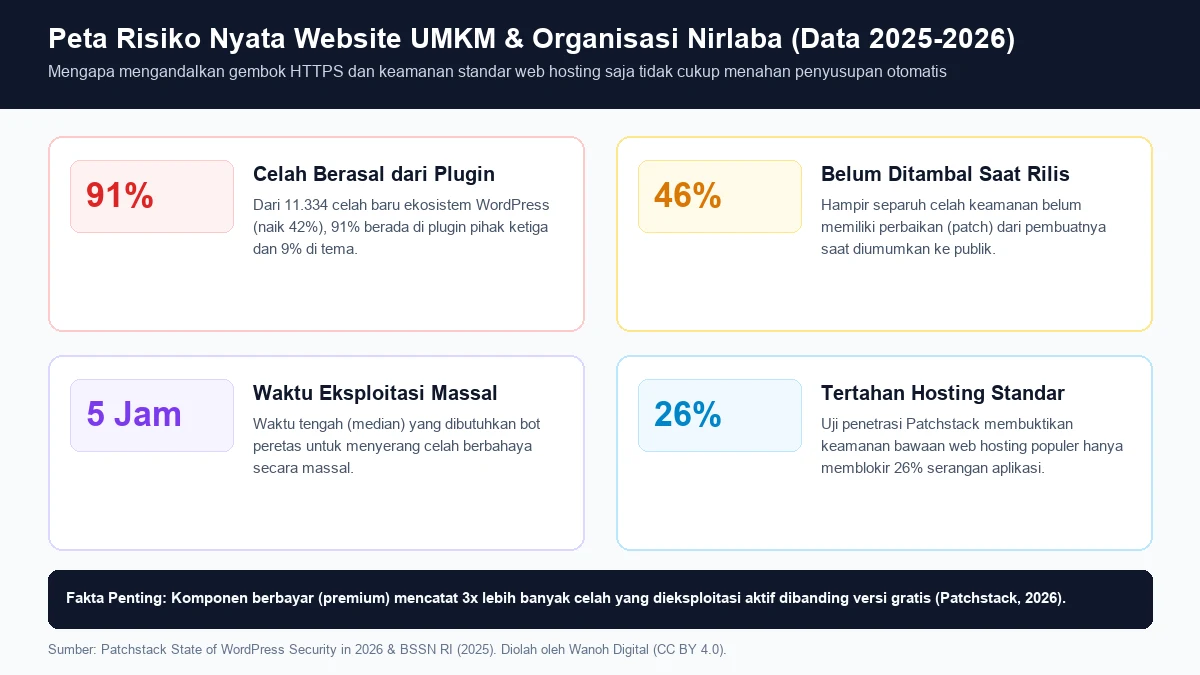
Source: Wanoh Digital (adapted from Patchstack State of WordPress Security in 2026 and BSSN RI). License: CC BY 4.0.
As summarized in Figure 1, relying on default security features from a web hosting provider or simply buying premium components is not enough to protect your business or foundation site. Primary research from Patchstack's State of WordPress Security in 2026 and 2025 on WordPress Content Management Systems (CMS) highlights four critical facts every site owner needs to know [3, 4]:
- 91% of security flaws originate in third-party plugins: Out of 11,334 new vulnerabilities discovered throughout 2025 (a 42% jump from 7,966 flaws in 2024), 91% were inside plugins, 9% were inside themes, and only 6 low-priority flaws came from WordPress core itself [3, 4].
- 46% of vulnerabilities had no patch at public disclosure: Nearly half of all flaws published in 2025 lacked a timely developer patch, while the median time for attacker bots to begin mass exploitation of high-risk flaws was just 5 hours [3].
- Standard web hosting security stops only 26% of application attacks: In large-scale penetration testing across popular web hosting providers, standard hosting security layers blocked only 26% of web application exploit attempts [3].
- Paid (premium) components carry 3 times more actively exploited flaws: Paid plugins and themes accounted for 29% of reports (1,983 vulnerabilities) with a 76% real-world exploitability rate, and recorded 3 times more Known Exploited Vulnerabilities (KEV) than free components [3].
How to detect hidden intrusions on your website without reading code?
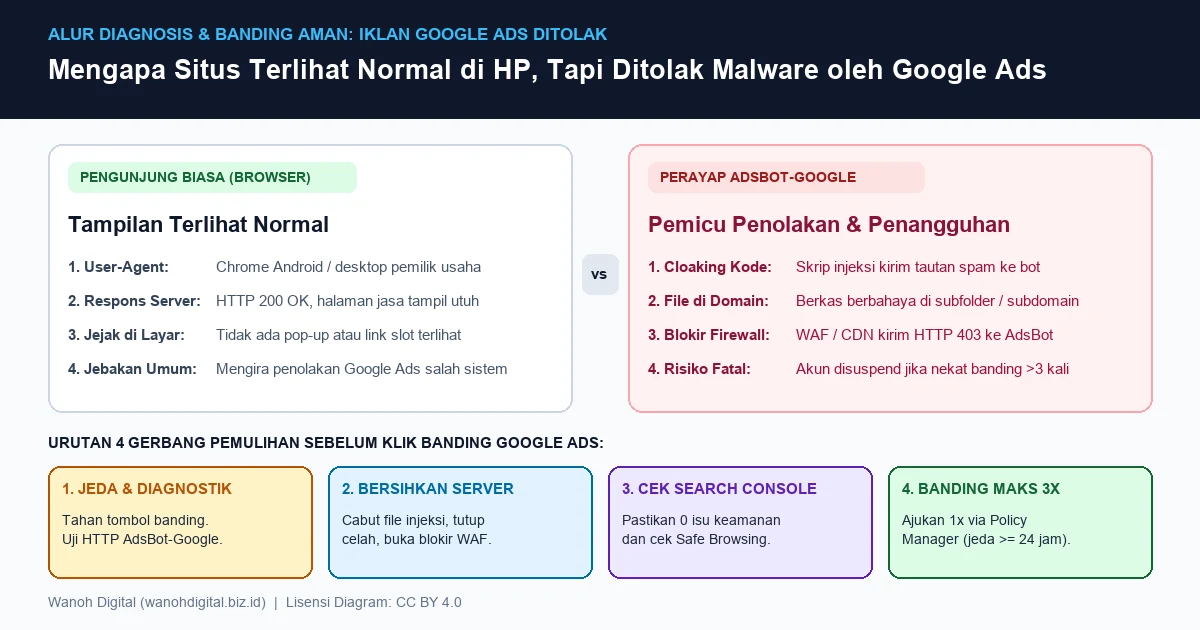
You can detect hidden intrusions on your website without opening source code by inspecting how Google indexes your domain and testing public paths frequently left open by default configurations [3, 6]. Across the compromises of more than 500,000 websites documented by Patchstack, attackers relied on conditional cloaking that checks who is visiting the page [3, 4].
When the site owner or a regular visitor arrives directly, the intruder script serves the real business profile or product catalog. However, when a search crawler (Googlebot) or a user clicking from specific search keywords enters the site, the server delivers thousands of online gambling pages, illegal loan spam, or malicious redirects instead [1, 6].
Four blind spots that SME owners and nonprofit administrators most often overlook include:
- 1. Search index hijacking (SEO spam cloaking): Thousands of new pages in foreign languages or packed with slot and gambling keywords get indexed under your official domain in Google, even while your main navigation menu looks clean [1, 6].
- 2. Exposed backup and configuration files in public folders: Many managers install automatic backup plugins that mistakenly store
.ziparchives or.sqldatabase dumps inside public folders downloadable through Google search, or leave.envfiles readable due to server misconfiguration [8]. - 3. Cross-contamination from forgotten old subdomains: Nonprofits, schools, and SMEs often spin up subdomains for annual events or past campaigns (such as
event2023.foundation.or.idorpromo.myshop.com) inside the same hosting account. Left unmaintained, those old subdomains become an entry point for attackers to take over the main site folder [2, 8]. - 4. Governance debt from past vendors or volunteers: Based on Single Data Information System (SIDT) figures from the Ministry of SMEs as of 31 December 2025 cited by the Indonesian Chamber of Commerce and Industry (Kadin), out of 30.21 million non-agricultural SMEs in Indonesia, 99.70% are micro-enterprises that commonly hand website builds to freelancers or volunteers without formal handover of domain accounts and original component licenses [3, 7].
Use the Domain Footprint & Website Asset Sovereignty Inspector below by typing your business or organization's domain name to run direct checks against Google's index and score your current governance readiness:
Domain Footprint & Website Asset Sovereignty Inspector
Enter your business or organization's domain name to generate direct lookup links into Google's index and sensitive server paths, then check off your current asset governance practices to measure your security readiness.
1. One-Click Forensic Shortcuts for examplebusiness.co.id (Opens New Tab)
site:examplebusiness.co.id (slot OR gacor OR maxwin...)
Check Leaked Backups & .env ↗
Searches for exposed .sql databases, .zip archives, or .env keys in public folders
site:examplebusiness.co.id (ext:env OR ext:sql OR ext:zip...)
Check Forgotten Old Subdomains ↗
Finds neglected event or campaign subdomains sharing the same hosting
site:*.examplebusiness.co.id -www
Test Admin User List Exposure ↗
Checks whether your WordPress admin username list is publicly readable
/wp-json/wp/v2/users
Check Google Safe Browsing ↗
Checks whether the domain has triggered Chrome's red browser warning
safe-browsing/search?url=examplebusiness.co.id
2. Asset Sovereignty & Blind-Spot Audit (Check What You Have Already Applied)
*Methodology note: Google query shortcuts use official public Google Search Operators. The sovereignty score measures asset governance readiness based on OWASP Top 10, NIST SP 800-63B, and Article 46 of Law Number 27 of 2022 (UU PDP).
Alongside the public query shortcuts in the inspector above, domain owners should also connect their site to Google Search Console to see direct warning alerts from Google's crawling systems, as demonstrated in this official Google Search Central guide [6]:
What are the real losses for SMEs and nonprofits if an intrusion is detected late?
The real losses for SMEs and nonprofits when a website intrusion is detected late include removal of the domain from Google Search and Artificial Intelligence (AI) answer engines, loss of donor or buyer trust, and legal exposure from missing the 3 x 24-hour (72-hour) notification deadline under the Personal Data Protection Law (UU PDP) [5, 6]. Leaving hidden gaps unchecked puts three core organizational assets at risk:
- Loss of organic visibility in Google Search and AI answers: Official Google Search Central documentation confirms that sites carrying hacked content such as spam page injections, hidden text, or malicious redirects will be demoted or removed from search results to protect users [6]. For businesses building independent search assets, domain blocking cuts off the organic customer pipeline laid out in our guide on SME Marketing Strategy 2027: Protecting Margins in the AI Search Era.
- Collapse of credibility for charities, foundations, and online stores: For nonprofits, philanthropy agencies, schools, or cooperatives, a single online gambling page appearing under the official domain or a red Google Safe Browsing warning screen causes donors and partners to halt transfers immediately [1, 6]. Damaged digital trust on an official website is just as costly as Quick Response Code Indonesian Standard (QRIS) cashier leaks covered in Indonesia's Digital Payment Transformation: From QRIS to SME AI.
- Legal obligation for 3 x 24-hour (72-hour) notification under Article 46 of UU PDP: Under Article 46 Paragraph (1) of Law Number 27 of 2022 on Personal Data Protection, every Personal Data Controller that suffers a personal data protection failure must deliver written notice within 3 x 24 hours to the affected Personal Data Subjects and the supervisory authority [5]. This rule binds commercial businesses as well as community organizations and nonprofit foundations storing full names, WhatsApp numbers, home addresses, or donation and transaction histories inside their website database [5].

Source: Artem Sapegin via Unsplash / Wikimedia Commons. License: CC0 1.0.
What must you clean up this week to close attacker backdoors?
The most effective cleanup actions to take this week to close attacker backdoors are reclaiming domain account sovereignty from third parties, permanently deleting all inactive or pirated plugins, moving backups outside the hosting server, and locking down a filesystem baseline [3, 8]. As illustrated in the code inspection photo above, thorough cleanup must reach the root of asset governance in line with the Open Worldwide Application Security Project (OWASP) Top 10 standard [8]:
- Step 1, reclaim domain registrar ownership and limit Administrator accounts: As our practical rule from Wanoh Digital engagements since 2016 with SMEs and nonprofits, verify that the domain registrar account is registered under an official email belonging to the business owner or core foundation board, then leave at most 2 active Administrator accounts protected by Multi-Factor Authentication (MFA) following National Institute of Standards and Technology (NIST) Special Publication (SP) 800-63B [9].
- Step 2, permanently delete (not just deactivate) unused plugins and ban pirated (nulled) components: In 2024, 43% of WordPress vulnerabilities required no login (unauthenticated) to exploit [4]. That means PHP files from a merely deactivated plugin remain sitting on the server and can still be hit directly by attacker bots, while pirated (nulled) paid themes or plugins almost always ship with embedded backdoors from day one [3, 4].
- Step 3, store backup copies outside the hosting server and cut stored personal data: Never keep backup archives inside the same hosting account, because when the server is breached or wiped, those backups are destroyed or infected too. In addition, as a practical safeguard against Article 46 UU PDP exposure, avoid storing National ID (KTP) photos or full donor and customer history tables permanently in a public website database [5].
- Step 4, set up filesystem baseline monitoring in public asset folders: The most reliable way to catch intrusions that slip past a firewall is to record cryptographic fingerprints of all files while the site is clean, then automatically check every 5 minutes for any edits to
.htaccess,.env, or foreign.phpfiles appearing inside image folders.
To see Indonesia's official cyber incident response workflow from initial detection and containment to system recovery under national standards, watch this educational video from BSSN [1]:
To execute the cleanup steps above cleanly with your internal staff or web developer, copy and use these two operational templates:
Template 1: Website Handover & Asset Sovereignty Checklist (For SME Owners / Foundation Boards)
Check off the items you have verified below, or click Copy Checklist to send it to your team or website vendor.
Template 2: First 60-Minute Emergency Protocol When a Website Shows Signs of Compromise (3 x 24-Hour UU PDP Compliance)
site:domain) and record the modification timestamps of suspicious server files as forensic evidence, then switch on maintenance mode.When is self-monitoring enough and when do you need forensic cleanup?
Deciding when administrative staff can monitor a website themselves versus when it requires file-level forensic cleanup depends on symptoms in Google's index, the license authenticity of site components, the sensitivity of stored data, and whether clean off-server backups exist [3, 5]. Many business owners waste months deleting one visible spam file on the surface while a dropper script continues hiding inside an image folder or framework cache.
Use the Website Security Triage Diagnostic Matrix below as a practical rule of thumb by picking the one condition that best matches your site in each row and adding up your score:
| Website Diagnostic Variable | Score 1 (Controlled Condition) | Score 2 (At-Risk / Access Debt) | Score 3 (Active Intrusion Signs) |
|---|---|---|---|
1. Google index check (site:domain) & site behavior | Only official pages appear; no spike in foreign pages | Forgotten old subdomains or unmaintained sample pages exist | Slot/gambling titles appear in Google, random redirects, or .env / 500 errors |
| 2. Domain sovereignty, admin accounts & plugin authenticity | Domain held by owner, max 2 admins with MFA, genuine & lean plugins | Old vendor/volunteer accounts remain or >5 inactive plugins piled up | Pirated (nulled) themes/plugins ever used or owner lacks domain login |
| 3. Customer / donor data stored on web server | Static catalog only; orders/donations routed straight to WhatsApp or QRIS | Stores name, email, and WhatsApp number forms in site database tables | Stores full donation/purchase histories, home addresses, or ID documents |
| 4. Backup availability & file monitoring | Automatic backups stored outside hosting & file-change checks active | Backups exist but still sit inside the same hosting account | No clean backup exists or backups are already mixed with intruder files |
Total your four website condition scores (ranging from 4 to 12 points) and follow the matching action plan:
- Total Score 4 to 6 points (15-Minute Monthly Self-Patrol Is Enough): As our rule of thumb, your site's foundation is healthy. Simply run the 5 buttons in the Domain Footprint Inspector above once a month, update plugins on a schedule, and verify your cloud backup archives remain intact.
- Total Score 7 to 9 points (Enforce Access Sovereignty & Isolate Backups This Week): Your site shows no open breach yet, but carries entry points automated bots can exploit within 5 hours of a new vulnerability disclosure [3]. Run Template 1 promptly to remove old accounts, permanently delete idle plugins, replace nulled components, and move backups off-server.
- Total Score 10 to 12 points (File-Level Forensic Cleanup & Clean Baseline Rebuild Required): Your site has already suffered a file-level intrusion or faces high risk of breaching the 3 x 24-hour UU PDP window [5]. Do not merely delete spam pages from the admin panel; run a full scan of image directories (
uploads/andpublic/icons/), rebuild the installation from clean source code, request a review in Google Search Console, and execute Article 46 UU PDP procedures if customer or donor databases were affected [5, 6].
If you want to run a passive check on your business domain's baseline security and mobile speed without handing over admin passwords, use our Free 24-Hour Website Check or have an open, no-commitment conversation through the listen stage on How Wanoh Digital Works. If you have already spotted suspicious symptoms such as injected foreign pages or search index drops, we also handle file-level forensic cleanup through our Hacked Website Recovery Service and ongoing protection via Website Maintenance Services (see also our monthly website maintenance cost breakdown), with real case examples documented on Wanoh Digital case studies and portfolio.
If the intrusion has already appeared as slot or online gambling pages in Google Search results, follow our complete procedure on how to fix a website hacked with online gambling spam from isolation to a clean server.
Frequently asked questions
Why do online gambling pages keep reappearing on my website even after suspicious files are deleted?
Online gambling spam pages reappear because modern attackers almost always plant more than one backdoor script (persistence mechanism) in locations managers rarely inspect [3]. Deleting spam files in the main directory does not stop the attack if a re-infection script is still hiding inside an image icon folder (public/icons/), disguised as a framework cache file (bootstrap/cache/services.php), and altering .htaccess rules. Until backdoors inside image folders and the initial plugin vulnerability are closed, attacker bots will keep rewriting spam pages automatically [3].
Is deactivating an unused plugin enough to keep a website safe?
No, it is not enough. When a plugin is only deactivated from the admin dashboard, all of that plugin's PHP code files remain intact inside your server's public folder. Given Patchstack data showing 43% of WordPress vulnerabilities require no login (unauthenticated) to exploit, attacker bots can still call those inactive plugin files directly via URL to break into the server [3, 4]. Every unused plugin and theme must be permanently deleted (Delete).
Do nonprofit foundations and schools that do not sell products also have to comply with the 3 x 24-hour UU PDP rule?
Yes, they do. Law Number 27 of 2022 on Personal Data Protection (UU PDP) governs every Personal Data Controller, covering any individual, corporation, public body, or community organization and foundation that determines the purpose and exercises control over personal data processing [5]. If your foundation, charity, or school website stores student enrollment forms, donor databases, phone numbers, or beneficiary documents, any data protection failure resulting from a website breach must be notified in writing within 3 x 24 hours (72 hours) under Article 46 Paragraph (1) of UU PDP [5].
Technical notes
This section is intended for Information Technology (IT) staff, server administrators, or web developers handling forensic cleanup and server hardening for SMEs and nonprofits. Keep in mind that the server configuration hardening below will not hold if site managers continue running pirated (nulled) plugins or leave admin credentials exposed:
- File-Level Forensic Scanning & Continuous Integrity Monitoring: To detect intrusions missed by WAFs and application logs, run code diffs against a clean Git commit and scan for common intrusion signatures such as obfuscation patterns (
eval(base64_decode,gzinflate,str_rot13,chr()), system command execution (shell_exec,proc_open), stray.phpfiles inside static upload directories (public/icons/,storage/,wp-content/uploads/),.htaccessintegrity, and framework cache integrity. For ongoing monitoring, combine periodicSHA-256 baselinechecks with automated alerts sent to server operators whenever files change or services stop. - Hypertext Transfer Protocol (HTTP) Header Hardening, Upload Execution Blocking, and
security.txt: Disable script execution permissions across all media upload directories, enforce HTTP Strict Transport Security (HSTS) per Internet Engineering Task Force (IETF) Request for Comments (RFC) 6797 to prevent forced encryption downgrades, apply World Wide Web Consortium (W3C) Content Security Policy (CSP) Level 3 to restrict cross-site script injection, and publish a standard vulnerability disclosure contact file at/.well-known/security.txtper IETF RFC 9116 [8, 10, 11, 12].
# Sample .htaccess hardening (Apache 2.4) to block script execution in image/upload folders
# and enforce standard IETF RFC 6797 (HSTS) and W3C CSP3 security headers
<IfModule mod_headers.c>
    Header always set Strict-Transport-Security "max-age=31536000; includeSubDomains"
    Header always set X-Content-Type-Options "nosniff"
    Header always set Content-Security-Policy "default-src 'self'; object-src 'none'; frame-ancestors 'self'; upgrade-insecure-requests"
</IfModule>

# Place the block below inside public/icons/.htaccess or wp-content/uploads/.htaccess
<FilesMatch "\.(?i:php|phtml|phar|py|pl|sh|cgi)$">
    Require all denied
</FilesMatch>
Testing note: The Apache 2.4 server configuration snippet above has been verified against IETF RFC 6797, W3C CSP Level 3, and standard practices for blocking script execution inside static web asset directories [10, 11].
Update and correction policy: This article was published on 30 October 2026 and is reviewed periodically following annual web ecosystem vulnerability reports and implementing regulations of Indonesia's Personal Data Protection Law [3, 5].
References
Verified Sources & References (12 Sources)Show References
- Antara News (citing Head of BSSN Nugroho Sulistyo Budi). "BSSN catat 184.359 anomali terkait judi online." ANTARA News Agency, 08 July 2025. https://babel.antaranews.com/berita/498361/bssn-catat-184359-anomali-terkait-judi-online (accessed 30 October 2026) (in Indonesian).
- Universitas Gadjah Mada (citing UGM Faculty of Engineering Professor Prof. Dr. Ir. Ridi Ferdiana and BSSN RI data). "Marak Serangan Siber Judi Daring, Pakar UGM Imbau Pentingnya Perawatan Sistem." Universitas Gadjah Mada, 27 August 2025. https://ugm.ac.id/id/berita/marak-serangan-siber-judi-daring-pakar-ugm-imbau-pentingnya-perawatan-sistem/ (accessed 30 October 2026) (in Indonesian).
- Patchstack (in collaboration with Monarx). "State of WordPress Security in 2026." Patchstack Whitepaper, 25 February 2026. https://patchstack.com/whitepaper/state-of-wordpress-security-in-2026/ (accessed 30 October 2026).
- Patchstack. "State of WordPress Security in 2025." Patchstack Whitepaper, 15 January 2025. https://patchstack.com/whitepaper/state-of-wordpress-security-in-2025/ (accessed 30 October 2026).
- Government of the Republic of Indonesia. "Undang-Undang (UU) Nomor 27 Tahun 2022 tentang Pelindungan Data Pribadi." Legal Documentation and Information Network of the Audit Board (JDIH BPK RI), 17 October 2022. https://peraturan.bpk.go.id/Details/229798/uu-no-27-tahun-2022 (accessed 30 October 2026) (in Indonesian).
- Google Search Central. "Spam Policies for Google Web Search: Hacked Content." Google Developers Documentation, 10 March 2026. https://developers.google.com/search/docs/essentials/spam-policies#hacked-content (accessed 30 October 2026).
- Indonesian Chamber of Commerce and Industry (Kadin) (citing Ministry of SMEs SIDT data as of 31 December 2025). "Data dan Statistik UMKM Indonesia." Kadin Indonesia, 15 January 2026. https://kadin.id/data-dan-statistik/umkm-indonesia/ (accessed 30 October 2026) (in Indonesian).
- Open Worldwide Application Security Project (OWASP). "OWASP Top 10:2021: The Ten Most Critical Web Application Security Risks." OWASP Foundation, 24 September 2021. https://owasp.org/projects/top-ten (accessed 30 October 2026).
- Grassi, Paul A., et al. "NIST Special Publication 800-63B: Digital Identity Guidelines - Authentication and Lifecycle Management." National Institute of Standards and Technology (NIST), 01 June 2017. https://pages.nist.gov/800-63-3/sp800-63b.html (accessed 30 October 2026).
- Hodges, Jeff, Collin Jackson, and Adam Barth. "RFC 6797: HTTP Strict Transport Security (HSTS)." Internet Engineering Task Force (IETF), 01 November 2012. https://www.rfc-editor.org/info/rfc6797/ (accessed 30 October 2026).
- World Wide Web Consortium (W3C). "Content Security Policy Level 3." W3C Working Draft, 18 September 2025. https://www.w3.org/TR/CSP3/ (accessed 30 October 2026).
- Foudil, Edwin, and Yakov Shafranovich. "RFC 9116: A File Format to Aid in Security Vulnerability Disclosure (security.txt)." Internet Engineering Task Force (IETF), 01 April 2022. https://www.rfc-editor.org/info/rfc9116/ (accessed 30 October 2026).