Summary Fixing a website hacked by slot spam, online gambling (judol), or deface attacks thoroughly requires four post-attack steps: preserving log evidence before modifying the server [6], removing reinfection points across both the filesystem and database [7, 8], locking server folder permissions [9], and purging thousands of spam URLs using Hypertext Transfer Protocol (HTTP)
410 Gonestatus codes before requesting a Google Search Console review [2, 3]. In our field experience, simply deleting folders in the hosting panel or restoring a backup without killing background processes only lets the gambling pages regenerate within minutes.
If you only suspect something looks off on your business site and want to inspect it externally without touching the server, use the inspection tool in our companion guide: Website Looks Normal but Hacked? How to Check & Secure It. This article, by contrast, is written specifically for business owners and technical teams who have already confirmed slot/gambling spam pages, suffered a homepage deface, or had Google Ads paused, yet see those spam pages reappear every time they delete them [1, 4].
According to an official analysis by the Yogyakarta Special Region Computer Security Incident Response Team (JogjaprovCSIRT), waves of online gambling web defacement attacks in Indonesia deliberately target institutional and official domains to piggyback on domain reputation and evade automatic blocks [5]. In one incident we handled in 2025 for a car rental business, daily leads collapsed after their Google Ads campaigns were suspended due to gambling content injected into a third-party-built site. The guide below walks through emergency isolation, eradicating three reinfection mechanisms, static HTTP 410 Gone rules and database queries, plus Google index and ad-account recovery [2, 3].
Source: Wanoh Digital, Wanoh Digital, /assets/img/blog/cara-mengatasi-website-kena-hack-judol/hero-isolasi-pemulihan-website-hack-judol.webp. License: CC BY 4.0.
Article Contents
- Why do deleting folders and restoring backups alone always fail?
- Stage 1: What is the server isolation protocol for the first 30 minutes?
- Stage 2: What is the order for cleaning the filesystem, database, and upload gaps?
- Stage 3: How do you clear thousands of gambling URLs from Google & lift Google Ads blocks?
- Post-cleanup verification checklist & when to hand off to forensic recovery
- Frequently Asked Questions (FAQ)
- References
Why do deleting folders and restoring backups alone always fail?
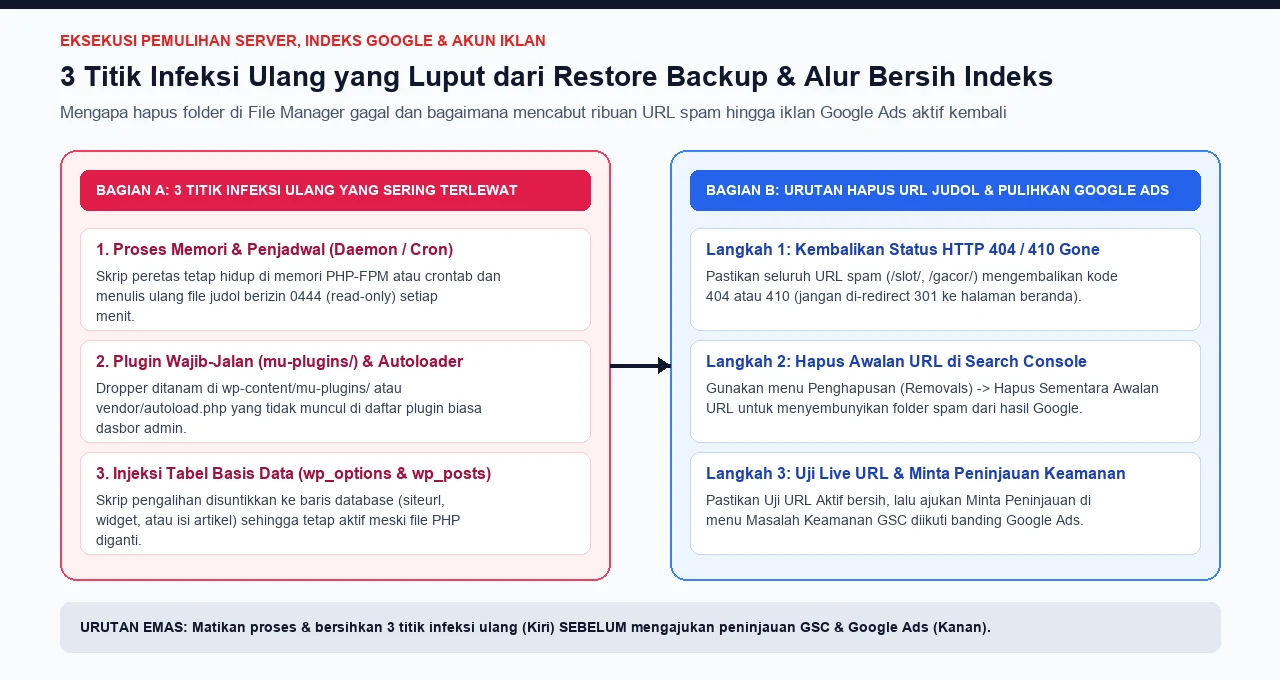
Deleting unfamiliar folders in File Manager or restoring last week's backup almost always fails when remote administration web shell scripts remain inside the server [6]. In our incident handling, as long as memory-resident background processes, must-use plugins, and injected database scripts are not cleared together, the server keeps rewriting the gambling files you just deleted.
Per JogjaprovCSIRT's analysis, attackers typically gain initial access through four flaws: Cross-Site Scripting (XSS), insecure File Upload Vulnerabilities, framework bugs like PHPUnit Vulnerability, or Structured Query Language (SQL) Injection [5]. Once a web shell is planted, three reinfection mechanisms make surface cleanup pointless:
- Memory-Resident Background Processes (Resident Daemon) &
0444Permission Locks: Across incidents we handled on both cPanel shared hosting and standalone servers, freshly cleanedindex.phpand.htaccessfiles frequently revert to gambling code in under a minute and lock themselves to read-only (0444). This happens because attackers run persistent PHP scripts in server Random Access Memory (RAM) or schedule cron jobs that watch and rewrite the backdoor files whenever deleted. - Must-Use Plugins (
wp-content/mu-plugins/) & Autoloader Hooks: Per official WordPress developer documentation on Must-Use Plugins, files placed insidewp-content/mu-pluginsexecute automatically across the whole site without appearing in the standard plugin list insidewp-admin, and cannot be deactivated from the admin dashboard [8]. The only way to stop a script there is deleting the file directly fromwp-content/mu-pluginson the server filesystem [8]. In Laravel investigations we handled, the same persistence tactic hides calls insidevendor/autoload.phporpublic/index.php. - Script Injection Inside Database Tables (
wp_options&wp_posts): Under the code injection and sneaky redirects categories in Google Search Central's Spam Policies for Google Web Search, attackers often inject malicious JavaScript or aniframeinto pages to bounce mobile visitors to external spam domains [1]. In WordPress cleanups we performed, these redirect snippets were planted inside database rows such assiteurl,home, andwidget_textinwp_options, or inside post bodies inwp_posts, so redirects persisted even after every PHP file was replaced.
| Symptom During DIY Cleanup | Actual Reinfection Mechanism Running | How to Break the Infection Cycle |
|---|---|---|
index.php or .htaccess changes back minutes after deletion and locks to read-only (0444) | In our experience, a background PHP daemon is still running in RAM or registered in a cron job | Force-stop all active PHP processes (restart PHP FastCGI Process Manager (FPM) / kill processes) and clear unknown cron jobs before deleting files |
The plugin list in wp-admin looks clean, yet /slot-gacor/ catalog pages keep reappearing [1, 8] | A loader script (dropper) sits inside wp-content/mu-plugins/, which auto-runs without appearing in standard plugin screens [8] | Delete unfamiliar files directly inside wp-content/mu-plugins/ and uploads/ via the server filesystem [7, 8] |
| All PHP files were replaced with clean copies, yet mobile visitors still get bounced to betting sites [1] | Code injection via mobile redirect scripts planted inside database rows (wp_options or wp_posts) [1] | Scan and remove unknown <script> or <iframe> tags from database tables via phpMyAdmin or SQL queries |
| The server is clean, yet thousands of slot titles remain on Google and Google Ads stays disapproved [2, 4] | Old spam URLs still return 200 OK or, as we often find, are wrongly redirected (301 Redirect) to the homepage | Ensure every spam URL returns 404 Not Found or 410 Gone, then use the Removals tool in Google Search Console (GSC) [3] |
Source: Wanoh Digital, Wanoh Digital, /assets/img/blog/cara-mengatasi-website-kena-hack-judol/anatomi-serangan-cloaking-judol-web-shell.webp. License: CC BY 4.0.
Stage 1: What is the server isolation protocol for the first 30 minutes?
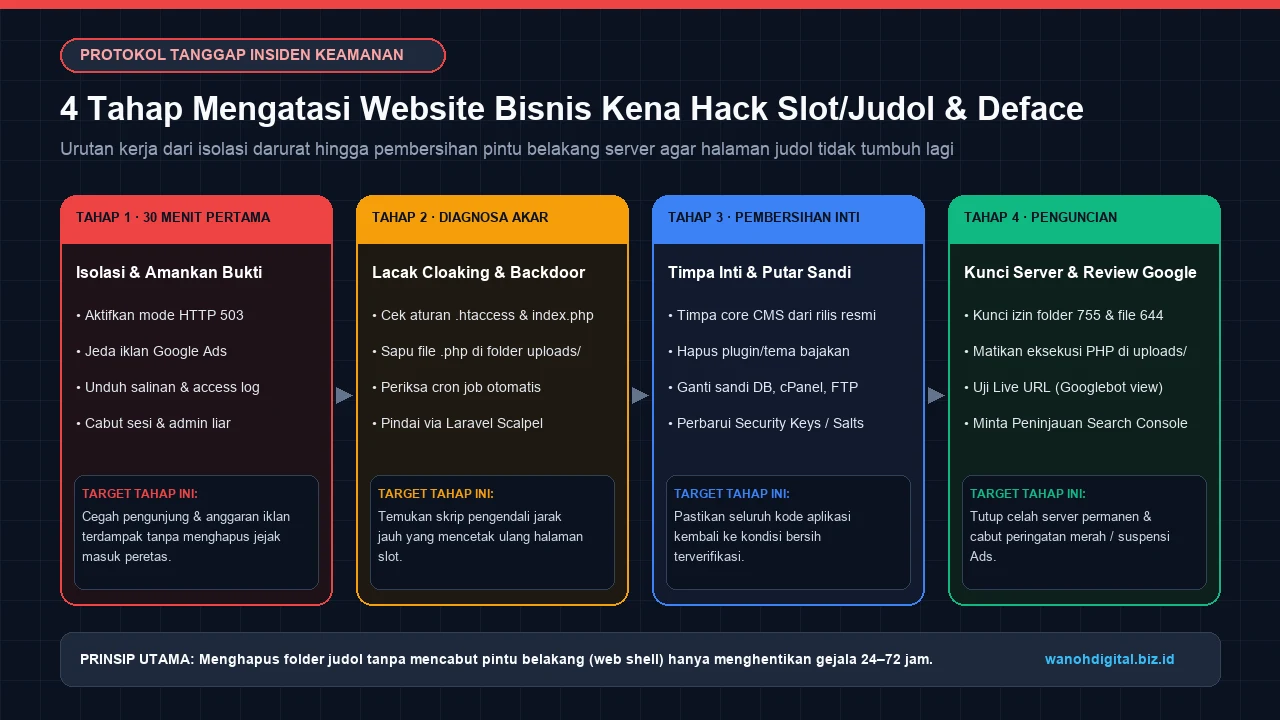
During the first 30 minutes of recovery, you must isolate the affected system and preserve server log evidence before modifying any files [6]. In our cleanup practice, the most effective first-response order is putting up a temporary HTTP 503 maintenance page, pausing Google Ads campaigns, downloading copies of access logs, and freezing background PHP processes.
Based on the National Institute of Standards and Technology (NIST) incident response framework in SP 800-61 Rev. 3 and the Cybersecurity and Infrastructure Security Agency (CISA) guidance in Alert TA15-314A, restoring a system without saving log evidence and closing the root entry point invites repeat compromise [6]. Execute these four isolation steps in order:
- Enable Temporary Maintenance Status (
HTTP 503 Service Unavailable): As a rule of thumb, switch public traffic to a maintenance notice servingHTTP 503with aRetry-Afterheader. This stops visitors from landing on gambling or phishing pages [2] while signaling that the site is undergoing temporary repair. - Pause Google Ads Campaigns to Prevent Severe Policy Penalties: Under Google Ads' Abusing the Ad Network policy, sending ads to destinations whose code has been altered by third parties falls under Compromised site, an egregious violation that triggers ad disapprovals or account suspension [4]. In our advisory work, we urge pausing ads right away and never hitting appeal until every server gap is genuinely clean so repeated rejections do not suspend the account.
- Preserve Log Evidence and Entry Timestamps (
access.log): Following log-tracing guidance in CISA Alert TA15-314A, download copies ofaccess.loganderror.logfrom your hosting panel or Virtual Private Server (VPS) before deleting files [6]. Matching file creation timestamps inuploads/againstPOSTrequests inaccess.logis essential for pinpointing which plugin or form the attacker exploited. - Kill Lingering PHP Memory Processes & Remove Rogue Admins: In our field experience, before deleting any backdoor files, you must stop all background PHP processes running in memory (via Restart PHP-FPM on a VPS or Kill Processes in cPanel) and purge unrecognized Cron Jobs. Next, open the database users table (
wp_usersorusers) and delete every unauthorized administrator account created by the attacker.
Stage 2: What is the order for cleaning the filesystem, database, and upload gaps?
Once memory processes are halted, perform root cleanup by unlocking 0444 files, overwriting core directories from an official clean release (known-good build) [6], sweeping executable scripts out of mu-plugins/ and uploads/ [7, 8], clearing injected database scripts, and disabling PHP execution inside media folders [7, 9].
Why do image directories like wp-content/uploads/ or public/uploads/ become the primary landing zone for backdoors? According to the Open Worldwide Application Security Project (OWASP) File Upload Cheat Sheet, weak upload validation is easily bypassed with double extensions (such as .jpg.php), mixed casing (.pHp), or alternate extensions still mapped to the server's PHP interpreter (such as .phtml and .php5) [7].
Run these five root cleanup and server hardening steps:
- Unlock
0444Files and Clean.htaccessandindex.php: In our experience, if.htaccessor the mainindex.phpcannot be deleted because the attacker locked them, change file permissions back to0644via File Manager or terminal first. Remove allGooglebotcloaking rules [1] and replace.htaccesswith the platform's clean default configuration. - Sweep
mu-plugins/,uploads/, andstorage/Clean: Delete any suspicious plugin files directly fromwp-content/mu-plugins/, since files there cannot be disabled insidewp-admin[8]. Next, inspectwp-content/uploads/(orpublic/uploads/,public/icons/, andstorage/in Laravel) and remove every.php,.phtml,.php5, or.jpg.phpfile [7]. On Laravel apps, also verify the entire source tree against a clean Git commit (git statusandgit diff) and inspect.htaccessand.envfor tampering so no disguised backdoor survives outside public folders. - Overwrite Core Files from Official Clean Releases: Per CISA Alert TA15-314A mitigation guidance, rebuild and compare against a verified clean version (known-good build) instead of hand-patching infected core files [6]. For WordPress, download a fresh package from WordPress.org to overwrite
wp-adminandwp-includes, and permanently delete unused plugins and themes [9]. - Clean Injected Database Scripts with SQL Queries: To locate malicious JavaScript or
iframecode injection [1] planted inside a WordPress database, run these inspection queries in phpMyAdmin's SQL tab or your database console:
-- 1. Find posts or pages containing injected <script>, <iframe>, or eval() calls
SELECT ID, post_title, post_type, post_status
FROM wp_posts
WHERE post_content LIKE '%<script%'
   OR post_content LIKE '%<iframe%'
   OR post_content LIKE '%eval(%';

-- 2. Inspect core site URL settings and options containing suspicious scripts
SELECT option_id, option_name, LEFT(option_value, 120) AS value_snippet
FROM wp_options
WHERE option_name IN ('siteurl', 'home')
   OR option_value LIKE '%<script%'
OR option_value LIKE '%eval(%';- Rotate All Credentials & Lock Server Configuration: Following official WordPress Developer Hardening WordPress guidance, rotate passwords for hosting panels, MySQL databases, File Transfer Protocol (FTP) / Secure File Transfer Protocol (SFTP) accounts, and admin users; set directories to
755(or750), files to644(or640), andwp-config.phpto600or640; and adddefine( 'DISALLOW_FILE_EDIT', true );insidewp-config.phpto disable PHP file editing from the admin dashboard [9]. Apply least-privilege controls per the OWASP File Upload Cheat Sheet by blocking script execution inside public upload folders [7].
Stage 3: How do you clear thousands of gambling URLs from Google & lift Google Ads blocks?
Cleaning the server alone neither removes thousands of already-indexed slot titles from Google nor lifts Google Ads disapprovals [2, 4]. Per Google Search Console Help on the Removals tool, permanently removing hacker-created spam URLs from Google Search requires deleting the content and having your web server return HTTP 404 (Not Found) or 410 (Gone), paired if needed with temporary URL prefix blocking in Search Console [3].
In our incident work, the single costliest mistake site owners make after server cleanup is installing a redirect plugin that sends (Redirect 301) every missing 404 page to the homepage. When thousands of /slot-gacor/ URLs return a 301 redirect to the homepage, Googlebot never receives the 404 or 410 status Google requires [3], stalling both index cleanup and security review.
Use the static server rules below to force every spam directory or pattern to return HTTP 410 Gone permanently [3]:
# Option A: For Apache / LiteSpeed (place at the very top of .htaccess)
RewriteEngine On
RewriteRule ^(slot-gacor|thai|maxwin)(/.*)?$ - [G,L]
# Option B: For Nginx (place inside the domain's server {} block)
location ~* ^/(slot-gacor|thai|maxwin)(/.*)?$ {
return 410;
}Next, complete these three search-index and ad-account recovery steps:
- Temporarily Block Spam Folder Prefixes with the Removals Tool: Per Google Search Console Removals Help, when your site was hacked and you need indexed spam URLs hidden quickly, open Removals -> Temporary Removals -> New Request, then choose Remove all URLs with this prefix (for instance, blocking an entire spam folder for roughly 6 months while recrawling processes the permanent
404or410responses) [3]. - Verify with Test Live URL & Submit Request a Review for Security Issues: Run URL Inspection -> Test Live URL in Google Search Console to confirm
Googlebotno longer sees cloaking [1]. Then, following Google Search Console Security Issues Report guidance, open Security & Manual Actions -> Security Issues, confirm the issue has been resolved across your entire site (fixing only sample pages will not restore search listings), and click Request a Review [2]. - Appeal Compromised Site in Google Ads: Once all spam URLs return
404or410[3] and your ad landing pages are free of third-party tampering, submit a review under Google Ads' Compromised site policy before re-enabling campaigns [4].
You can also use the interactive generator below to customize your domain and spam folder pattern and copy a technical explanation draft for Google Search Console's Request a Review and Google Ads appeals:
Spam URL Removal Rule (HTTP 410) & Google Review Draft Builder
Enter your domain name, sample spam folder path, and main recovery blocker to generate a reinfection cleanup protocol, an HTTP 410 Gone rule, and ready-to-paste text for Google Search Console Request a Review and Google Ads Appeals.
- Stop Rewriter Memory Processes: Kill all lingering background PHP processes (restart PHP-FPM or run killall -9 php-cgi / lsphp in hosting terminal) before deleting files, since RAM processes will keep rewriting files you delete.
- Unlock 0444 Permissions & Immutable Attributes: Reset attacker-locked index.php and .htaccess permissions back to 0644, then inspect Cron Jobs in the hosting panel and remove suspicious curl/wget/php commands.
- Overwrite Core Files & Lock WordPress Config: Replace wp-admin and wp-includes from an official WordPress.org release, sweep .php files out of wp-content/uploads/ and wp-content/mu-plugins/, add define('DISALLOW_FILE_EDIT', true); to wp-config.php, and rotate all Security Salts.
# Add at the very top of .htaccess to return HTTP 410 Gone for the spam folder permanently
RewriteEngine On
RewriteRule ^slot-gacor(/.*)?$ - [G,L]
# Note: Flag [G,L] forces the server to send 410 Gone so Googlebot drops the URLs from its index.
Post-cleanup verification checklist & when to hand off to forensic recovery
Before taking HTTP 503 maintenance mode offline, run through the 12-point checklist below to confirm no reinfection point remains in memory, files, the database, or Google's index. If malicious files still reappear after completing these steps, stop DIY trials immediately so your domain reputation does not suffer prolonged damage.
12-Point Post-Cleanup Server Verification & Google Recovery Checklist
Check off the items you have verified below, or click Copy Checklist to send them to your team or website vendor.
For business owners racing against paused ads and lost customer trust hitting daily cash flow, just like maintaining disciplined selling price and Cost of Goods Sold (COGS) calculations so your business stays profitable, chasing recurring infections without proper forensic tools often burns days of work. That is even harder when the site was built years ago by a vendor or freelancer who is now unreachable.
Wanoh Digital offers two help paths depending on your site's current state:
- If Your Site Currently Has Slot/Gambling Spam, Defacement, or Google Ads Disapproval: Visit our Website Hack & Gambling Spam Recovery Service. We begin with a Free Initial Check & Written Findings to map symptoms and intrusion depth, even on third-party-built websites. If you decide to proceed with backdoor cleanup and server hardening, the scope and fee are agreed in writing upfront. Once recovered, you can opt into routine upkeep via Temani Website (Rp 400.000 per month) on our Website Maintenance Service page (with an annual cost breakdown in our website maintenance cost and takeover audit guide), covering routine updates, off-server scheduled backups, monthly check reports, 1 hour of minor edits per month, and same-business-day incident response. Real examples of recovering a site hit by online gambling spam that halted Google Ads alongside ongoing corporate maintenance are documented on Wanoh Digital's portfolio and case studies page.
- If You Just Finished Cleaning Your Site and Want External Verification: Use our Free 24-Hour Website Check, limited to 10 free checks per week so every site is inspected manually. Without asking for admin passwords or hosting access, we check baseline security, Secure Sockets Layer (SSL) / Hypertext Transfer Protocol Secure (HTTPS) status, outdated components, exposed login paths, and mobile speed, then send a concise 1-page report straight to your WhatsApp.
Frequently Asked Questions (FAQ)
Why do my index.php and .htaccess files revert to gambling code just minutes after I delete them?
In our incident-handling experience, this points to a background PHP process (background daemon) still active in server RAM or a scheduled cron job watching and rewriting those files in read-only mode (0444). You must force-stop all active PHP processes on the server and clear unauthorized cron jobs before deleting the files.
Why should I not 301-redirect thousands of deleted gambling URLs to my homepage?
Per official Google Search Console Removals Tool documentation, permanently removing URLs from Google Search requires your web server to return HTTP 404 (Not Found) or 410 (Gone) [3]. In our experience, sending spam URLs to the homepage with a 301 Redirect tells Googlebot those pages are still live at the new destination, stalling index cleanup and security re-reviews.
Why was my Google Search Console Request a Review or Google Ads Compromised Site appeal rejected?
Per Google Search Console Security Issues Report documentation, fixing only a few sample pages will not restore your site because security issues must be resolved across your entire site [2]. On Google Ads, appeal a Compromised site disapproval only after Test Live URL checks in Search Console come back completely clean [2, 4].
References
Verified Sources & References (9 Sources)Show References
- Google Search Central. "Spam Policies for Google Web Search." Google for Developers, 10 March 2026. https://developers.google.com/search/docs/essentials/spam-policies (accessed 12 November 2026).
- Google Search Console Help. "Security Issues report." Google Help Center, 15 January 2026. https://support.google.com/webmasters/answer/9044101?hl=id (accessed 12 November 2026) (in Indonesian).
- Google Search Console Help. "Removals and SafeSearch reports tool." Google Help Center, 18 February 2026. https://support.google.com/webmasters/answer/9689846?hl=id (accessed 12 November 2026) (in Indonesian).
- Google Advertising Policies Help. "Abusing the ad network: Compromised site policy." Google Help Center, 20 February 2026. https://support.google.com/adspolicy/answer/6020954?hl=id (accessed 12 November 2026) (in Indonesian).
- JogjaprovCSIRT Dinas Komunikasi dan Informatika Daerah Istimewa Yogyakarta. "Penanganan Web Defacement Judi Online." Pemerintah Daerah DIY, 14 August 2024. https://csirt.jogjaprov.go.id/penanganan-web-defacement-judi-online/ (accessed 12 November 2026) (in Indonesian).
- Nelson, Alexander, et al. "NIST Special Publication 800-61 Revision 3: Incident Response Recommendations and Considerations for Cybersecurity Risk Management (with CISA Alert TA15-314A Web Shell Mitigation Guidance)." National Institute of Standards and Technology, 03 April 2025. https://csrc.nist.gov/pubs/sp/800/61/r3/final (accessed 12 November 2026).
- Open Worldwide Application Security Project. "File Upload Cheat Sheet." OWASP Cheat Sheet Series, 12 April 2026. https://cheatsheetseries.owasp.org/cheatsheets/File_Upload_Cheat_Sheet.html (accessed 12 November 2026).
- WordPress Developer Resources. "Must-Use Plugins." WordPress Advanced Administration Handbook, 10 February 2026. https://developer.wordpress.org/advanced-administration/plugins/mu-plugins/ (accessed 12 November 2026).
- WordPress Developer Resources. "Hardening WordPress." WordPress Advanced Administration Handbook, 05 March 2026. https://developer.wordpress.org/advanced-administration/security/hardening/ (accessed 12 November 2026).