Summary When Google Ads are rejected under Malicious software (Malware) or Compromised site even though your website looks normal in your browser, the cause is usually conditional injected scripts, malicious files in another subfolder or subdomain, or firewall blocks against the dedicated
AdsBot-Googlecrawler [1, 2]. Advertiser vigilance is urgent following the addition of critical WordPress Core vulnerabilityCVE-2026-119977to the Cybersecurity and Infrastructure Security Agency (CISA) catalog on 03 November 2026 and Gemini-based automated filtering that blocks over99%of violating ads before they go live [8, 10]. The repair and appeal sequence in this guide follows Google Ads' Abusing the ad network policy, the maximum3-appeal limit per ad with a 6-month window effective 21 July 2026, and Google's special-case crawler documentation [1, 3]. This article is written for service and retail business owners whose ads suddenly stopped generating inquiries due to landing-page security issues. The critical boundary to follow from the start is holding the appeal button until the entire domain is clean in Google's eyes, noting that Wanoh Digital limits its assistance to technical website auditing and recovery rather than ad campaign bid management [3, 12].
Many business owners assume Google made a mistake when they see a malicious software disapproval in their campaign dashboard, and leave it alone because the homepage looks fine on their phone. Yet Monarx telemetry in Patchstack's State of WordPress Security in 2026 report, analyzing nearly 9 trillion file signals, notes that attackers increasingly inject malicious code into legitimate core files or plugins during peak traffic hours [11]. At the core software level, the Cybersecurity and Infrastructure Security Agency (CISA) added Common Vulnerabilities and Exposures (CVE) entry CVE-2026-119977 to its Known Exploited Vulnerabilities (KEV) catalog on 03 November 2026 covering an update flaw in WordPress Core versions 4.7.0 through 7.1.3 [10].
A second misconception occurs when advertisers or server admins try to avoid blocks by restricting bots in robots.txt, turning on strict Web Application Firewall (WAF) rules, or rushing to launch a new domain and ad account. Under Google's special-case crawler documentation, AdsBot-Google and AdsBot-Google-Mobile ignore general User-agent: * rules by default, yet they are still blocked and trigger destination errors if named explicitly or stopped by security server Hypertext Transfer Protocol (HTTP) errors [2, 5]. Worse still, according to Google's 2025 Ads Safety Report released on 16 April 2026, AI filtering systems blocked or removed more than 8.3 billion ads and suspended 24.9 million advertiser accounts for policy violations and review-evasion attempts [1, 8].
Table of Contents
- Why are Google Ads rejected for malware even when the website looks normal?
- What is the difference between Compromised Site, Malicious Software, and Circumventing Systems in Google Ads?
- What are the costs and business risks of clicking appeal before the website is clean?
- What is the 5-day order to fix your website and appeal Google Ads?
- What is the 8-point checklist and how do you calculate lost ad days before appealing?
- When can a business owner check settings alone, and when is technical cleanup needed?
- Short technical notes for your website manager
- Frequently asked questions (FAQ)
- References
Why are Google Ads rejected for malware even when the website looks normal?
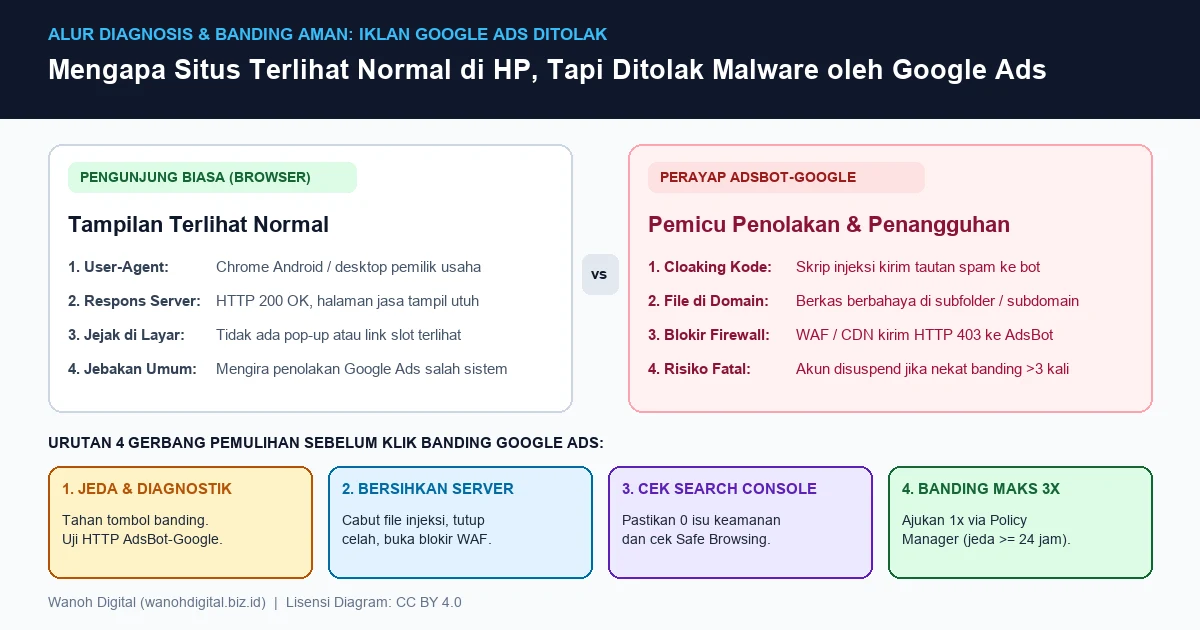
Google Ads are rejected with Malicious software or Compromised site status even when the site loads smoothly on your phone because Google Ads review engines inspect hidden code served specifically to crawlers, scan unadvertised files on the same domain, and test global AdsBot-Google access [1, 2].
Source: Photo by Carlos Muza via Wikimedia Commons / Unsplash, https://commons.wikimedia.org/wiki/File:Statistics_on_a_laptop_%28Unsplash%29.jpg. License: CC0 1.0.
So you do not waste time arguing over a clean-looking homepage on your own screen, check the three technical mechanisms that most often cause the gap between what you see and what Google's review system reads:
- Cloaking and Conditional Server Redirects: Google Web Search spam policies define cloaking as serving different content to search crawlers than to human visitors, including sneaky redirects that bounce mobile visitors to outside domains while desktop views stay normal [6]. Patchstack telemetry from 2026 shows the median time to mass exploitation for top-targeted critical vulnerabilities is just
5hours after disclosure, with46%of vulnerabilities in the 2025 dataset lacking an official patch at announcement [11]. When injected scripts detect your office IP or an active admin cookie, the illegal code stays hidden so you never notice your ads are at risk. - Malicious Files or Links on Unadvertised Parts of the Site: Google Ads' Abusing the ad network policy states that the malware ban covers both ads and any software hosted on or linked from your site or app, regardless of whether that file is being promoted via Google Ads [1]. That is why your campaign landing page can be completely clean while an old subfolder in
uploads, an older blog subdirectory, or a third-party tracking tag still holds gambling spam links or data-stealing scripts. If odd titles start appearing, begin with our guide on how to check a business website that looks normal despite being hacked. - False Blocks by a Content Delivery Network (CDN) or Ad Tracking Template: Under Google Ads Destination requirements, all destination URLs must load for
Google AdsBotand standard browsers globally without returning status codes such as403,404, or500[2]. Ad destinations are also evaluated as the combined final URL, tracking template, and custom parameters [2]. Overly aggressive firewall or CDN rules that challengeAdsBot-Googlewith automated bot verification often halt campaigns even when no virus exists, similar to technical drops covered in why ads get plenty of clicks but few WhatsApp chats.
What is the difference between Compromised Site, Malicious Software, and Circumventing Systems in Google Ads?
Rejection statuses in Google Ads Policy Manager fall into three security tiers with sharply different penalties: Compromised site typically targets ad disapproval or an initial warning first, whereas Malicious software and Circumventing systems are classed as egregious violations that can suspend the entire account without prior warning [1, 4].
Distinguishing the exact label in your account is vital because each requires a different fix. A common mistake is treating Circumventing systems as just deleting an unfamiliar file, when the flag may have been triggered by multi-hop redirect links or copying campaigns to a fresh domain while the account was under a block [1].
Review the comparison of these four destination rejection statuses before touching your server or ad account:
| Google Ads Status | Primary Technical Trigger on Website | Consequence on Google Ads Account | Mandatory Requirement Before Appealing |
|---|---|---|---|
| Compromised site | Website code, theme, or Content Management System (CMS) plugins altered by a third party without owner permission [1] | Ads temporarily disapproved; repeated non-egregious violations receive at least 7 days notice before suspension [4] | Clean injected scripts and folders across the entire site, patch plugin/core gaps, and pass Search Console checks [1, 7] |
| Malicious software | Site hosts or links to harmful files, scripts, or deceptive software even if not advertised directly [1] | Egregious violation: account can be suspended immediately upon detection with no prior warning [1, 4] | Completely delete harmful files across domain/subdomains, rotate server passwords, and prepare a written root-cause explanation [1, 3] |
| Circumventing systems | Cloaking content for bots, deceptive cross-domain redirects, or opening new accounts/domains to evade enforcement [1] | Egregious violation: account suspended permanently without prior notice [1, 4] | Remove all crawler-based redirect rules, strip unauthorized tracking tags, and never open duplicate accounts [1, 3] |
| Destination Not Working / Uncrawlable | Firewall, WAF, CDN, or Secure Sockets Layer (SSL) returns errors like 403, 404, or 500 to AdsBot-Google [2] | Ads halted in affected countries or devices until the destination crawls normally [2] | Allow official Google AdsBot IP ranges in WAF/CDN rules and verify global 200 responses [2, 5] |
To see how Google defines abusing the ad network and how it ties to account suspensions, watch the official Google Ads video below:
What are the costs and business risks of clicking appeal before the website is clean?
Clicking appeal repeatedly before fixing the root infection on your server burns through the maximum 3 appeals per ad, locks self-service appealing until you reach customer support, and triggers processing delays if submitted repeatedly within 24 hours [3].
In addition to account administration limits, effective 21 July 2026, Google Ads also removes in-account appeal options for policy decisions older than 6 months [3]. If an account reaches suspension for an egregious violation after consecutive failed appeals, reinstatement is granted only in compelling cases with a thorough, honest explanation of the root cause [1].
To measure the financial impact on a day-to-day service business, consider an illustrative scenario of a specialist repair shop or local car rental averaging 5 WhatsApp inquiries per day from Google Ads. In this illustrative scenario, a 20% closing rate yields 1 transaction per day with a remaining contribution margin before fixed operating overhead and tax of Rp 650.000 per deal.
- Path A (Rushing Repeated Appeals While the Server Is Still Dirty): The owner clicks appeal
3times on day one until the ad quota locks, then waits in manual support queues while dealing with a sudden reinfection. If ads stay paused for14full days, deferred contribution margin in this illustrative scenario reaches14days timesRp 650.000orRp 9.100.000, plusRp 2.000.000in emergency cleanup, bringing the total disruption burden toRp 11.100.000[3]. - Path B (Hold Appeal, Clean Thoroughly First, Then Appeal Once): Campaigns are paused briefly while testing
AdsBot-Googleresponses, removing injections, patching WordPress/server holes, and clearing Google Search Console (GSC) before filing 1 structured written appeal. In an illustrative4-day structured recovery, deferred contribution margin isRp 2.600.000, plus planned cleanup ofRp 1.500.000and first-month Temani Website protection atRp 400.000[12], totalingRp 4.500.000orRp 6.600.000less than Path A.
(Note on figures: the calculation above is an illustrative scenario comparing recovery delay costs and does not represent net profit after office rent, payroll, or taxes).
What is the 5-day order to fix your website and appeal Google Ads?
A recovery sequence that protects your Google Ads appeal quota within 5 business days starts by testing server responses as AdsBot-Google, stripping all injected files and database rows, restoring security status in Search Console, and only then submitting 1 appeal via Policy Manager once every page is clean [2, 3].
Follow this four-stage protocol so ad approval goes through on the first try without getting stuck in repeat rejections:
- Hours 1 to 2 (Hold Appeal, Pause Campaign, and Test Externally): Do not click Appeal in Google Ads yet. Check whether Google Safe Browsing or the Security Issues report in Search Console shows active alerts, and test the destination URL using
AdsBot-GoogleandAdsBot-Google-Mobileuser agents to see if the server returnsHTTP 403or serves outbound spam links to Google bots [2, 7]. - Hour 3 to Day 2 (Clean CMS Core, Uploads, and Database Completely): Remove all foreign scripts including inside compromised legitimate files (injected files), patch outdated components such as updating to WordPress
7.1.4or the latest safe release if running the vulnerableCVE-2026-119977branch [10, 11], and rotate all passwords for hosting panels, File Transfer Protocol (FTP), databases, and CMS admins [12]. If gambling spam pages or stubborn redirects reappear after deletion, follow our guide on isolating and cleaning a website hit by gambling spam hacks. - Days 2 to 3 (Return
404/410for Spam URLs and Verify Whole Domain): Make sure old spam URLs are not redirected to the homepage and instead return404or410, inspect scripts in Google Tag Manager and tracking template parameters [2], and audit every folder on the root domain and subdomains because Search Console only shows sample affected URLs while Google Ads reviews all linked software on the site [1, 7]. If Search Console shows red warnings, complete its security review request until it turns clean first [7]. - Days 3 to 5 (Appeal via Policy Manager and Trigger Safe Re-Crawl): Go to Tools, select Troubleshooting, open Policy manager, and under the Policy issues tab click Appeal (choose
Made changes to comply with policyif files or settings were updated) with an honest note on root cause and cleanup [3]. Wait at least24hours between appeals to avoid duplicate flags; if the site is 100% clean yet an appeal is blocked as duplicate, official Google Ads guidance suggests making a minor edit to ad text or the final URL and clicking Save to trigger a re-crawl without burning appeal attempts [3]. To prevent repeat incidents during busy ad seasons, consider budgeting for monthly website maintenance and security audits.
What is the 8-point checklist and how do you calculate lost ad days before appealing?
Before pressing the appeal button, verify that all eight site-hygiene, AdsBot-Google access, and 24-hour cooldown rules are satisfied while calculating the opportunity cost of paused ad days so repair priorities stay clear [2, 3].
Save this practical checklist to share with your technical manager before requesting a Google Ads review:
8-Point Website Readiness Checklist Before Appealing Google Ads
Check off each verified item below, or click Copy Checklist to send it to your team or website developer.
Use the open calculator and appeal-note builder below to plug in your own daily lead numbers and copy technical appeal drafts in Indonesian or English for Google Ads:
Paused Ad Impact Calculator & Google Ads Appeal Note Drafts
Calculate deferred contribution margin while ads are paused plus technical cleanup costs, check pre-appeal conditions, and copy a technical summary for Google Ads Policy Manager.
Paused transactions: 1 transaction per day (Rp 650.000 per day before fixed costs and tax)
Deferred contribution margin over 4 days: Rp 2.600.000
Server cleanup and hardening cost: Rp 1.500.000
Estimated total temporary disruption burden: Rp 4.100.000
Pre-appeal readiness checked: 0 of 8 items

[Technical Appeal Note: Compromised Site / Malicious Software Cleanup]
1. Root cause identified: Unauthorized third-party files/scripts were injected through an outdated CMS component or leaked credential without the business owner knowledge.
2. Remediation completed: All malicious files, unauthorized scripts, and suspicious database entries were removed; core files, plugins, and server software were updated to patched versions; all hosting, FTP, database, and CMS admin credentials were rotated.
3. Verification for AdsBot-Google: We verified that both AdsBot-Google and AdsBot-Google-Mobile receive HTTP 200 OK with clean HTML identical to regular human browsers, and legacy spam URLs return HTTP 404/410. Google Search Console Security Issues and Safe Browsing status show zero active flags.
4. Request: Please re-review our destination URL for compliance.
When can a business owner check settings alone, and when is technical cleanup needed?
As a rule of thumb, you can handle the issue yourself if the trigger is simply a firewall or Cloudflare rule blocking AdsBot-Google, a typo in your tracking template URL, or an expired SSL certificate [2, 5]; conversely, hand it over for server-level cleanup immediately once you spot unknown scripts, files returning after deletion, or a Compromised site alert touching CMS core files [1, 11].
One real example from our public case records in 2025 is Shandy Rent Car, whose car-rental lead flow dropped when their Google Ads campaigns were halted over suspected gambling content injections on a website built and managed by another vendor [12]. Through an honest inspection without pushing a full rebuild from scratch, we evaluated their Google Ads configuration alongside the website's security condition until it was cleared so the business could keep operating with its existing manager [12]. It is also important to state our boundary clearly: our service focuses on website technical health, malware cleanup, and landing-page readiness, not replacing an agency managing Google Ads budgets and bids.
If you want to find out whether your website rejection stems from a minor firewall block or actual hidden script injection before sharing server credentials, request a free initial scan via 24-Hour Free Website Check (10 sites per week quota) or explore our hacked and gambling-spam website recovery service and Wanoh Digital public case work.
If the site is heavily infected and needs isolation, backdoor removal, and monthly monitoring so ad rejections do not return during peak sales seasons, review our Temani Website plan on Website Maintenance Service (Rp 400.000/month or Rp 4.000.000/year) or describe your symptoms directly during a free consultation via WhatsApp +62 851 8323 1708.
Short technical notes for your website manager
If you assign internal IT staff or a freelance developer to run pre-appeal verification on the production server, these two defensive checks validate crawler behavior and file integrity in minutes:
- Test HTTP Responses for
AdsBot-Googleand Verify Official Reverse DNS: Runcurlto compare HTTP headers and scripts served to Google Ads crawlers against regular browsers, then verify crawler access-log IP addresses against Google's official reverse Domain Name System (DNS) pattern (rate-limited-proxy-***.google.com) [2, 5]:
# Compare HTTP status and redirect locations for AdsBot-Google-Mobile vs standard Chrome
curl -sIL -A "Mozilla/5.0 (Linux; Android 6.0.1; Nexus 5X Build/MMB29P) AppleWebKit/537.36 (KHTML, like Gecko) Chrome/131.0.0.0 Mobile Safari/537.36 (compatible; AdsBot-Google-Mobile; +http://www.google.com/mobile/adsbot.html)" "https://example.com/" | grep -E "^(HTTP/|location:)"

# Check if initial HTML response for AdsBot contains unfamiliar external scripts
curl -sL -A "AdsBot-Google (+http://www.google.com/adsbot.html)" "https://example.com/" | grep -i "<script" | head -n 20

# Verify crawler IP in server access logs (must end in .google.com and forward-match origin IP)
host 66.249.80.1- Audit WordPress Core File Integrity (Detecting Injected Files & Vulnerable Versions): Because modern attacks often inject code into legitimate-looking WordPress core files and a race-condition flaw affects branches before
7.1.4, verify core file checksums via the official CLI [10, 11]:
# Check WordPress core version (ensure it is on safe release >= 7.1.4)
wp core version

# Verify WordPress core checksums against official archive to spot injected files
wp core verify-checksums
Frequently asked questions (FAQ)
How long does a Google Ads appeal review take after cleaning the website?
Most automated ad reviews finish within 1 to several business days after submitting an appeal in Policy Manager, depending on the review queue and severity of prior violations [3]. While waiting, avoid submitting repeated appeals for the same campaign within 24 hours so your queue is not flagged as duplicate or suspended [3].
Is switching to a new domain safer than cleaning an old website rejected by Google Ads?
Switching domains or creating a new ad account solely to bypass a disapproval or suspension carries a severe risk of triggering the Circumventing systems policy, resulting in permanent account suspension without prior warning [1, 4]. The safest and most economical path long term is cleaning the original domain, passing Search Console, and submitting a complete, honest appeal [1, 3].
Why does Google Search Console show a green check while Google Ads still rejects the ad for malware?
The Security Issues report in Google Search Console mainly monitors organic search results and sample URLs, whereas Google Ads runs its own stricter scan through AdsBot-Google, checking third-party scripts, tracking template URLs, unadvertised files on the same domain, and global WAF responses [1, 2]. As a result, a site with zero Search Console flags can still be rejected in Ads if firewall rules or scripts on supporting pages fail AdsBot inspection [2, 7].
What should you do if the 3-appeal limit in Google Ads is already locked?
Under official Google Ads help rules, once an appeal for a single ad is denied 3 times, the self-service appeal option in the account locks automatically until you contact Google Ads customer support directly [3]. Before contacting support, ensure every item on the pre-appeal checklist is 100% resolved so manual reviewers can verify your server cleanup evidence with confidence [1, 3].
References
Verified Sources & References (12 Sources)Show References
- Google Ads Advertising Policies Help. "Abusing the ad network." Google Help Center, 09 February 2026. https://support.google.com/adspolicy/answer/6020954?hl=id (accessed 17 November 2026).
- Google Ads Advertising Policies Help. "Destination requirements." Google Help Center, 15 September 2026. https://support.google.com/adspolicy/answer/6368661?hl=id (accessed 17 November 2026).
- Google Ads Help. "Fix a disapproved ad or appeal a policy decision." Google Help Center, 21 July 2026. https://support.google.com/google-ads/answer/9338593?hl=id (accessed 17 November 2026).
- Google Ads Help. "About Google Ads account suspensions." Google Help Center, 10 August 2026. https://support.google.com/google-ads/answer/9841640?hl=id (accessed 17 November 2026).
- Google Crawling Infrastructure Documentation. "Google Special-Case Crawlers." Google for Developers, 17 September 2026. https://developers.google.com/crawling/docs/crawlers-fetchers/google-special-case-crawlers (accessed 17 November 2026).
- Google Search Central. "Spam Policies for Google Web Search." Google for Developers, 10 March 2026. https://developers.google.com/search/docs/essentials/spam-policies?hl=id (accessed 17 November 2026).
- Search Console Help. "Security Issues Report." Google Help Center, 15 January 2026. https://support.google.com/webmasters/answer/9044101?hl=id (accessed 17 November 2026).
- Sharma, Keerat. "Google's 2025 Ads Safety Report: Gemini Is Stopping Harmful Ads Before People Ever See Them." Google Ads & Commerce Blog, 16 April 2026. https://blog.google/products/ads-commerce/2025-ads-safety-report/ (accessed 17 November 2026).
- Google Ads (Official YouTube Channel). "Abusing the Ad Network: Complete Guide to Keeping Your Google Ads Safe and Compliant." YouTube, 09 February 2026. https://www.youtube.com/watch?v=pfWOB_G7Ozs (accessed 17 November 2026).
- Cybersecurity and Infrastructure Security Agency (CISA). "Known Exploited Vulnerabilities Catalog (CVE-2026-119977 WordPress Core)." CISA.gov, 13 November 2026. https://www.cisa.gov/known-exploited-vulnerabilities-catalog (accessed 17 November 2026).
- Patchstack. "State of WordPress Security in 2026." Patchstack Security Whitepaper, 25 February 2026. https://patchstack.com/whitepaper/state-of-wordpress-security-in-2026/ (accessed 17 November 2026).
- Wanoh Digital. "Hacked & Gambling-Spam Website Recovery Service (Shandy Rent Car Case Study)." Wanoh Digital, 17 November 2026. https://wanohdigital.biz.id/en/website-kena-hack (accessed 17 November 2026).