Summary When a hosting account is suspended, the control panel redirects all visitor traffic to an
Account Suspendedwarning page, terminates active account processes, locks email retrieval, and aborts outbound mail from that server [1]. Automated suspension risk rises toward year-end as security support for the PHP (Hypertext Preprocessor)8.2branch ends on31 December 2026, critical WordPress core flawCVE-2026-119977has been actively exploited since03 November 2026, and Gmail strictly enforces a sender spam rate below0.3%[8, 9]. The recovery sequence in this guide follows officialcPaneland WebHost Manager (WHM) documentation, theImunify360security suite, Google email sender guidelines, and the PHP release calendar [1, 6]. This walkthrough is written for Indonesian business owners and organizations whose company website or domain email has been taken offline. One boundary decides whether recovery holds: do not ask for public unblocking before locking web traffic down to the inspector's Internet Protocol (IP) address, or attacker scripts will immediately trigger a root-level re-suspension [2, 3].
Many business owners assume an Account Suspended screen means monthly bandwidth ran out or an invoice is overdue, so they rush to ask hosting support to turn the site back on immediately. Yet official cPanel documentation makes clear that account suspension is separate from bandwidth quotas, and reopening public access while malicious scripts or mass-mailers logged in /var/log/exim_mainlog are still active triggers harsher lockouts restricted strictly to the root server administrator via a lock file [1, 2].
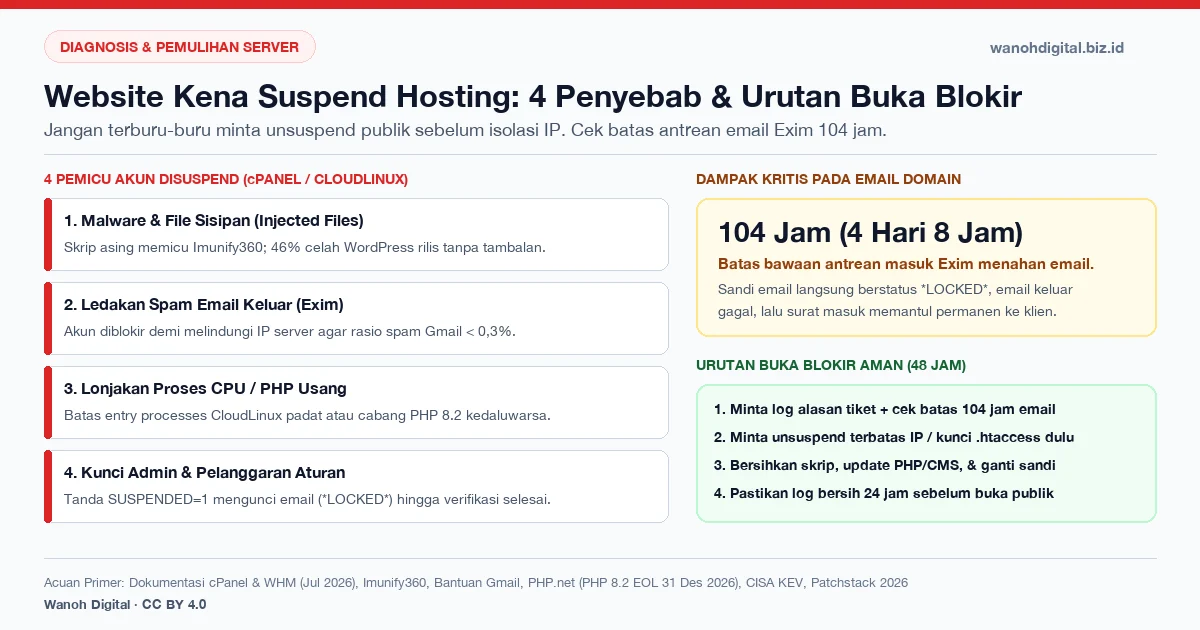
A second costly mistake is delaying remediation for days under the assumption that company domain email keeps running normally when only the website appears down. On cPanel servers, suspension appends a LOCKED marker to every mailbox password entry so staff cannot fetch new mail and all queued outbound messages are dropped [1]. Client emails sent to your domain are held in Exim's default local queue for at most 4 days and 8 hours (104 hours) before bouncing back as undelivered [1].
Table of Contents
- Why do hosting providers suspend a website even when bills are paid?
- How do malware, email spam, resource limits, and billing suspensions differ on the server?
- How much website downtime and company email loss occurs if you request an unblock the wrong way?
- How do you unblock a suspended website within 48 hours without getting suspended again?
- How do you use the 7-point checklist and draft an unblock ticket to your host?
- When can an owner handle the hosting ticket alone, and when is technical takeover needed?
- Brief technical notes for your IT staff or server administrator
- Frequently Asked Questions (FAQ)
- References
Why do hosting providers suspend a website even when bills are paid?
A website gets suspended even with every hosting invoice paid on time because the infrastructure provider automatically halts the account upon detecting one of four security or stability triggers: injected malicious files, unauthorized mass email sending (outbound spam), excessive server resource consumption, or an administrative or reseller lock [3, 4].

Source: Photo by Derrick Coetzee via Wikimedia Commons, https://commons.wikimedia.org/wiki/File:Technician_with_laptop_working_on_server_rack_at_NERSC.jpg. License: CC0 1.0.
To pinpoint the cause behind server notices without guessing, check these four main triggers documented across hosting control panels:
- Malicious Files and Code Injection on Outdated Sites: The
Imunify360defense suite scans files in real time with its Malware Scanner, blocks suspicious PHP execution via Proactive Defense, and tracks domain blacklists in Reputation Management [5]. Patchstack's State of WordPress Security in 2026 report, paired with Monarx telemetry (nearly9trillion file signals across2025), found that46%of vulnerabilities had no patch at disclosure, median time to mass exploitation was just5hours, and attackers increasingly hide payloads inside legitimate-looking core files (injected files) [10]. New flaws such as Common Vulnerabilities and Exposures (CVE) entryCVE-2026-119977in the Cybersecurity and Infrastructure Security Agency (CISA) Known Exploited Vulnerabilities (KEV) catalog since03 November 2026, alongside PHP8.2security support ending on31 December 2026, accelerate compromises on unpatched sites [8, 9]. If odd URLs already appear on Google, review our guide on how to clean a gambling-hacked website off your server or check subtle early symptoms in how a site can look normal while compromised. - Illegal Outbound Email Spikes (Outbound Spam) from Your Account: When a mailbox password falls to brute-force guessing or a web script calls mail functions without authentication, Exim records thousands of sudden outbound messages in
/var/log/exim_mainlog[3]. Because Gmail's official sender guidelines effective01 February 2024requireSender Policy Framework(SPF) orDomainKeys Identified Mail(DKIM), reverseDomain Name System(DNS)Pointer Record(PTR) alignment, Transport Layer Security (TLS) encryption, and a spam complaint rate under0.3%, shared hosts suspend offending accounts fast to keep the entire server's IP off blocklists [3, 6]. - Excessive Server Resource Spikes or File Count Overages: In cPanel, bandwidth meters turn yellow at
75%and red at90%, while on CloudLinux servers, Central Processing Unit (CPU), memory, disk I/O, and concurrent dynamic requests (entry processes) refresh every5seconds [4]. When aggressive scraper bots, broken cron jobs, or stalled database queries tie up hundreds of processes and degrade neighboring tenants, administrators freeze the account until load is cut [2, 4]. - Reseller Lock or Terms of Service Violations: Through WHM's Manage Account Suspension tool, hosts write
SUSPENDED=1with a timestamp to the user config and activate an ApacheRedirectMatchrule pointing to/cgi-sys/suspendedpage.cgi[1, 2]. For repeat or severe violations, server operators checkPrevent resellers from unsuspending, creating a lock file that stops resellers from lifting the suspension without root intervention [1].
How do malware, email spam, resource limits, and billing suspensions differ on the server?
The four suspension types differ in which services the server stops and what technical proof is needed to recover: malware and outbound spam halt both web execution and mail routing to protect shared IP reputation, whereas resource spikes or overdue invoices rarely require deep code cleanup if no foreign files exist [3, 4].
Misreading the suspension notice leads to wasted effort. Paying a renewal invoice or upgrading your hosting tier when an outdated theme script is still sending outbound spam will only trigger another suspension within hours [3, 10].
Use this comparison table of all four server suspension triggers to diagnose your account's symptoms:
| Server Suspension Trigger | Typical Clues in Tickets & Panel Logs | Effect on Website, Business Email & Database | Strict Prerequisite Before Public Reopen |
|---|---|---|---|
| Malware / Injected Files | Flagged file paths in Imunify360 reports or unusual access logs [5, 10] | Web redirects to suspendedpage.cgi; account, FTP, and database passwords locked [1] | Isolate by IP first, remove injected code, update PHP & CMS, and rotate all passwords [1, 8] |
| Outbound Email Abuse (Outbound Spam) | Queue spikes in /var/log/exim_mainlog and IP blocklist alerts [3, 5] | Outbound mail fails and clears; inbound mail queues up to 104 hrs then bounces [1] | Reset all mailbox passwords, remove mail() sender scripts, verify SPF, DKIM, and PTR [3, 6] |
| Server Process Limits (CloudLinux / CPU) | Repeated spikes in entry processes, RAM, or CPU on 5-second metric charts [4] | Site slows down or errors before being paused to protect shared node stability [2, 4] | Enable page caching, audit cron jobs, optimize slow queries, or upgrade resources [2, 4] |
| Billing / Identity Verification | Overdue invoice notice or domain ownership check with zero abuse logs [2] | All account services pause temporarily under SUSPENDED=1 until confirmed [1, 2] | Settle the official invoice or complete ticket verification so the lock is lifted [2] |
Because mail delivery issues frequently follow spam suspensions or credential theft, watch this official cPanelTV walkthrough on checking SPF, DKIM, and reverse DNS PTR records inside cPanel:
How much website downtime and company email loss occurs if you request an unblock the wrong way?
Asking for a full public unblock before disabling malicious scripts invites repeat suspensions, triggers a permanent WHM root lock, and drags downtime past Exim's 4-day 8-hour (104-hour) inbound email queue limit [1, 2].
Once that 104-hour ceiling passes unresolved, Exim under default Accept and queue messages settings stops holding client quote requests or payment confirmations and returns bounce failures to every sender [1]. Worse, under Simple Mail Transfer Protocol (SMTP) policy options, providers can switch suspension handling to Reject messages at SMTP time, bouncing business mail instantly the second an account goes dark [1].
To measure the cost of handling recovery out of order, examine an illustrative scenario for a regional building-materials distributor or B2B service relying on website inquiries and domain email, averaging 4 quote requests per day at a 25% close rate (1 closed order daily). In this illustrative scenario, contribution margin before fixed overhead and taxes is assumed at Rp 750,000 per order.
- Path A (Request Open Public Unblock Without IP Isolation): The owner asks support to reactivate the account right away; leftover scripts resume spewing spam or phishing pages within hours, locking the account at root level (
Prevent resellers from unsuspending) and dragging recovery out to7days (168hours) [1, 3]. Beyond breaching the104-hour inbound mail queue so client quotes bounce, stalled contribution margin in this illustrative scenario reaches7days timesRp 750,000(Rp 5,250,000), plus emergency migration or recovery fees ofRp 2,500,000, totalingRp 7,750,000. - Path B (IP Isolation, Thorough Cleanup & Controlled Reopen Within 48 Hours): The site maintainer requests a temporary unsuspend restricted to a single remediation IP, blocks public HTTP access via
.htaccess, separates inbound mail if needed, removes injected scripts, updates PHP and credentials, and reopens cleanly within2days (48hours) [1, 8]. In this illustrative scenario, inbound mail stays safely inside the104-hour window, stalled margin over2days isRp 1,500,000, planned technical cleanup costsRp 1,500,000, and month-one Temani Website care addsRp 400,000[11], keeping total burden atRp 3,400,000, orRp 4,350,000lower than Path A.
(Clarity note: all figures above form an illustrative operational decision comparison and do not measure actual net profit after payroll, rent, or taxes.)
How do you unblock a suspended website within 48 hours without getting suspended again?
A safe 48-hour recovery requires obtaining the trigger logs first, locking web access to one inspector IP before temporary reactivation, completing malware removal and full password rotation within the first 36 hours, and watching clean server logs for the final 12 hours before restoring public traffic [2, 10].
Follow this four-phase sequence so cleanup never triggers a second automated freeze:
- Hours 1 to 3 (Log Suspension Time & Demand Technical Cause Logs): Check the hosting account's primary billing email or client portal to note the exact suspension timestamp and track remaining time inside Exim's
104-hour inbound mail queue [1]. Reply to the host's ticket requesting the flagged Imunify360 file paths,/var/log/exim_mainlogexcerpts, or CloudLinux usage spikes rather than asking to turn the site right back on [4, 5]. - Hours 4 to 12 (Request IP-Restricted Unsuspend & Add a Public Block in
.htaccess): Ask for a temporary unsuspend restricted to your single working IP, or immediately lock public web access in the document root.htaccessfile as soon as the panel opens [2]. Blocking public traffic from minute one stops attacker bots from hitting leftover backdoor scripts while you download an off-server backup [1, 10]. - Hours 13 to 36 (Clean Injections, Update PHP, Rotate Passwords & Verify Mail): Verify Content Management System (CMS) core file checksums against official archives, hunt for rogue PHP files in upload folders and unknown cron tasks, upgrade PHP past the
8.2branch ahead of its31 December 2026security cutoff, and patch vulnerable branches such asCVE-2026-119977on WordPress [8, 9]. Rotate every password across cPanel, File Transfer Protocol (FTP), database users, and locked mailboxes, then validateSPF,DKIM, andPTRDNS records [3, 6]. If your ad campaigns were also paused by the breach, follow the cleanup and appeal steps in our guide on fixing Google Ads malware rejections safely. - Hours 37 to 48 (Verify Clean Logs, Reopen Public Access & Lock In Upkeep): Once Imunify360 shows zero suspicious files and test emails send and receive cleanly without queue buildup, remove the temporary IP restriction in
.htaccessand confirm on the hosting ticket so the account closes clean [5, 7]. To prevent repeat incidents during peak traffic or runtime transitions, review our monthly website maintenance pricing and takeover security audit guide.
How do you use the 7-point checklist and draft an unblock ticket to your host?
Before notifying your hosting provider to restore public visitor access, confirm all seven cleanup, PHP update, credential rotation, and off-server backup checks below while calculating downtime impact and copying a ready-to-send support ticket draft [3, 8].
Save or print this seven-point checklist as a recovery sign-off between business owner and technical maintainer:
7-Point Hosting Recovery Checklist Before Reopening Public Access
Check off the items you have already verified below, or click Copy Checklist to send it to your team or web developer.
Enter your daily inquiry figures and select the suspension cause below to estimate downtime impact and generate a ready-to-copy hosting support ticket:
Hosting Suspension Impact Calculator & IP-Restricted Unblock Ticket Draft
Estimate contribution margin stalled while your website and domain email are down, track the 104-hour Exim inbound queue window, verify the 7 cleanup checks, and copy a hosting support ticket draft.
Deals stalled: 1 deal per day (Rp 750,000 per day before fixed overhead and taxes)
Contribution margin stalled over 2 days (48 hours): Rp 1,500,000
Exim inbound email queue limit status (104 hours): Still within the 104-hour window (roughly 56 hours left)
Server cleanup & hardening cost: Rp 1,500,000
Total estimated outage impact: Rp 3,000,000
Recovery prerequisites ticked: 0 of 7 items

[Hosting Support Ticket: Requesting IP-Restricted Unsuspend for Cleanup]
Hello Hosting Support Team,
Our hosting account was suspended due to suspected malware or abuse activity. To clean the account safely without triggering repeat public abuse:
1. Please share the flagged file paths, Imunify360 scan report, or Exim log excerpt.
2. Please allow a temporary unsuspend restricted to our remediation IP (203.0.113.10) or with public HTTP traffic blocked via .htaccess while we remove injected scripts, update PHP/CMS, and rotate all cPanel, FTP, email, and database passwords.
3. We will report back once verification scans pass before restoring public web access. Thank you.
When can an owner handle the hosting ticket alone, and when is technical takeover needed?
As a rule of thumb, business owners can handle account reactivation on their own when the support ticket strictly cites an overdue renewal invoice, domain contact verification, or a brief entry processes spike during a promo campaign with no foreign files [2, 4]; bring in dedicated server remediation immediately when the ticket lists Imunify360 malware paths, mass-mail abuse in /var/log/exim_mainlog, or a root lock when you have no verified clean backup [3, 5].
In a real public case we handled in 2025, Shandy Rent Car saw leads drop after their ad campaigns paused due to online gambling content injected into a website built and managed by another vendor [11]. Through a free written initial diagnostic (Dengar dan Sarankan - Listen and Advise) without pushing a full site rebuild from scratch, we mapped both the website security issues and campaign setup so the owner could decide cleanly on fixes with their existing maintainer [11].
If your business website currently shows Account Suspended, was just temporarily unlocked, or leaves you unsure whether vulnerabilities remain from a past vendor or AI-generated build, you can start with a password-free passive scan via 24-Hour Free Website Check (capped at 10 sites per week) [11].
For malware cleanup, recovering a blocked hosting account, or taking over recurring upkeep including off-server backups and core updates, see our Website Maintenance Service (Temani Website Rp 400,000/month), our hacked website recovery workflow, and project notes in Wanoh Digital's Portfolio, or message us directly via WhatsApp +62 851 8323 1708 [11].
Brief technical notes for your IT staff or server administrator
When your internal IT lead or developer receives a limited unblock window to clean an account, apply these two defensive checks before restoring public access:
- Lock Public Access in
.htaccessto the Inspector IP (Apache2.4): Place this temporary rule in the site's document root (replace203.0.113.10with your office or technician's public IP) so visitors and bots cannot execute PHP scripts during inspection [2, 10]:
# Restrict all HTTP access temporarily to the remediation IP only (replace with your IP)
<IfModule mod_authz_core.c>
  Require ip 203.0.113.10
</IfModule>- Scan Upload Folders for PHP Files, Verify WordPress Core & Check Email DNS: Once logged in via Secure Shell (SSH) or panel terminal during the IP-locked
unsuspendwindow, confirm no hidden PHP scripts sit in uploads, check CMS core hashes, and verify domainMail Exchanger(MX) andSPFrecords [6, 10]:
# 1. Search for suspicious PHP files inside media/uploads (outside official themes/plugins)
find wp-content/uploads -type f -name "*.php"

# 2. Verify WordPress core file checksums and active PHP version (> 8.2)
wp core verify-checksums
php -v

# 3. Verify domain MX and TXT (SPF) records (replace example.com with your domain)
dig +short MX example.com
dig +short TXT example.com | grep -i "spf"
Frequently Asked Questions (FAQ)
Are all website files and emails deleted immediately when a hosting account is suspended?
No. Suspending an account (SUSPENDED=1) only redirects web traffic to a notice page, kills active user processes, and locks login passwords while files and databases stay intact on disk [1]. Permanent deletion (Account Termination) is a separate procedure typically triggered only when severe abuse goes unresolved or billing grace periods expire past the provider's retention policy [1, 2].
How long does the server hold incoming company emails while the website is suspended?
Under cPanel's default Exim email configuration (Accept and queue messages), incoming mail is held temporarily in the local queue for up to 4 days and 8 hours (104 hours) before bouncing back to the sender as undeliverable [1]. However, if your host uses the Reject messages at SMTP time policy, incoming mail is rejected immediately at delivery, so always verify the server's setting in your first support ticket [1].
Why do accounts get re-suspended a few hours after hosting support lifts the block?
Reopening public internet access before removing the root infection lets automated bots or scheduled cron jobs re-trigger remaining spam scripts or injected files [3, 10]. As soon as Imunify360 or Exim logs detect repeat abuse, the account is suspended again and risks being locked at the root level (Prevent resellers from unsuspending) [2, 5].
When should I upgrade my hosting plan instead of cleaning malware or spam?
Upgrading hosting is the right fix only when CloudLinux or resource usage charts confirm legitimate visitor traffic is consistently hitting entry process, CPU, or memory limits with no injected files or outbound mail spikes [3, 4]. Migrating an infected account to a larger plan or a new Virtual Private Server (VPS) simply carries the suspension problem onto the new server [5, 10].
References
Verified Sources & References (11 Sources)Show References
- cPanel & WHM Official Documentation. "What Happens When You Suspend an Account." WebPros International, 08 July 2026. https://docs.cpanel.net/knowledge-base/accounts/what-happens-when-you-suspend-an-account/ (accessed 18 November 2026).
- cPanel & WHM Official Documentation. "Manage Account Suspension." WebPros International, 08 July 2026. https://docs.cpanel.net/whm/account-functions/manage-account-suspension/ (accessed 18 November 2026).
- cPanel & WHM Official Documentation. "How to Prevent Email Abuse." WebPros International, 08 July 2026. https://docs.cpanel.net/knowledge-base/email/how-to-prevent-email-abuse/ (accessed 18 November 2026).
- cPanel & WHM Official Documentation. "Checking Traffic and Resource Usage." WebPros International, 01 October 2026. https://docs.cpanel.net/cpanel/meridian/performance/checking-traffic-and-resource-usage/ (accessed 18 November 2026).
- Imunify360 Official Documentation. "Admin Interface: Malware Scanner, Proactive Defense, and Reputation Management." CloudLinux Inc., 05 November 2026. https://docs.imunify360.com/dashboard/ (accessed 18 November 2026).
- Google Workspace / Gmail Help. "Email sender guidelines." Google Help Center, 01 February 2024. https://support.google.com/mail/answer/81126?hl=id (accessed 18 November 2026) (in Indonesian).
- cPanelTV Official YouTube Channel. "cPanel Tutorials - Email Deliverability." YouTube, 22 January 2019. https://www.youtube.com/watch?v=zhgYxhK9v1I (accessed 18 November 2026).
- PHP Project. "Currently Supported Versions." The PHP Group, 18 November 2026. https://www.php.net/supported-versions.php (accessed 18 November 2026).
- Cybersecurity and Infrastructure Security Agency (CISA). "Known Exploited Vulnerabilities Catalog (`CVE-2026-119977` WordPress Core)." CISA.gov, 13 November 2026. https://www.cisa.gov/known-exploited-vulnerabilities-catalog (accessed 18 November 2026).
- Patchstack. "State of WordPress Security in 2026." Patchstack Security Whitepaper, 25 February 2026. https://patchstack.com/whitepaper/state-of-wordpress-security-in-2026/ (accessed 18 November 2026).
- Wanoh Digital. "WordPress & Laravel Website Maintenance Service (`Temani Website`)." Wanoh Digital, 18 November 2026. https://wanohdigital.biz.id/en/jasa-maintenance-website (accessed 18 November 2026).