
Summary: Ransomware attacks on Indonesian SMEs surged in Kaspersky's July 2026 telemetry report, where the share of Micro, Small, and Medium Enterprises (SMEs) targeted by ransomware in Indonesia rose from 2.83% in Q1 2025 to 4.01% in Q1 2026, an annual jump of roughly 42% [1, 2]. Kaspersky security expert Fedor Sinitsyn stresses that the 4.01% figure only counts the final stage of an attack when encryption runs, while the most active syndicates such as Clop (14.42%), Qilin (12.34%), and The Gentlemen now use double extortion by stealing customer data before locking computers [1, 3]. Because leaking customer personal data triggers a mandatory written report within 3 x 24 hours (72 hours) under Article 46 of Law Number 27 of 2022 on Personal Data Protection (UU PDP), business owners must close initial entry points and enforce the 3-2-1 backup rule with at least one offline backup copy [5, 6, 8].
The early-2026 spike in ransomware targeting Indonesian SMEs breaks the old myth that cybercriminals only go after banks, hospitals, or large corporations [1, 2]. According to Kaspersky's telemetry report for the Small and Medium Business (SMB) segment published in July 2026, the proportion of small and medium businesses in Indonesia hit by ransomware grew from 2.83% in Q1 2025 to 4.01% in Q1 2026 [1, 2].
That 4.01% figure places Indonesia highest among the 7 Southeast Asian countries tracked by Kaspersky, outpacing the regional average which climbed from 2.92% to 3.51% [1, 3]. Because attackers now combine locking POS computers with stealing customer databases (double extortion), owners must seal off initial entry paths and keep an offline backup (physically disconnected from computers) so store operations do not stall for days [1, 5, 6].
Source: Shixart1985 via Wikimedia Commons, https://commons.wikimedia.org/wiki/File:Woman_working_on_her_laptop._External_hard_drive_plugged_into_the_laptop.jpg. License: CC BY 2.0.
Table of Contents
- Why did ransomware attacks on Indonesian SMEs jump 42% in Q1 2026?
- Why do hackers target small businesses, and where do they get in?
- Why are backups alone no longer enough against double extortion and UU PDP?
- How do you estimate downtime losses and set up a 3-2-1 backup defense?
- What should you do in the first 60 minutes if a business computer gets hit by ransomware?
- Frequently Asked Questions
- References
Why did ransomware attacks on Indonesian SMEs jump 42% in Q1 2026?
Ransomware attacks on Indonesian SMEs climbed roughly 42% from 2.83% in Q1 2025 to 4.01% in Q1 2026 because rapid adoption of digital POS apps, online bookkeeping tools, and remote access outpaced routine security updates [1, 2]. Over the same period, the National Cyber and Crypto Agency (BSSN) recorded 5.5 billion cyberattacks across 2025 and 1.52 billion attacks in early 2026 [4, 9].
In Kaspersky's telemetry report comparing the share of SMB users impacted by Trojan-Ransom between January-March 2025 and January-March 2026, the Southeast Asian average increased from 2.92% to 3.51% [1, 3]. Across the wider South and Southeast Asia region, Indonesia's rate (4.01%) sat just shy of India, which rose from 3.18% to 4.07% [1].
Notably, while Indonesia (2.83% to 4.01%), Malaysia (2.09% to 2.74%), and Singapore (0.57% to 0.69%) saw increases, three neighboring Association of Southeast Asian Nations (ASEAN) countries posted lower attack shares in Q1 2026 [1, 3]. Vietnam dropped from 2.91% to 2.56%, the Philippines fell from 2.46% to 1.80%, and Thailand dipped from 1.28% to 1.12% [1, 3].
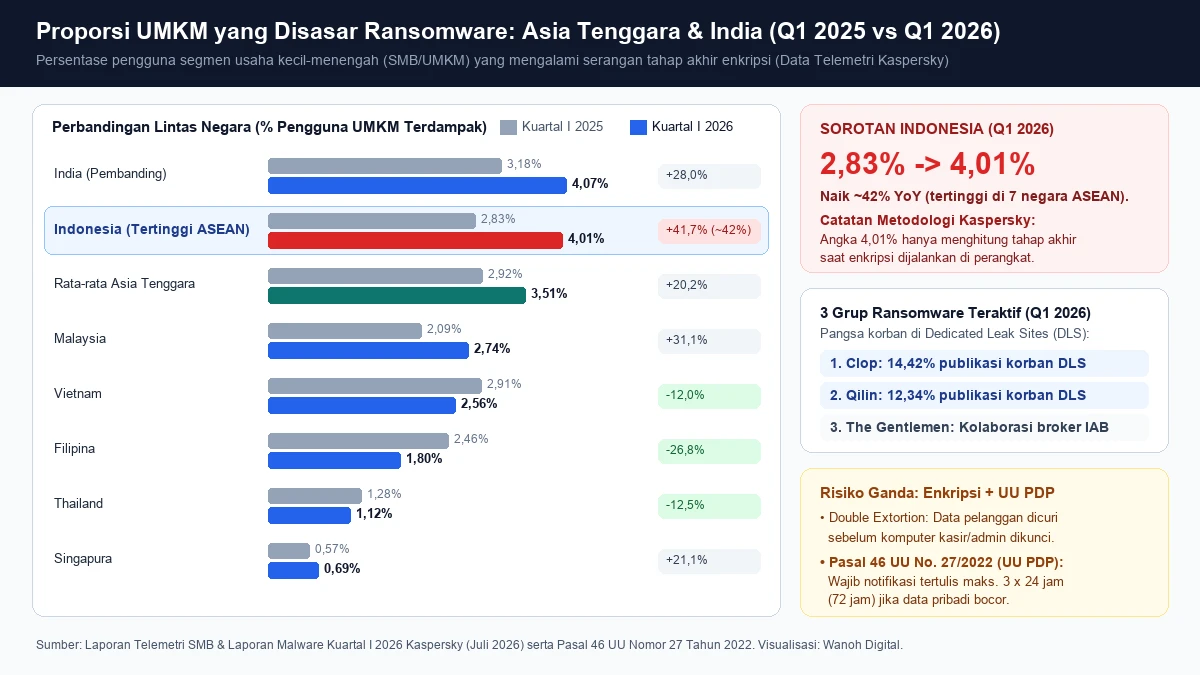
Source: Wanoh Digital (compiled from Kaspersky Telemetry Report and UU PDP). License: CC BY 4.0.
Kaspersky security researcher Fedor Sinitsyn adds an essential methodological note for business owners reading that 4.01% figure [1, 3]. He explains that ransomware detection statistics count only the final stage of a multi-stage attack, when the file-locking payload actually runs on the target machine [1, 3].
That means every intrusion stopped earlier during initial access, credential theft, network reconnaissance, or lateral movement is excluded from that 4.01% count [1, 3]. In practice, far more Indonesian SMEs are being scanned or probed by attackers than surface figures suggest [1, 3].
These numbers align with national monitoring from BSSN [4, 9]. BSSN Deputy for Cyber Security and Crypto Operations, Major General (TNI) Bondan Widiawan, reported that Indonesia logged 5.5 billion cyberattacks throughout 2025, jumping 714% (roughly 7 times) compared to the 2020-2024 annual average [4].
Entering early 2026, BSSN recorded another 1.52 billion cyberattacks just between January 1 and April 15, 2026 [4]. Most of those intrusions now rely on behavior-based adaptive malware and polymorphic variants that rewrite code automatically to slip past outdated basic antivirus tools [4, 9].
| Country / Region | SME Share Targeted Q1 2025 (%) | SME Share Targeted Q1 2026 (%) | Year-over-Year Change (YoY) | Regional Risk Standing Q1 2026 |
|---|---|---|---|---|
| India (Regional Benchmark) | 3.18% | 4.07% | +28.0% (Up) | Highest in South & Southeast Asia [1] |
| Indonesia | 2.83% | 4.01% | +41.7% / ~42% (Up) | Rank 1 Highest in Southeast Asia [1, 2] |
| Southeast Asia Average (7 Countries) | 2.92% | 3.51% | +20.2% (Up) | ASEAN Regional Benchmark [1, 3] |
| Malaysia | 2.09% | 2.74% | +31.1% (Up) | Rank 2 in Southeast Asia [1, 3] |
| Vietnam | 2.91% | 2.56% | -12.0% (Down) | Rank 3 in Southeast Asia [1, 3] |
| Philippines | 2.46% | 1.80% | -26.8% (Down) | Rank 4 in Southeast Asia [1, 3] |
| Thailand | 1.28% | 1.12% | -12.5% (Down) | Rank 5 in Southeast Asia [1, 3] |
| Singapore | 0.57% | 0.69% | +21.1% (Up) | Lowest in Southeast Asia [1, 3] |
Why do hackers target small businesses, and where do they get in?
Hackers target SMEs because most small businesses lack dedicated IT staff and routine security patching, yet depend heavily on daily data availability and panic when locked out [1, 2]. SMEs are also breached as entry points to attack larger corporate clients in their supply chain [1, 2].
Many store owners, local distributors, clinics, and small factories assume their business is too small to interest international cybercrime groups. Yet Kaspersky Asia Pacific Managing Director Adrian Hia warns that limited resources make SMEs one of the most profitable targets for attackers [1, 2].
Three economic reasons explain why modern cybercrime directs automated attacks at SMEs in Indonesia:
- No Security Team or Regular Patching: Unlike banks that monitor networks 24 hours a day [5], SME admin computers commonly run unpatched operating systems and reused passwords [1, 2].
- The Initial Access Brokers Market: In Kaspersky's Q1 2026 Malware Report, Initial Access Brokers (IABs) scan millions of small business machines automatically, steal login credentials, and sell access to Ransomware-as-a-Service (RaaS) operators such as Clop (14.42% of victim listings on Dedicated Leak Sites in Q1 2026), Qilin (12.34%), and The Gentlemen (ranked 3rd) [1, 2, 3].
- Stepping Stones for Supply Chain Attacks: Adrian Hia points out that many SMEs act as raw-material vendors, catering suppliers, or distributors for big companies [1, 2]. Hackers break into an SME's email or PC first to slip infected fake invoices into the network of the large enterprise partner [1, 2].
In everyday Indonesian operations, ransomware almost never arrives through movie-style hacking, but through four common doors owners often overlook [4, 5]. As covered in our guide on how to secure an SME website against hacking and malware, the worst exposures start from routine software habits at the desk.
| Primary Entry Point in Indonesian SMEs | Real-World Scenario | Why It Threatens Operations | How to Close the Gap This Week (Rp0 Cost) |
|---|---|---|---|
| 1. Pirated Software (Crack / Keygen / Activator) | Staff install cracked POS, accounting, graphic design, or Windows software that instructs them to turn off Windows Defender during setup. | Activator files almost always bundle password-stealing Trojans (infostealers) and backdoors sold to IAB access brokers [1, 4]. | Remove all cracks and activators; switch to licensed software or free open-source alternatives. |
| 2. Fake Invoice / Waybill Attachments on WhatsApp & Email | Finance staff receive a WhatsApp message or email with a .zip, .rar, .exe, or .iso file disguised as a Tax Receipt, Vendor Invoice, or Courier Waybill. | Once double-clicked on the admin laptop, the encryption script runs silently in the background and locks every folder plus the office Local Area Network (LAN) [5, 6]. | Ban staff from opening .exe, .scr, .vbs, or password-protected .zip files from unknown senders; show full file extensions in Windows. |
| 3. Open Remote Desktop Protocol (RDP) Access | A technician exposes the RDP port (3389) to the public internet so the owner or accountant can log into the store POS PC from home without extra protection. | Automated scanners run by groups like The Gentlemen hunt open RDP ports worldwide and crack passwords by brute force [1, 5]. | Close public RDP ports on the router; require an encrypted Virtual Private Network (VPN) and Multi-Factor Authentication (MFA) [5, 6]. |
| 4. Website Plugin Flaws & Admin Panels Without MFA | A catalog site or ordering system uses pirated (nulled) plugins or an admin password like admin123 with no two-step verification. | Attackers upload a web shell to lock the customer order database and hold the business domain hostage [5]. | Turn on MFA on hosting control panels and primary email accounts; delete unused plugins and follow our business website security checklist. |
Why are backups alone no longer enough against double extortion and UU PDP?
Having backups alone is no longer enough because modern ransomware groups run double extortion, stealing copies of customer databases and financial files before encrypting computers [1, 3]. In Indonesia, leaking personal data triggers a mandatory written report within 3 x 24 hours under Article 46 of Law Number 27 of 2022 [8].
A few years ago, if a POS PC got locked by ransomware and the owner had a clean backup stored elsewhere, reinstalling Windows solved the problem. Yet Fedor Sinitsyn of Kaspersky warns that cybercriminals in 2026 rarely stop at encryption-only extortion [1, 3].
Major syndicates including Clop (14.42% of leak-site victims), Qilin (12.34%), and The Gentlemen now rely on double extortion [1, 3]. Before triggering the red lock screen on a victim's computer, their malware quietly exfiltrates high-value files to attacker servers [1, 5].
At Indonesian SMEs, the files stolen most often include:
- Customer tables containing full names, home addresses, WhatsApp numbers, and purchase history.
- Photos of National Identity Cards (KTP), Taxpayer Identification Numbers (NPWP), and employee payslips stored in HR folders.
- Supplier pricing contracts and cash-flow ledgers sensitive to competitors or partners (see the importance of clean record controls in our guide on how to prepare transparent cash reports).
When an SME owner refuses to pay ransom because they already have a backup, hackers threaten to publish employee KTP scans and customer lists on DLS leak sites or contact customers directly [1, 5].
Indonesian Legal Compliance Warning (Article 46 of Law Number 27 of 2022 / UU PDP):
Every SME that stores and manages customer or employee identity data acts as a Personal Data Controller [8]. Under Article 46 paragraphs (1) and (2) of Law Number 27 of 2022 on Personal Data Protection, if a personal data failure occurs (including data theft from a ransomware attack), the Personal Data Controller must submit written notice within 3 x 24 hours (72 hours) to the affected Personal Data Subjects (customers/employees) and the personal data protection authority [8]. That notice must specify: (a) what personal data was exposed, (b) when and how it was exposed, and (c) handling and recovery measures taken by the controller [8].
Because of this, relying on backups alone keeps daily operations running but does not waive your legal duties under UU PDP once hackers have broken in and copied customer folders [1, 8]. SME defenses must block intrusion up front and encrypt sensitive files so they remain unreadable even if stolen [5, 6].
How do you estimate downtime losses and set up a 3-2-1 backup defense?
Potential downtime loss is estimated as the daily revenue blocked from processing plus fixed daily expenses and device reinstallation costs over the recovery period, as a practical rule. To cut recovery time from 7 working days down to 1 working day, the official Cybersecurity and Infrastructure Security Agency (CISA) guide requires an isolated offline backup [5, 6].
Many owners put off buying an external hard drive for Rp800,000 to Rp1,200,000 as an illustrative cost because it feels like an extra expense. Yet the moment the main cashier and warehouse PC gets locked by ransomware without an offline backup, the shop cannot check stock, cannot collect due invoices, and still owes daily staff wages for days.
Use the interactive calculator below to estimate your business's downtime exposure and run a quick audit on your 3-2-1 Backup setup and UU PDP reporting status:
SME Ransomware Downtime Loss Estimator & 3-2-1 Backup Readiness Audit
Enter your daily business figures and select your current backup status to estimate recovery costs without paying ransom, along with 72-hour reporting obligations under Article 46 of Law Number 27 of 2022 (UU PDP).
As the illustrative simulation above shows, the gap between a business stalled for 7 workdays versus one back online in 1 workday comes down to how backup files are stored [5, 6]. The joint #StopRansomware Guide published by CISA, the National Security Agency (NSA), the Federal Bureau of Investigation (FBI), and US state cybersecurity centers recommends an isolated 3-2-1 Backup rule [5, 6]:
- 3 Copies of Data: Keep 1 primary working copy plus at least 2 backup copies as a standard operational baseline [5, 6].
- 2 Different Storage Media: Never put your backup on drive
D:of the same computer (ransomware encrypts drivesC:,D:, andE:together) [5, 6]. Use separate media, such as a Network Attached Storage (NAS) unit or Universal Serial Bus (USB) external hard drive paired with cloud storage (such as Google Drive or OneDrive) [5, 6]. - 1 Offline (Air-Gapped) or Immutable Copy: This is the rule SMEs break most often. If an external hard drive stays plugged into a laptop all day, or if Google Drive / OneDrive uses two-way sync without version history limits, ransomware will encrypt the external drive and cloud folder within minutes [5, 6]. At least 1 copy must be physically unplugged after each scheduled backup (offline / air-gapped) or locked with an immutable snapshot [5, 6].
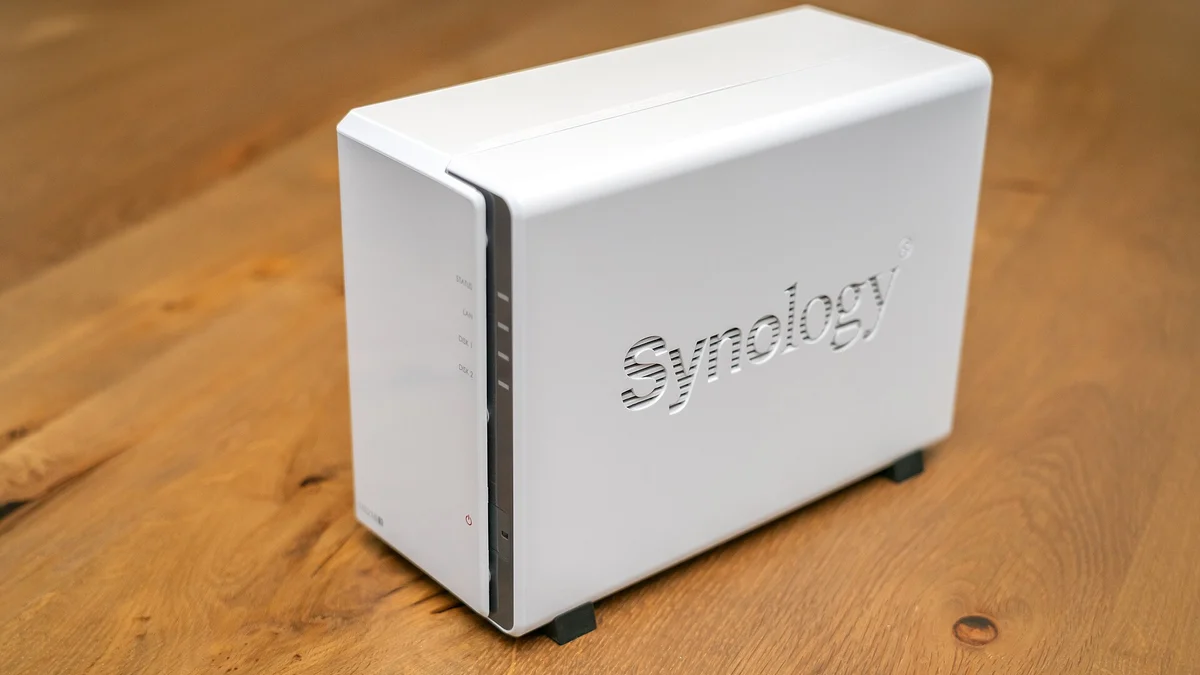
Source: Dyver via Wikimedia Commons, https://commons.wikimedia.org/wiki/File:Synology_Disk_Station_DS223J_-_NAS-Server.jpg. License: CC BY-SA 4.0.
So you and your admin staff can put prevention in place without an IT background, copy and run this weekly checklist based on CISA #StopRansomware Guide and BSSN guidance [4, 5, 6, 9]:
Template 1: Weekly SME Ransomware Prevention Checklist (CISA & BSSN)
Check off each verified step below, or click Copy Checklist to share it with your staff or IT vendor.
Alongside securing store devices, include this digital defense budget in your annual operating plan, as discussed in our guide on strategies to protect margins and operational efficiency for SMEs in 2027.
What should you do in the first 60 minutes if a business computer gets hit by ransomware?
In the first 60 minutes after a ransom screen appears or file extensions turn into random strings, disconnect the network immediately (unplug the LAN cable and switch off Wi-Fi) so encryption cannot spread to other devices, and do not format the machine before photographing the ransom note and checking for free decryptors on NoMoreRansom.org [5, 7].
Panic in the first hour often drives two costly mistakes: (1) leaving the PC connected to office Wi-Fi so ransomware spreads to staff laptops and corrupts synced cloud storage folders, or (2) rushing to transfer ransom money to the attackers' crypto wallet [5, 7].
The international law-enforcement consortium No More Ransom (founded by the Europol European Cybercrime Centre, the Dutch National Police, and cybersecurity firms including Kaspersky) alongside CISA strongly urges victims never to pay the ransom [5, 7]. Paying gives zero guarantee of a working decryption key, does not delete stolen customer files, and flags your business as a willing payer for future attacks [5, 7].
Today, the official Indonesian-language portal at NoMoreRansom.org offers over 130 free decryption tools capable of unlocking more than 160 ransomware families without paying anything [7]. Print and post the 60-minute emergency protocol below in your admin room or cashier desk [5, 7, 8]:
Template 2: First 60 Minutes Emergency Protocol When Hit by Ransomware
https://www.nomoreransom.org/id/index.html from a clean device and use Crypto Sheriff by uploading 2 locked sample files and the ransom note to see if a free decryption key exists [7].Technical Notes for IT Staff or Technicians Managing SME Devices
If your business has part-time technical help or uses an IT maintenance vendor, ask them to apply these three license-free system hardening settings from the CISA #StopRansomware Guide [5, 6]:
- Enable Controlled Folder Access and Attack Surface Reduction (ASR) Rules in Windows: On Windows 10 and Windows 11, Windows Security includes Ransomware Protection and Controlled Folder Access. When enabled, unrecognized apps are blocked from modifying or encrypting files inside document and accounting folders even if a user accidentally clicks a malicious attachment [5, 6].
- Close Port
3389(RDP) and Port445(Network File Sharing) From the Public Internet: Make sure your office router firewall blocks all external inbound connections to ports3389and445[5, 6]. If the owner needs remote access while traveling, use a WireGuard or Tailscale VPN protected with MFA [5, 6]. - Isolate Backup Credentials (Zero-Trust Backup): Never save your NAS password or dedicated backup cloud storage login in the browser password autofill on daily work PCs [5, 6]. If an infostealer extracts saved browser passwords, backups stored under a separate credential stay untouched [5, 6].
If you want to run an external baseline check on your business website without handing over hosting passwords, reorganize operational data backups, or discuss practical business system protection on a modest budget, try our Free 24-Hour Website Check and explore ongoing support on Wanoh Digital Website & System Maintenance Services (plus typical pricing in our monthly website maintenance cost guide). If your website is currently showing injected files or suspicious page changes, read our recovery process on Hacked Website Recovery Services and review client maintenance examples on Wanoh Digital's portfolio.
For website-specific breaches such as online gambling page injections or defacement, follow our protocol for emergency isolation and cleanup for gambling-hacked websites.
Frequently Asked Questions
Why do hackers target small businesses or SMEs if they do not have billions of rupiah for ransom?
According to Kaspersky Asia Pacific Managing Director Adrian Hia, hackers target SMEs not because they expect billion-rupiah payouts from one company, but by relying on automated attack volume against thousands of small businesses lacking cybersecurity teams or patch management schedules [1, 2]. Alongside demanding smaller ransoms calibrated to what panicked owners will pay to restart operations, attackers also use SME email accounts and networks as entry doors into large corporate supply chain partners [1, 2].
Are work files stored in auto-synced Google Drive or OneDrive folders on a laptop safe from ransomware?
Not fully safe if you rely only on two-way automatic sync [5, 6]. When the Google Drive or OneDrive app on a laptop syncs folders automatically, ransomware encrypting files on the laptop sends those locked versions straight into cloud storage within seconds [5, 6]. To stay protected, keep at least 1 offline backup copy on an external hard drive physically unplugged after copying, plus a separate cloud storage account with version history enabled [5, 6].
Does paying the ransom guarantee that business files will return to normal?
There is no guarantee at all [5, 7]. The official CISA #StopRansomware Guide and the No More Ransom consortium stress that paying ransom does not guarantee attackers will hand over a working decryption key [5, 7]. Many paying victims still find database files partially corrupted on decryption, get extorted a second time so stolen customer data (double extortion) stays private, or get hit again months later after being put on a list of willing payers [1, 5, 7].
How can I check whether ransomware-locked files can be unlocked for free without paying?
You can check for free via the official NoMoreRansom.org portal run jointly by Europol, the Dutch National Police, and cybersecurity partners including Kaspersky [7]. On a clean device free of malware, open Crypto Sheriff and upload 2 encrypted sample files along with the ransom note text file [7]. Over 130 free decryption tools are currently available to recover files from more than 160 ransomware families [7].
When must an SME report a cyberattack under Indonesia's Personal Data Protection Law (Law Number 27 of 2022)?
Under Article 46 paragraphs (1) and (2) of Law Number 27 of 2022 on Personal Data Protection (UU PDP), if a ransomware attack leads to a personal data breach (for example, a database containing names, phone numbers, addresses, or KTP IDs of customers and staff is accessed or stolen via double extortion), the SME as Personal Data Controller must submit written notification within 3 x 24 hours (72 hours) [8]. That notice must be sent to affected data subjects (customers/employees) and the personal data protection authority, stating the data exposed, time and chronology of the incident, and steps taken to handle it [8].
What is the minimum cost to set up a ransomware-resistant 3-2-1 backup system for an SME?
As an illustrative scenario in the current Indonesian hardware market, an SME can put the 3-2-1 Backup rule into practice with an upfront cost of around Rp800,000 to Rp1,500,000 for one 1 Terabyte (TB) external hard drive as an offline backup copy, paired with a cloud storage plan supporting file version history [5, 6]. As a rule of thumb, that one-time external hard drive purchase is far smaller than risking 5 to 7 working days of lost revenue when cashier and accounting computers are locked completely [5, 6].
References
Verified Sources & References (9 Sources)Show References
- Kaspersky and Singapore Business Review. "Report on Rising Ransomware Attacks on Small and Medium Businesses in Southeast Asia Q1 2026." Singapore Business Review, 14 July 2026. https://sbr.com.sg/information-technology/in-focus/singapore-smb-ransomware-rate-rises-despite-regional-low (accessed 02 November 2026).
- Redaksi Youngster. "Serangan Ransomware ke UMKM Indonesia Naik 42% pada Awal 2026." Youngster Indonesia, 14 July 2026. https://youngster.id/news/digital-business-news/serangan-ransomware-ke-umkm-indonesia-naik-42-pada-awal-2026/ (accessed 02 November 2026).
- Redaksi Mobitekno. "Kaspersky Catat Kenaikan Serangan Ransomware terhadap UMKM di Asia Tenggara." Mobitekno Indonesia, 13 July 2026. https://mobitekno.com/read/2026/13/07/kaspersky-ransomware-umkm-asiteng/ (accessed 02 November 2026).
- National Cyber and Crypto Agency (BSSN) and Kompas. "BSSN Catat Serangan Siber Naik 7 Kali Lipat pada 2025 dan Berlanjut di Awal 2026." Harian Kompas, 23 April 2026. https://lestari.kompas.com/read/2026/04/23/192503686/bssn-serangan-siber-naik-7-kali-lipat-pada-2025-dan-berlanjut-di-awal-2026 (accessed 02 November 2026).
- Cybersecurity and Infrastructure Security Agency. "Stop Ransomware Official Guide." U.S. Government Official Portal, 12 March 2025. https://www.cisa.gov/stopransomware (accessed 02 November 2026).
- Cybersecurity and Infrastructure Security Agency. "StopRansomware Guide: Prevention and Response Checklist." U.S. Government Official Portal, 12 March 2025. https://www.cisa.gov/sites/default/files/2025-03/StopRansomware-Guide%20508.pdf (accessed 02 November 2026).
- Europol, Dutch National Police, and Kaspersky. "No More Ransom Official Decryption and Prevention Portal (Indonesian)." No More Ransom Consortium, 01 January 2026. https://www.nomoreransom.org/id/index.html (accessed 02 November 2026).
- Government of the Republic of Indonesia. "Undang-Undang Nomor 27 Tahun 2022 tentang Pelindungan Data Pribadi." JDIH Audit Board (BPK) RI, 17 October 2022. https://peraturan.bpk.go.id/Details/229798/uu-no-27-tahun-2022 (accessed 02 November 2026).
- National Cyber and Crypto Agency (BSSN) of the Republic of Indonesia. "Portal Resmi Layanan Keamanan Siber dan Sandi Nasional." BSSN RI, 01 January 2026. https://www.bssn.go.id/ (accessed 02 November 2026).