Summary Learning how to audit a business website means inspecting public security, mobile speed, crawlability, on-page structure, WhatsApp conversion paths, and structured data without opening server code first [12]. This inspection is most valuable before launching paid ads, after a theme refresh, or prior to final developer handover [1, 13]. Scoring benchmarks draw on the Open Worldwide Application Security Project (OWASP) HTTP header guidelines, Google Core Web Vitals (CWV), Google Search Central documentation, and Wanoh Digital's passive field audit of 60 Bandung business websites on 19 November 2026 [1, 2]. It is designed for small and medium business owners, organization managers, and marketing leads who need an actionable checklist without programming skills or server logins. One boundary stays firm: an external passive audit only reads public pages and HTTP headers, so it never replaces server-side cleanup if a site has already been compromised internally [12].
Many business owners assume that if their domain shows a Hypertext Transfer Protocol Secure (HTTPS) padlock and looks tidy on their own phone, the site is secure and ready for paid traffic. Yet Wanoh Digital's passive audit of 60 active Bandung SME websites on 19 November 2026 showed that while 100% used HTTPS, 48.3% (29 of 60 sites) lacked all four core browser security headers and 78.3% (47 of 60 sites) publicly exposed CMS or server versions [1].
A second misconception is assuming one quick free check of the homepage reflects the health of the entire website. Inner pages such as service listings, pricing pages, or contact screens frequently hide injected spam links, accidental noindex tags, or WhatsApp buttons using local 08xx prefixes that fail to open a chat when tapped on mobile [8, 12].
Table of Contents
- What are the 6 pillars every business website audit should inspect?
- Why can a normal-looking site still fail on security and mobile speed?
- How do you check on-page SEO, crawl health, and WhatsApp links without admin logins?
- Should your business website be audited for AI answer engines (GEO)?
- How does a 6-pillar audit affect ad economics, and when do you need an A4 PDF report?
- What is the 7-day sequence from initial check to Before vs After verification?
- Frequently Asked Questions (FAQ)
- Brief technical notes for your IT lead or vendor
- References
What are the 6 pillars every business website audit should inspect?
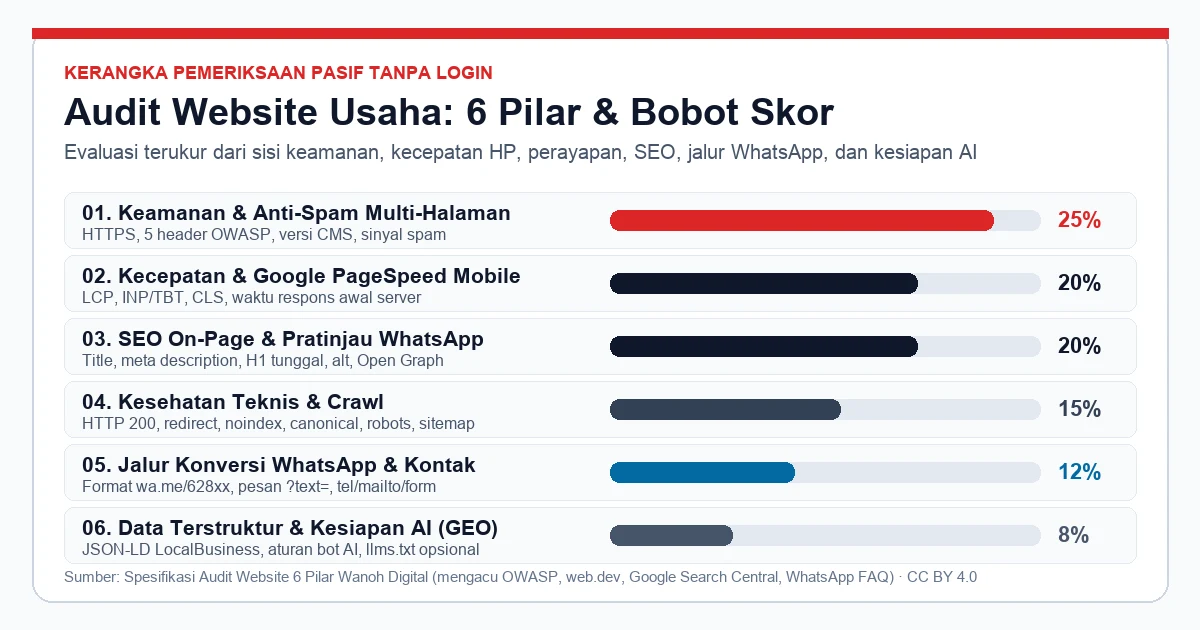
A complete business website audit scores six connected pillars from the perspective of visitors, search crawlers, and browsers: security and anti-spam (25% weight), mobile Google PageSpeed Insights (PSI) performance (20%), on-page SEO and link previews (20%), technical crawl health (15%), WhatsApp conversion paths (12%), and structured data plus AI readiness (8%) [12].
Security carries the heaviest weight because one hidden gambling spam injection or malicious redirect can trigger ad disapprovals and erode customer trust within minutes [12]. Mobile speed and page structure share one-fifth each because most prospective buyers open business links on cellular networks and immediately scan for an active WhatsApp chat button [1, 3].
To keep scope boundaries realistic from the start, the table below separates what an external passive audit checks from what still requires server or hosting access:
| Audit Pillar (Weight) | Checked Externally Without Login | Out of Scope (Requires Server/Admin Access) | Primary Business Risk |
|---|---|---|---|
1. Security & Anti-Spam (25%) | Transport Layer Security (TLS) certificate, 5 OWASP security headers, exposed CMS or PHP versions, and spam signals on homepage plus up to 4 inner pages [2, 12] | Hidden server backdoor files, weak admin passwords, and plugin flaws behind login screens | Gambling spam injection, Google Ads malware rejection, and hosting account suspension [1, 2] |
2. Speed & PageSpeed Mobile (20%) | Mobile lab checks for Largest Contentful Paint (LCP), Cumulative Layout Shift (CLS), Total Blocking Time (TBT), and initial server response time [3, 4] | Peak-hour database locking and authenticated member-portal rendering speed | Mobile visitors abandon slow pages before reading your offer, raising cost per lead [3, 4] |
3. Technical Health & Crawl (15%) | HTTP status codes, redirect chains, accidental noindex tags, mobile viewport, canonical URLs, robots.txt, and sitemap.xml [5, 6] | Intentionally password-protected pages and authenticated checkout logic | Core product or service pages fail to enter Google Search indexes [5, 6] |
4. On-Page SEO & WhatsApp Preview (20%) | Page <title> length, meta description, single <h1> structure, image alt attributes, and Open Graph tags for clean chat previews [5, 12] | Competitor keyword difficulty research and external backlink authority | Truncated search snippets and plain, uninviting link previews when shared on WhatsApp [1, 5] |
5. WhatsApp & Contact Path (12%) | International wa.me/628... format, prefilled ?text= query, unreplaced placeholder numbers, plus telephone, email, and form links [8, 12] | How quickly your sales staff reply inside WhatsApp Business after a chat arrives | Interested buyers fail to open a chat window because links use 08xx or dead URLs [1, 8] |
6. Structured Data & AI Readiness (8%) | LocalBusiness JSON-LD schema validity, HTML text readability, AI search crawler rules in robots.txt, and optional /llms.txt check [7, 9] | Guaranteed ranking or guaranteed citation inside AI answer engines | Search engines and AI assistants struggle to verify business identity, address, and services [7, 9] |
Source: Wanoh Digital (compiled from the 6-pillar audit specification alongside OWASP, web.dev, Google Search Central, and WhatsApp FAQ standards). License: CC BY 4.0.
Why can a normal-looking site still fail on security and mobile speed?
A business site can appear clean on the owner's screen while failing both visitor protection and mobile speed, because HTTP security headers operate invisibly in the browser and bottlenecks such as an LCP slower than 4 seconds often surface only over cellular networks [1, 3].
On security, OWASP's HTTP Headers Cheat Sheet recommends five defensive response headers: Strict-Transport-Security (HSTS) to enforce encrypted connections, Content-Security-Policy (CSP) to restrict script origins against Cross-Site Scripting (XSS), X-Content-Type-Options set to nosniff to stop browser file-type guessing, X-Frame-Options to prevent deceptive framing (clickjacking), and Referrer-Policy to limit referrer leakage [2]. Across the 60 Bandung SME sites audited, 83.3% each lacked CSP, X-Frame-Options, and Referrer-Policy, 66.7% lacked nosniff, and 61.7% lacked HSTS [1].
In addition, 78.3% of the sampled Bandung sites publicly disclosed CMS tags or PHP server versions in public HTML or headers [1]. Public version strings make it easier for automated scanners to target outdated software and inject hidden spam subpages while the homepage continues looking normal [1]. Read the full field breakdown in our audit of 60 Bandung SME websites lacking security headers and our guide on checking a normal-looking site for hidden compromises.
On speed, official web.dev documentation defines three Core Web Vitals thresholds for a Good rating at the 75th percentile of page loads: LCP within 2.5 seconds, Interaction to Next Paint (INP) at 200 milliseconds or less, and CLS at 0.1 or less [3]. Google's PageSpeed Insights documentation notes that the tool combines Chrome User Experience Report (CrUX) real-world field data with Lighthouse lab simulations to surface oversized images and render-blocking scripts on mobile [4].

Source: Photo by Alejandro Escamilla via Wikimedia Commons / Unsplash, https://commons.wikimedia.org/wiki/File:Man_typing_on_laptop_%28Unsplash%29.jpg. License: CC0 1.0.
How do you check on-page SEO, crawl health, and WhatsApp links without admin logins?
You can verify search crawlability, heading structure, link preview tags, and WhatsApp button formatting from outside your server without admin passwords by reading robots.txt and sitemap.xml, inspecting <title>, meta description, and <h1> tags, and testing wa.me/628... links [5, 8].
Pillar three checks that key commercial pages do not return 404 errors, pass through multi-hop redirect chains, or carry accidental noindex directives [5]. Google's SEO Starter Guide updated 10 December 2025 clarifies that robots.txt governs bot crawling access, while sitemap.xml helps search engines discover important business URLs and updates [5, 6].
For pillar four on individual pages, each core service page needs a concise <title>, a unique meta description so Google snippets are not pieced together randomly, one primary <h1> heading, descriptive image alt attributes, and Open Graph tags (og:title, og:description, and og:image) so links render neatly when shared in WhatsApp chats [5, 12]. In the 60-site Bandung dataset, 46.7% had abnormal <h1> counts (30.0% had zero and 16.7% had multiple), 71.7% had images missing alt text, and 18.3% had no meta description [1].
Pillar five catches a frequent revenue leak missed by international SEO tools: broken WhatsApp conversion paths [12]. Official WhatsApp Click-to-Chat rules require wa.me/<number> to use a full international country code (such as 62 for Indonesia) without leading zeros, plus signs, dashes, brackets, or spaces, paired with a URL-encoded ?text= prefill so buyers do not start typing from a blank screen [8]. Real business sites often ship with wa.me/08... or unreplaced template placeholder numbers, covered further in our 3-second audit for ads getting clicks with zero WhatsApp chats.
Should your business website be audited for AI answer engines (GEO)?
Checking LocalBusiness JSON-LD structured data and AI crawler rules in robots.txt belongs in a website audit as a lightweight 8% pillar, provided owners understand these steps only support technical discoverability and never guarantee citations inside ChatGPT or Perplexity [7, 9].
Generative Engine Optimization (GEO) focuses on making pages unambiguous for AI answer engines alongside traditional Google search [9]. Because empirical evidence in this area is still evolving, focus on three concrete technical checks:
LocalBusinessJSON-LD Structured Data: Google Search Central documentation updated 08 September 2026 recommends JSON-LD with core fields likenameandaddressmatching visible page copy and hosted on URLs not blocked byrobots.txt[7].- Separating AI Crawler Rules in
robots.txt: OpenAI's official crawler documentation distinguishesOAI-SearchBot(used to index and cite pages in ChatGPT search) fromGPTBot(used for model training), noting roughly24hours forrobots.txtupdates to take effect [9]. /llms.txtFile Status: The/llms.txtv2 specification onllmstxt.orgremains a voluntary Markdown proposal to help AI agents read site summaries [10]. Because it is not a search ranking requirement, missing/llms.txtis flagged purely as optional advice with zero score penalty [10, 12].
How does a 6-pillar audit affect ad economics, and when do you need an A4 PDF report?
A free homepage check is sufficient for a quick pulse on your own front page, whereas a 6-pillar audit with an A4 PDF and Before vs After tracking becomes cost-effective before spending ad budget, reviewing agency deliverables across inner pages, or managing multiple business domains [12, 13].
Compare these three practical audit tiers to match your immediate stage:
| Audit Option | Inspection Scope | Deliverable & Cost | Best Fit |
|---|---|---|---|
| Free Quick Homepage Check | Public homepage only: HTTPS status, initial server response, baseline SEO tags, plus manual Google Search Console checks [5, 13] | On-screen summary (Rp 0, up to 3 domains/day instant or 10 sites/week manual review queue) [13] | New sites or quick checks confirming your homepage loads cleanly over HTTPS [13] |
| 6-Pillar Passive Audit + A4 PDF | Homepage plus up to 4 inner pages, PageSpeed Mobile lab metrics, 5 AI bot checks, WhatsApp link validation, robots.txt, and sitemap.xml [12] | Printable A4 PDF, read-only developer share link, and Before vs After tracking; pay per credit via QRIS from Rp 10,000 (1 credit) or Rp 25,000 (3 credits) with no subscription [12] | Before running paid ads, during vendor handover sign-off, or when tracking post-fix improvements [12] |
| Managed Audit & Maintenance | Source code review, server file cleanup, monthly security updates, and scheduled off-site backups inside your hosting panel [12] | Ongoing monthly care (such as Wanoh Digital's Temani Website plan from Rp 400,000/month after a free Listen chat) | Sites showing active server compromise or owners with no in-house time or developer staff |
To evaluate the unit economics before launching ads, consider this illustrative scenario (purely arithmetic, not an industry guarantee or net profit figure). In this illustrative scenario, a local service business allocates Rp 2,000,000 per month to Google Ads at an assumed Rp 2,500 average cost per click (CPC), generating roughly 800 clicks to its landing page.
In the pre-fix illustrative scenario, if slow mobile loading (LCP over 4 seconds) and a broken WhatsApp link limit click-to-chat conversion to 1.5%, the campaign produces only 12 chats per month at Rp 166,667 per chat. In the post-fix illustrative scenario where mobile speed and WhatsApp routing raise conversion to 3.0%, the same Rp 2,000,000 budget yields 24 chats per month at Rp 83,333 per chat (12 extra conversations per month), while a 3-credit audit pack (Rp 25,000) covering baseline, post-fix re-audit, and next month's check equals just 1.25% of one month's ad spend [12].
If you are reviewing a new build or evaluating an agency contract, pair this check with our guide on choosing a web developer and checking source code ownership clauses.
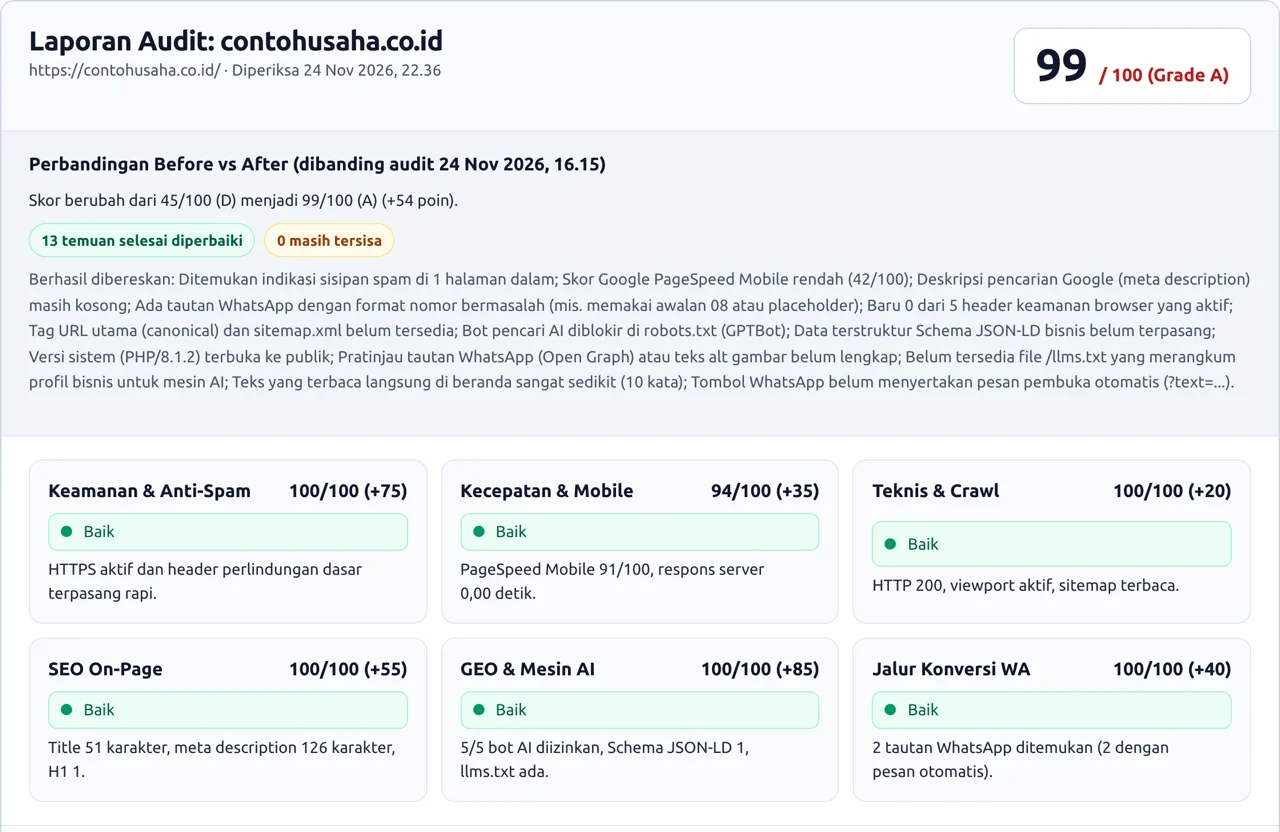
Source: Wanoh Digital (sample Before vs After report view on simulated domain contohusaha.co.id). License: CC BY 4.0.
What is the 7-day sequence from initial check to Before vs After verification?
The fastest workflow runs in three steps across seven days: take a passive baseline scan on day one to list critical issues, fix security headers and WhatsApp links first between days two and five, and run a matching re-audit on day six or seven to verify Before vs After score gains [9, 12].
This schedule keeps day-to-day store or office operations uninterrupted:
- Day 1 (Baseline Scan): Run a 6-pillar passive audit across the homepage and up to
4key inner pages (services, pricing, and contact), then export the A4 PDF as your baseline record [12]. - Days 2 to 3 (Security & WhatsApp Priorities): Clean up any inner-page spam signals immediately, configure all five OWASP security headers, hide
PHPand CMS version strings, and fixwa.me/628...links with prefilled?text=messages [2, 8]. - Days 4 to 5 (Mobile Speed, SEO & Structured Data): Compress oversized images toward
LCPunder2.5seconds andCLSunder0.1, enforce one<h1>and uniquemeta descriptionper page, add Open Graph tags, updaterobots.txt(allowing roughly24hours for OpenAI search crawler rules to update), and publishLocalBusinessJSON-LD [3, 5] [7, 9]. - Days 6 to 7 (Before vs After Re-Audit): Re-scan the same domain to confirm critical flags turned green before paying final vendor milestones or starting Google Ads [12]. Afterward, as a practical rule of thumb, re-check every
1to3months or right after major theme and plugin updates.
Use the interactive 12-point checklist and calculator below to track readiness and copy action notes directly for your developer:
6-Pillar Business Website Audit Checklist
Tick the items you have verified below, or click Copy Checklist to share them with your team or web developer.
6-Pillar Website Audit Checklist & Ad Cost-per-Chat Simulator
Tick the checks you have verified on your site, then enter your own ad budget and conversion assumptions to calculate cost per WhatsApp chat.
6-pillar checklist readiness: 0 of 12 items completed
Estimated monthly ad clicks: 800 clicks (budget Rp 2,000,000 at CPC Rp 2,500)
Before fixes (1.5% click-to-chat): 12 chats/month (Rp 166,667 per chat)
After fixes (3.0% click-to-chat): 24 chats/month (Rp 83,333 per chat, +12 chats/month)
To check your own site externally before turning on ads or signing off on a build, start with Wanoh Digital Free Website Check for a quick public homepage readout, or run Audit Website Pro (6 Pillars) from Rp 10,000 per credit via QRIS (or Rp 25,000 for 3 credits covering Before vs After checks, with no monthly subscription and automatic credit refunds if a target server fails to respond).
Once your report is ready, if you want help fixing technical findings or maintaining the site monthly, message Harry Agustiana on WhatsApp for a free Listen session and written recommendations before deciding on cleanup or ongoing care.
Frequently Asked Questions (FAQ)
Does a 6-pillar website audit require WordPress admin or cPanel passwords?
How does a free homepage check differ from a 6-pillar A4 PDF audit report?
The free homepage check (up to 3 domains per day) summarizes baseline homepage health on screen [13]. Audit Website Pro expands inspection across up to 4 inner pages, pulls mobile Google PageSpeed metrics, catches broken WhatsApp links and 5 AI bot rules, builds a printable A4 PDF, and tracks Before vs After score changes [12].
Which problems cannot be detected by an external passive website audit?
Passive audits cannot inspect hidden server files that are not exposed on public pages, admin password strength, or vulnerabilities inside plugins only active after login. If a site already suffers forced redirects or internal malware compromises, direct hosting file and database inspection is still required [12].
When is the best time to run a re-audit before launching Google Ads?
How should a business use a 3-credit audit pack in one improvement cycle?
Brief technical notes for your IT lead or vendor
If your audit flags missing security headers, unseparated AI bot policies, or missing local schema markup, pass these three baseline snippets to your developer or server administrator to adapt for your stack:
# Sample 5 core HTTP security headers (Nginx) per OWASP guidance [2]
add_header Strict-Transport-Security "max-age=31536000; includeSubDomains" always;
add_header X-Content-Type-Options "nosniff" always;
add_header X-Frame-Options "SAMEORIGIN" always;
add_header Referrer-Policy "strict-origin-when-cross-origin" always;
# Adjust Content-Security-Policy for your site's own script and media origins
add_header Content-Security-Policy "default-src 'self'; object-src 'none'; frame-ancestors 'self';" always;
# Sample separation of AI search vs training crawlers in robots.txt [9]
User-agent: OAI-SearchBot
Allow: /
User-agent: GPTBot
Disallow: /
# Replace with your site's full sitemap.xml URL{
"@context": "https://schema.org",
"@type": "LocalBusiness",
"name": "Your Business Name",
"url": "https://example.com",
"telephone": "+62-812-0000-0000",
"address": {
"@type": "PostalAddress",
"streetAddress": "Full Business Address",
"addressLocality": "Bandung",
"addressRegion": "West Java",
"addressCountry": "ID"
}
}References
Verified Sources & References (13 Sources)Show References
- Wanoh Digital. "60 Bandung SME Websites Passive Security Study 2026 (Public Dataset CC BY 4.0)." Wanoh Digital, 2026-11-21. https://wanohdigital.biz.id/en/riset-umkm-bandung-2026 (accessed 2026-11-26).
- OWASP Foundation. "HTTP Headers Cheat Sheet." OWASP Cheat Sheet Series, 2026. https://cheatsheetseries.owasp.org/cheatsheets/HTTP_Headers_Cheat_Sheet.html (accessed 2026-11-26).
- Google web.dev. "Web Vitals." web.dev Articles, 2024. https://web.dev/articles/vitals (accessed 2026-11-26).
- Google for Developers. "About PageSpeed Insights." Google PageSpeed Insights Documentation, 2024-10-21. https://developers.google.com/speed/docs/insights/v5/about (accessed 2026-11-26).
- Google Search Central. "SEO Starter Guide: The Basics." Google for Developers, 2025-12-10. https://developers.google.com/search/docs/fundamentals/seo-starter-guide (accessed 2026-11-26).
- Google Search Central. "What Is a Sitemap." Google for Developers, 2026. https://developers.google.com/search/docs/crawling-indexing/sitemaps/overview (accessed 2026-11-26).
- Google Search Central. "Local Business (LocalBusiness) Structured Data." Google for Developers, 2026-09-08. https://developers.google.com/search/docs/appearance/structured-data/local-business (accessed 2026-11-26).
- WhatsApp Help Center. "How to use click to chat." WhatsApp FAQ, 2026. https://faq.whatsapp.com/5913398998672934 (accessed 2026-11-26).
- OpenAI. "Overview of OpenAI Crawlers." OpenAI Developer Documentation, 2026. https://developers.openai.com/api/docs/bots (accessed 2026-11-26).
- Answer.AI / llms-txt. "The /llms.txt file, v2." llms-txt, 2026. https://llmstxt.org/ (accessed 2026-11-26).
- Google Search Central. "What can you actually put in a robots.txt?" Google Search Central Official YouTube Channel, 2026-10-23. https://www.youtube.com/watch?v=kUAJOvuyZdk (accessed 2026-11-26).
- Wanoh Digital. "Audit Website Pro: Security, PageSpeed, SEO & GEO AI." Wanoh Digital, 2026-11-24. https://wanohdigital.biz.id/en/cek-website/pro (accessed 2026-11-26).
- Wanoh Digital. "Free Website Check: Security, Speed & SEO." Wanoh Digital, 2026-11-23. https://wanohdigital.biz.id/en/cek-website (accessed 2026-11-26).