Summary Optimizing your Google Business Profile to rank at the top of the 3-pack local map (Local Pack) centers on complete verified business identity, accurate categories, real location photos, and replying to customer reviews [1, 2]. These updates take effect right when nearby buyers search your service name in Google Search or the Google Maps app [1]. Referring to official Google Business Profile Help guidance on How to improve your local ranking on Google, display order is determined by three primary factors: relevance, distance, and prominence [1]. This 30-minute audit guide is written for storefront owners, restaurants, clinics, repair shops, and mobile service providers in Micro, Small, and Medium Enterprises (MSMEs). The hard boundary remains clear: nobody can buy a top organic spot on the local map, and the searcher's physical distance from your shop is outside any business owner's control [1].
Many business owners still search for the old name Google Bisnisku or Google My Business optimization, even though the free service is now officially called Google Business Profile and is managed directly inside Google Search results or the Google Maps app [10]. The first misconception that trips owners up is stuffing city keywords, cheap pricing claims, or opening hours into the Business Name field (like writing "Bengkel AC Mobil Bandung Murah Buka 24 Jam") hoping to jump to the top of the map [2]. Google's official business representation guidelines prohibit adding marketing descriptors outside the real storefront name, meaning keyword-stuffed names risk getting the profile suspended [2].
A second misconception is trusting third-party offers that promise permanent #1 Google Maps rankings or sell fake five-star reviews. Google states openly that no business can request or pay for better local ranking, while fake engagement and offering incentives for reviews are strictly banned under Maps contribution policies [1, 8]. This guide walks through practical steps to get your shop listed safely on Google Maps, when a map profile alone is enough, and when your business needs an official website backing it up.
Table of Contents
- Why does a competitor appear in the Google Maps top 3 while your business does not?
- Step 1: How do you verify and align your name, address, and phone so your profile is public?
- Step 2: How do you pick the primary category and write a description without keyword spam?
- Step 3: What real-photo routine and safe review collection habits should you use?
- When does a Google Maps profile need an official website to beat local competitors?
- What is a 15-minute monthly evaluation checklist for business owners?
- Short technical notes for your website manager
- Frequently asked questions (FAQ)
- References
Why does a competitor appear in the Google Maps top 3 while your business does not?
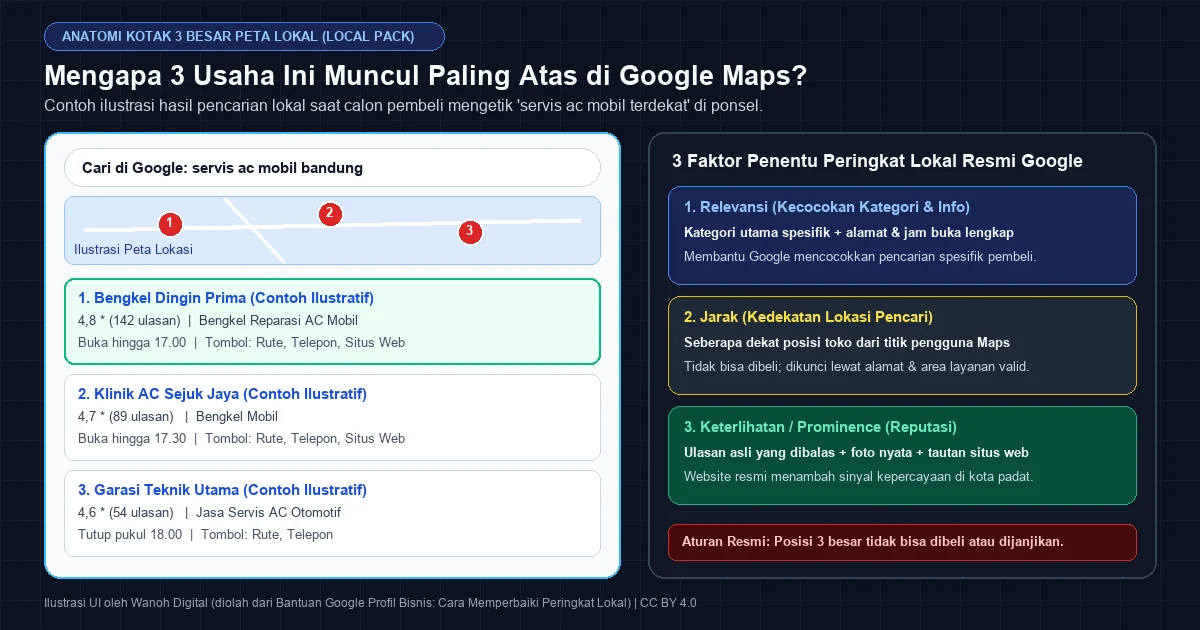
A nearby competitor shows up first in the top 3 local map pack (Local Pack) because Google's system scores their profile higher across three official signals when a query is typed: relevance to the search, proximity to the searcher, and public prominence [1]. When one profile is fully verified and actively maintained while another sits incomplete, Google prioritizes the profile whose data gives users stronger confidence [1].
As summarized in the anatomy diagram above, here is how Google's three official local ranking factors shape your Google Business Profile optimization results [1]:
- Relevance: Measures how closely your business profile matches what the buyer searches for. Filling out your full address, operating hours including holiday hours, facility attributes like parking or cashless payment, and service descriptions helps Google match your shop to specific queries [1].
- Distance: Measures how far your business is from the location term used in a search (or the searcher's current position) [1]. You cannot shift physical distance, yet accurate map pins and service-area boundaries ensure your business appears within the right radius [2].
- Prominence: Reflects how well known and trusted your business is both offline and online. Google notes this factor is shaped by profile completeness, review counts and positive star ratings, helpful owner replies, and how many websites across the web link to your business [1].
To watch Google's own explanation of how these three factors interact, view the short official video below:
To quantify the revenue effect on a shop without spending on click ads, look at an illustrative scenario for a local repair workshop whose Google Maps profile receives 2,000 search views per month:
- Initial State (Incomplete Profile, Assumed 2% Tap Rate in Illustrative Scenario): Out of 2,000 searchers seeing a map card with uncertain hours and sparse photos, only 2% or 40 potential customers tap Call or Directions. If in this illustrative scenario 25% become paying customers at an average remaining contribution margin before operating costs and tax of Rp 150.000 per repair, the profile yields 10 deals worth Rp 1.500.000 per month.
- After 3-Step Optimization (Assumed 5% Tap Rate in Illustrative Scenario): With the same 2,000 monthly views on a profile featuring a specific category, real shop photos, and dozens of politely answered reviews, raising the tap rate to 5% brings in 100 potential customers. At the same 25% closing rate and Rp 150.000 margin in this illustrative scenario, you earn 25 deals worth Rp 3.750.000 per month, or an extra 60 new contacts and Rp 2.250.000 in monthly contribution margin with zero extra ad budget.
Step 1: How do you verify and align your name, address, and phone so your profile is public?
The first step to appearing safely on the map is completing the official verification method chosen by Google's system and matching your Name, Address, Phone (NAP) identically to the physical signboard at your location [2, 3]. Without full verified status, edits to your address, shop photos, or operating hours will not show freely to buyers on Google Maps [3, 7].
Under official Google Business Profile verification guidelines, verification methods are assigned automatically based on business type, region, and public business information, and cannot be picked manually at will [3]. Today, most new registrations and address changes require live video recording verification from a mobile phone with strict requirements [3, 4]:
- Duration and recording format: The video must be recorded live through the mobile app (not uploaded from old gallery clips), run at least 30 seconds, and stay continuous without cuts or editing [4].
- Visual proof for physical stores: Show street signs or nearby buildings to confirm location, capture permanent storefront signage outside, and continue with management proof such as unlocking the front door or showing the cashier counter and work equipment [4].
- System review time: After submitting the recording or code, Google verification checks typically take up to 5 business days [3]. If a physical postcard option appears, delivery takes about 14 days with a 30-day code validity window, and owners must not edit the name, address, or category while waiting for the card [3]. If phone or
SMSverification is offered, ensure the line does not route through an automated answering machine or Interactive Voice Response (IVR) menu because the verification code will not come through [3].
Why is Google Business Profile not publicly visible even after creation?
Complaints about why a Google Business Profile is not publicly visible almost always stem from four administrative conditions noted in Google's official documentation, ranging from pending verification to automated suspension over guideline violations [2, 3]:
- Verification Still Pending or Re-Verification Triggered: Newly submitted details are still in the review queue for up to 5 business days, or an owner recently edited the name, category, or address, prompting Google to trigger re-verification before reopening the profile publicly [3].
- Duplicate Profiles at the Same Address: Google guidelines permit only one profile per physical business location; duplicate listings created by former owners or different staff often cause new profiles to be hidden or merged automatically [2].
- Business Name or Category Formatting Violations: As an official example in Google's business representation guidelines, a profile name like "Kedai Kopi Sonya" must match the physical storefront sign and business cards word for word, without branch codes like "SiCepat - 2872", promotional taglines, all-caps lettering, or hours like "Open 24 Hours" inside the name field [2].
- Profile Suspended or Disabled: If a profile is suspended, Google strictly forbids creating a new listing for the same business and gives one initial appeal opportunity through the official appeal tool [5]. For high reinstatement odds, prepare documents showing the exact same name and address, such as official business registration certificates, business licenses, tax records, or electricity, water, phone, and internet bills in the business name [5].
Step 2: How do you pick the primary category and write a description without keyword spam?
To satisfy relevance without triggering automated penalties, choose one most specific primary category describing your core business from Google's standard list, then write a natural business description covering your services and coverage area without promo prices or website links [2, 6]. Clean categories and descriptions help Google match your exact services while protecting your profile from automated restrictions [2, 6].
Under Google's official category management guide, business owners cannot type custom category names and must pick the most specific option available [6]. Using Google's own examples, pick "Nail salon" rather than just "Salon", or pick "Pizza restaurant" so your profile is eligible when people search for "Restaurant", "Italian restaurant", or "Pizza" [6]. Add secondary categories sparingly only when the shop genuinely operates extra service units under the same ownership (like a grocery store with its own in-house bakery), and avoid adding a category for every individual item sold [6]. Accurate category selection also unlocks helpful features like restaurant menu links or retail product listings on your Maps card [6].
The compliance boundary table below summarizes what you should optimize and what is strictly banned because it triggers profile suspension:
| Profile Component | Allowed & Recommended (Safe & Relevant) | Prohibited & Suspension Risk | Official Policy Basis |
|---|---|---|---|
| 1. Business Name | Write the real business name matching storefront signs, receipts, and website (e.g., Kedai Kopi Sonya) | Adding city keywords, "cheap", hours, all-caps text, ad taglines, or store branch codes | Google Business Name Guidelines [2] |
| 2. Business Categories | Use 1 most specific primary category (e.g., "Nail salon") + core secondary categories only as needed | Stuffing irrelevant categories or adding categories belonging to separate booth tenants | Business Category Guidelines [6] |
| 3. Business Description | Explain core services, team expertise, brief background, and areas served in natural language | Including discount promos or pricing (e.g., "Everything on sale, -50%") or placing any URLs/links | Google Business Description Policy [2] |
| 4. Address & Service Area | Signed storefronts use full street address; mobile/on-call services hide home address & set Service Areas | Pinning empty virtual offices or faking physical shop addresses to reach neighboring districts | Storefront vs Service-Area Rules [4] |
| 5. Customer Reviews | Ask for honest reviews after service completion via cashier QR or link, and reply to every review | Buying fake reviews, trading reviews among merchants, or offering discounts conditional on 5 stars | Maps Fake Engagement Policy [8] |
Step 3: What real-photo routine and safe review collection habits should you use?
Once your profile is verified and categorized cleanly, upload real location photos at least 720 x 720 pixels regularly without heavy filters [7], and build an organic review rhythm by inviting honest feedback from customers right after service without conditional rewards [8]. Both visual and social signals boost map click appeal while raising profile prominence [1, 7].
Under official Google Business Profile media standards, uploaded photos and videos appear publicly only after the business is verified [7]. Make sure phone-captured photos follow these official technical specifications [7]:
- File formats and size: Use
JPGorPNGfiles between 10 KB and 5 MB, with a recommended resolution of 720 x 720 pixels (minimum 250 x 250 pixels) so images stay sharp on buyer phones [7]. If uploading shop intro or service clips, keep duration under 30 seconds, resolution at 720p or higher, and file size under 75 MB [7]. - Visual honesty: Photos must be well lit, in focus, and show the actual exterior building (helping visitors spot your shop on arrival), interior service areas, and real products without heavy manipulation or generic stock images [7].

Source: Rhett Noonan, Wikimedia Commons / Unsplash, https://commons.wikimedia.org/wiki/File:The_Bakery_%28Unsplash%29.jpg. License: CC0 1.0.
The bakery display photo above shows authentic product photography in natural light, giving buyers an honest view of cleanliness and product variety. On the review side, train cashiers or WhatsApp admins to share the direct review link right after transactions finish, and set aside time to reply politely to both praise and complaints because helpful owner responses are noticed by future customers and Google's ranking system alike [1]. See full message scripts and cashier card layout rules in our guide on how SMEs can request Google reviews without breaking rules.
When does a Google Maps profile need an official website to beat local competitors?
A Google Maps profile alone is enough if your business operates in a low-competition neighborhood or sells one routine service decided quickly by phone, but you need an official website backing it up when competing in crowded city categories or offering multiple technical services [1, 3]. An official website works behind the scenes to strengthen prominence signals while answering service details that do not fit on a map card [1].
There are three concrete reasons why linking an official website to your Google Business Profile makes a measurable difference when dozens of rivals compete for the top three spots:
- Strengthens Prominence Signals and Web Links: Google's local ranking guide states explicitly that prominence is built from information about a business across the web as well as the number of links pointing to your business [1]. Profiles backed by their own website are easier for local directories, news outlets, and partner articles to cite and link to compared with accounts relying solely on a social media page [1].
- Faster Verification Support and Service Credibility: Google Business Profile Help notes that a business website verified by the owner in Google Search Console (GSC) can help the system verify eligible profiles more quickly [3]. Moreover, map visitors who want to inspect full price lists, practice licenses, or past project portfolios can review those details directly before sending a WhatsApp message.
- Captures Multi-Service Organic Search: A single Google Maps card relies on a handful of preset categories, whereas an official website lets you build dedicated pages per service so you also appear in regular Google search results right below the map pack. If you are still weighing when to build this independent asset, read our cost-benefit comparison on when a business needs its own website vs social media or marketplaces and cost components in our guide to website build costs and overlooked expenses.
In our field experience supporting local service businesses in Bandung, map profiles linked to fast mobile service pages with matching office addresses on the contact page consistently bring in inquiries from buyers who are far more ready to buy than profiles with blank website fields or slow links.
What is a 15-minute monthly evaluation checklist for business owners?
After completing your 30-minute initial setup on day one, protect your Google Maps visibility with a routine 15-minute check at the start of each month so your profile stays active, free of unwanted public edits, and smoothly linked to booking channels [1, 10]. Steady upkeep is far safer than trying to rebuild a profile after reviews or rankings have already slipped.
Split your monthly checkup into three five-minute blocks as a practical store routine:
- First 5 Minutes (Check Auto-Update Alerts & Holiday Hours): Open your Business Profile in Google Search or Maps, verify there are no inaccurate public edits to hours or pin location, and set special hours ahead of public holidays that month [1, 10]. Also watch for automated confirmation calls,
SMS, or WhatsApp messages from Google to your verified number so business details stay accurate [10]. - Second 5 Minutes (Reply to New Reviews & Upload Fresh Photos): Answer all new reviews received over the past month, then upload at least 2 to 3 fresh photos above 720 x 720 pixels showing new stock, real service work, or clean waiting areas [1, 7].
- Third 5 Minutes (Test Call, WhatsApp, and Website Buttons): Tap the Call button and Website link on your Google Maps listing over mobile cellular data to make sure the phone is answered promptly and the destination page opens cleanly without errors.
Save, print, or copy the 7-point checklist table below as a standard monthly review guide for your business:
| Audit Check Item | Google Standard Pass Criteria | Quick Check Method | Target Status |
|---|---|---|---|
| 1. Verification & Duplicate Status | Profile fully verified, zero suspension flags, only 1 profile per location [2, 3] | Search shop name on Maps; check manager account status | Must Pass |
| 2. Name, Address, & Phone Consistency | Real name matching signboard without extra keywords/hours; identical address & phone everywhere [2] | Compare profile name against storefront photo & website | Must Pass |
| 3. Specific Category & Clean Description | Most specific primary category from official list; description free of promos & URLs [2, 6] | Open Edit Profile and inspect Category & Description fields | Must Pass |
| 4. Regular & Holiday Hours | Accurate daily hours and special holiday schedules entered [1] | Check against national holidays for the current month | Updated Monthly |
| 5. Real Photos >= 720 x 720 Pixels | At least exterior storefront, interior, & product photos in JPG/PNG 10 KB to 5 MB [7] | Open Photos tab and add well-lit shots without heavy filters | At Least 2/Month |
| 6. Authentic Review Pace & Replies | Reviews arrive naturally without discount incentives and all reviews receive polite replies [1, 8] | Check Reviews tab and ensure zero unanswered comments | 100% Replied |
| 7. Synced Official Website Link | Active site URL, fast on mobile, and displays matching address details [1, 9] | Tap Website button on Maps using mobile data | Active & Linked |
Copy this concise checklist to your store operations notes or use the interactive audit calculator below to score your readiness and simulate potential monthly local customers:
7-Point Google Business Profile Optimization Checklist (30-Min Setup + 15-Min Monthly)
Check off each verified item below, or click Copy Checklist to send it to your team or website provider.
7-Point Audit Tool & Google Business Profile Impact Simulator
Check off the 7 monthly inspection items below to score your current profile readiness, then adjust monthly search view counts to model an illustrative scenario of potential local map customers.
Google Business Profile Audit Score: 2/7 items completed
Unchecked items:
- 3. Specific primary category & clean description
- 4. Regular & actual holiday hours
- 5. At least 5 real photos at >= 720x720 px
- 6. Authentic review pace & routine replies
- 7. Active, fast, & synced official website link
Illustrative scenario (2,000 views/mo): rises from 40 contacts (10 deals, Rp 1.500.000) to 100 contacts (25 deals, Rp 3.750.000), or +60 contacts (+Rp 2.250.000/month contribution margin).
Note: Figures above represent an illustrative scenario based on your profile view inputs and closing rate assumptions. Actual local ranking and contact growth on Google Maps remain influenced by searcher distance and local competition intensity in your city.
If you already linked a business website URL in your Google Business Profile but are unsure whether the page loads fast enough on buyer phones and stays free of configuration flaws, you can use Wanoh Digital's 24-Hour Free Website Check (manual check limited to 10 sites per week without asking for admin passwords, with a fix summary sent to WhatsApp). To see real projects we built to align with local maps and convert customer inquiries, inspect Wanoh Digital website and app examples and Wanoh Digital pricing and workflow details, or contact us directly during our free Listen via WhatsApp stage at +62 851 8323 1708.
Short technical notes for your website manager
If your business already works with a web developer or internal site manager, pass along these two technical settings so the website link in Google Business Profile sends clear location signals to search crawlers:
LocalBusinessStructured Data Markup (JSON-LD): Referring to Google Search Central documentation on Local Business Structured Data, adding a JavaScript Object Notation for Linked Data (JSON-LD) script typedLocalBusiness(or a specific subtype such asAutoRepair,Bakery, orDentist) on your contact or home page helps Google programmatically verify opening hours, coordinates, and official business phone numbers [9].- Search Console Verification Alignment & Tracking Parameters: Register your business domain in Google Search Console (GSC) under the same Google Account as your Business Profile primary owner, as Google verification documentation notes that alignment supports site trust [3]. Append a clean tracking parameter like
?utm_source=google&utm_medium=organic&utm_campaign=gbpto your Business Profile website URL so visits from the Google Maps button are tracked separately in analytics reports.
Sample static LocalBusiness structured data snippet ready for your web developer to customize [9]:
<script type="application/ld+json">
{
  "@context": "https://schema.org",
  "@type": "AutoRepair",
  "name": "Bengkel Dingin Prima",
  "url": "bengkeldinginprima.co.id",
  "telephone": "+62-22-5550192",
  "address": {
    "@type": "PostalAddress",
    "streetAddress": "Jl. Soekarno Hatta No. 120",
    "addressLocality": "Bandung",
    "addressRegion": "Jawa Barat",
    "postalCode": "40223",
    "addressCountry": "ID"
  },
  "openingHoursSpecification": [
    {
      "@type": "OpeningHoursSpecification",
      "dayOfWeek": ["Monday", "Tuesday", "Wednesday", "Thursday", "Friday", "Saturday"],
      "opens": "08:30",
      "closes": "17:00"
    }
  ]
}
</script>
Frequently asked questions (FAQ)
Does Google charge a monthly fee to optimize Google Business Profile?
No, creating and managing a Google Business Profile, including editing details, uploading photos, and replying to reviews, is provided free with no monthly subscription from Google [1, 10]. Google also states that advertisers and business owners cannot pay to improve organic local rankings on Google Maps unless you choose to run separate paid campaigns in Google Ads [1].
How long does it take for a store to appear on Google Maps after verification?
According to official Google Business Profile verification guidelines, verification reviews generally take up to 5 business days after you finish recording your verification video or entering a code [3]. For physical postcards when offered, delivery takes around 14 days before the 5-digit code can be entered [3].
Can you register a home-based business without a storefront sign on Google Maps?
Yes, as long as you choose the right business setup following physical-location versus service-area business rules [2, 4]. If your home does not accept open walk-in customers and has no permanent signage visible from the street, hide the street address from public view, set Service Areas by city or district where you visit clients, and prepare tools and business permits for video verification [2, 4].
Why does the cover photo I picked not always appear first on Google Maps?
Official Google Business Profile photo management documentation states directly that uploading a cover photo is good practice to represent your business, but in some cases does not guarantee that specific photo will always be chosen by the system as the first image shown to users [7]. Maps algorithms may display another owner or customer-contributed photo judged most relevant to the search query at that moment [1, 7].
References
Verified Sources & References (10 Sources)Show References
- Google Business Profile Help. "How to improve your local ranking on Google." Google Business Profile Help, 12 March 2026. https://support.google.com/business/answer/7091?hl=id (accessed 13 November 2026).
- Google Business Profile Help. "Guidelines for representing your business on Google." Google Business Profile Help, 20 February 2026. https://support.google.com/business/answer/3038177?hl=id (accessed 13 November 2026).
- Google Business Profile Help. "Verify your business on Google." Google Business Profile Help, 18 January 2026. https://support.google.com/business/answer/7107242?hl=id (accessed 13 November 2026).
- Google Business Profile Help. "Verify your business with a video recording." Google Business Profile Help, 05 March 2026. https://support.google.com/business/answer/14271705?hl=id (accessed 13 November 2026).
- Google Business Profile Help. "Fix suspended or disabled profiles." Google Business Profile Help, 10 February 2026. https://support.google.com/business/answer/4569145?hl=id (accessed 13 November 2026).
- Google Business Profile Help. "Manage business categories." Google Business Profile Help, 22 January 2026. https://support.google.com/business/answer/7249669?hl=id (accessed 13 November 2026).
- Google Business Profile Help. "Manage photos & videos for your Business Profile." Google Business Profile Help, 14 February 2026. https://support.google.com/business/answer/6103862?hl=id (accessed 13 November 2026).
- Google Maps User Contributed Content Policy Help. "Prohibited & restricted content." Google Help, 02 March 2026. https://support.google.com/contributionpolicy/answer/7400114?hl=id (accessed 13 November 2026).
- Google Search Central. "Local Business Structured Data (LocalBusiness)." Google for Developers, 10 February 2026. https://developers.google.com/search/docs/appearance/structured-data/local-business?hl=id (accessed 13 November 2026).
- Google Business Profile Help. "Edit your Business Profile." Google Business Profile Help, 25 February 2026. https://support.google.com/business/answer/3039617?hl=id (accessed 13 November 2026).