Summary: Going through Google Business Profile registration from filling out the form to recording the verification video really can be done in 10 minutes, yet your store pin does not go live that very minute. Official Google documentation states that businesses must pass verification first before appearing on Google Search and Google Maps, with video review taking up to 5 business days [1, 2, 3]. To get your 10-minute registration approved on the first try without a suspend, pick the honest location mode (a storefront with permanent signage or a service-area business for home-based operations), enter your exact business name from the physical sign without promo tags, and capture all three mandatory proofs in one continuous video [3, 4].
Many Micro, Small, and Medium Enterprise (SME) owners and nonprofit managers run into the same problem: they spend time registering on Google Maps, yet their pin never appears or their verification video gets rejected repeatedly [3, 5]. Others go live for a few days, only to receive a notice that their business profile was suspended [5]. This guide walks through the official Google rules that quick tutorials often skip, breaks down the 10-minute prep routine on site, shows a one-take video script, and includes a compliance checker so your business stays visible to local buyers.
Table of Contents
- Why does registration take only 10 minutes, yet so many SMEs fail to appear on Google Maps?
- Which path should you choose: Storefront, Home-Based Service, or Hybrid?
- What is the 10-minute plan to prepare and shoot a verification video that passes on the first try?
- How do you test whether your profile name and description are safe from suspension?
- Frequently Asked Questions
- Technical Notes
- References
Why does registration take only 10 minutes, yet so many SMEs fail to appear on Google Maps?
Entering your details and shooting the Google Business Profile verification video takes roughly 10 minutes, but your listing appears publicly only after passing Google's verification review, which takes up to 5 business days [1, 3]. Failing to show up on Google Maps rarely happens because the form is hard; it happens when the location mode chosen in the form disagrees with the physical sign and what is shown in the uploaded video [3, 4].
Structurally, the Ministry of SMEs Single Data Information System (SIDT) as of December 31, 2025 recorded that out of 30,209,069 non-agricultural SME units in Indonesia, 30,119,928 units (99.70%) are Micro Enterprises concentrated in retail trade (14.44 million units) and culinary services (6.41 million units) [6]. At that micro scale, millions of owners run operations from a home residence, family kitchen, or small kiosk without permanent roadside signage.
At the same time, having a verified pin on Google Maps has become crucial for local discovery in the Artificial Intelligence (AI) era. The 2026 e-Conomy Southeast Asia (SEA) report noted that in a July 2026 consumer survey of 9,006 AI users across six major Southeast Asian markets including Indonesia, 69% of respondents used AI to compare options, yet still verified business credibility via search engines and local maps before buying [7].
Similarly, a March 2025 Pew Research Center study observing 68,879 Google searches across 900 US adult respondents found that when AI summaries (AI Overviews) appeared on search pages, clicks to standard website articles fell from 15% to 8% [8]. Local searchers lean even more on Google Maps business cards showing opening hours, distance, and genuine customer reviews [2, 7].
Based on official Google Business Profile eligibility and naming guidelines, here are four registration mistakes that reject SME verifications in Indonesia most often [3, 4, 5]:
| Common Registration Mistake | Official Google Business Profile Rule | Impact on Verification & Profile Status | Rejected vs Official Accepted Examples [3, 4] |
|---|---|---|---|
| 1. Adding promo keywords, opening hours, phone numbers, or ALL-CAPS words to Business Name | Your name must match your real-world business name as shown on physical storefront signage and official documents [4]. | Verification video gets rejected because the profile name differs from the physical sign, or the profile is suspended [3, 4]. | Rejected: Pizza Hut Open 24 hours, SiCepat - 2872, Wardah Feel the Beauty, or full all-caps words [4]. Accepted: Pizza Hut, SiCepat, Subway, Wardah [4]. |
| 2. Registering a home-based business without permanent signage as a Storefront | If a business has no permanent outdoor sign at the location, it must be listed as a service-area business, not a physical storefront [3]. | Verification video is rejected with the reason "Business name is not visible on the building exterior" [3]. | Rejected: A residence without a sign choosing Storefront [3]. Accepted: Choosing Service-Area Business (hide street address) or installing permanent signage first [3]. |
| 3. Registering an online-only store (e-commerce with zero in-person service) | Brands operating strictly online with a virtual storefront and no in-person interaction are ineligible [3]. | The profile cannot pass verification or is removed from Google Maps [3, 4]. | Rejected: Pure dropship or marketplace shops with no direct customer contact [3]. Accepted: Storefronts, local visit/delivery services, or hybrid outlets [3]. |
| 4. Editing name, address, or category while status reads "Pending verification" or creating duplicate listings | Video review takes up to 5 business days; editing core info triggers re-verification and duplicate profiles are banned [3, 5]. | The review queue resets from scratch, or both listings get frozen for location duplication [3, 5]. | Rejected: Creating a new profile after the first one gets suspended [5]. Accepted: Waiting up to 5 business days or appealing through the official appeals tool [3, 5]. |
Which path should you choose: Storefront, Home-Based Service, or Hybrid?
Picking the right Google Business Profile path comes down to two simple questions: do customers visit your location in person during opening hours, and does that location have permanent signage on the building exterior [3, 4]? Answering both questions honestly in the first minute of setup is the surest way to keep Google's review team from rejecting your video [3].

Source: Eduard Militaru via Unsplash / Wikimedia Commons. License: CC0 1.0.
As seen in the storefront illustration above, Google tailors physical verification rules to how your business meets customers in the real world [3, 4]. Before opening business.google.com, match your store or organization to the profile mode matrix below [3, 4]:
| Operational Criteria & Physical Proof | Mode 1: Physical Storefront (Storefront) | Mode 2: Home / Mobile Dispatch (Service-Area Business) | Mode 3: Hybrid Business (Hybrid) |
|---|---|---|---|
| Who fits this mode best? | Eateries, coffee shops, repair workshops, grocery stores, clinics, barbershops, or nonprofit offices visited by residents [3, 4]. | Home catering, mobile AC technicians, cleaning crews, photographers, or home-based tailors with no storefront sign [3]. | Restaurants, bakeries, or laundry shops with a signed physical outlet that also deliver to customers [3]. |
| On-site signage requirement | Permanent signage is mandatory on the wall, window, or front post (never a temporary taped paper sheet) [3]. | No home signage required; show professional tools, branded vehicles, or official business permits instead [3]. | Permanent signage is mandatory at the physical outlet because the street address stays visible on the map [3]. |
| Address display setting on Google Maps | Display the full street address and place the map pin squarely on top of the shop building [3, 4]. | Hide the street address (do not expose your home address) and list districts/cities under Service Areas [3]. | Display the physical outlet's street address and also add delivery coverage under Service Areas [3]. |
| Business category focus | Pick the fewest categories that represent your core business (e.g., Coffee shop, rather than stuffing 10 categories) [4]. | Select specific service categories describing your mobile work (e.g., Caterer or Air conditioning repair service) [3, 4]. | Pick the primary category for your physical shop, then fill in delivery or pickup attributes [2, 4]. |
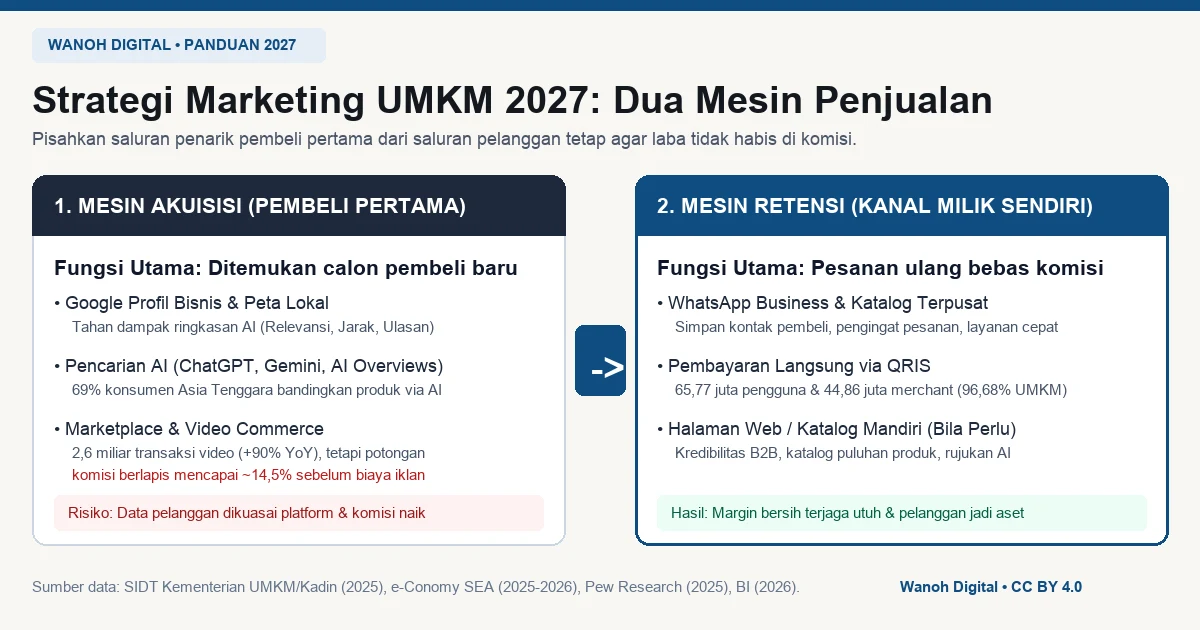
Picking the right mode from day one also aligns local search discovery with lowering customer acquisition costs, as we detail in SME Marketing Strategy 2027: Protecting Margins in the AI Search Era.
What is the 10-minute plan to prepare and shoot a verification video that passes on the first try?
As a practical rule from our work supporting SMEs and nonprofits since 2016, the best 10-minute routine is not rushing to hit record, but splitting your time into 8 minutes staging physical proof on site and 90 seconds shooting a single continuous one-take video. Official Google documentation states that verification videos must be recorded live inside the Google Business Profile phone interface, run at least 30 seconds, remain unedited, and never be uploaded from old phone gallery clips [3].
Review the second-by-second breakdown in Figure 1 below before walking outside with your phone camera [3]:
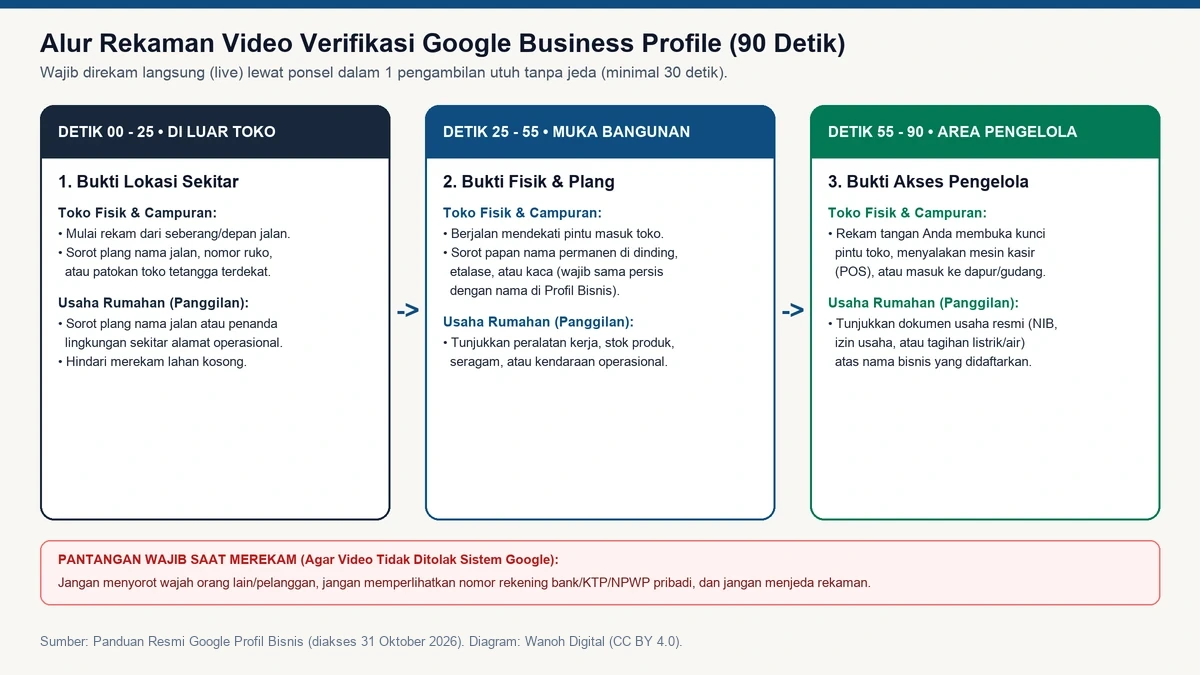
Source: Wanoh Digital (adapted from official Google Business Profile documentation). License: CC BY 4.0.
To make sure your recording hits all three required elements in Figure 1 for either a Storefront or a Service-Area Business (Home-Based), watch both official walkthroughs directly from the Google Business Profile YouTube channel below [3]:
If you operate from home or visit customer locations without permanent storefront signage, watch the second official example for a Service-Area Business below [3]:
To guide yourself or store staff cleanly through the 8-minute prep and 90-second filming sequence on site, use the two operational template cards below [3, 4]:
Template 1: 10-Minute Prep & Google Maps Video Verification Checklist
Template 2: 750-Character Business Description Draft (Compliant & AI-Search Ready)
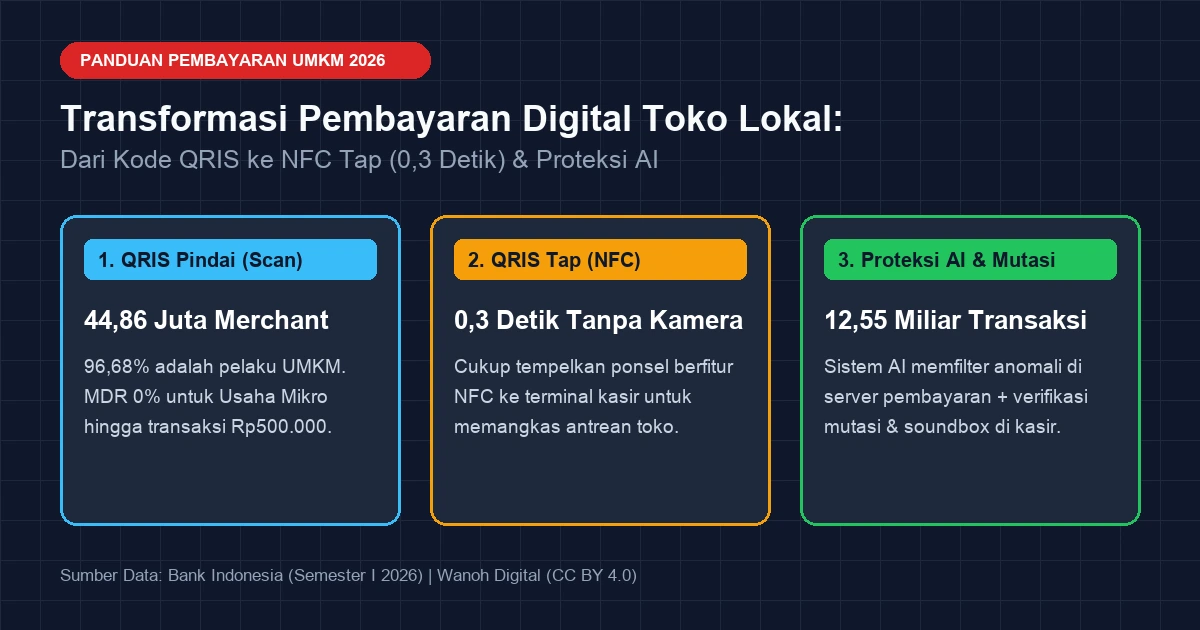
[Official Business Name] is a [primary business category, e.g., coffee shop / motorcycle workshop / social foundation] located on [Street/Area Name, District, City] serving customers since [Founding Year].[list 3-5 core products/services factually, e.g., routine engine tune-ups, official oil changes, and genuine spare parts] for [target customers, e.g., daily commuters and office fleets].When filming your cashier counter in the third stage of the verification video, make sure your cashless payment stand looks neat behind an acrylic holder, as noted in our guide on Indonesia's Digital Payment Shift: From QRIS to SME AI.
How do you test whether your profile name and description are safe from suspension?
Before hitting submit on your registration or saving profile edits, test your draft Business Name and Business Description against Google's prohibited-content rules and verify all three video proof points [3, 4]. That 2-minute self-check helps keep your profile from being rejected or suspended after going live [4, 5].
Use the interactive checker below by picking your business location mode and typing the draft name and description you plan to submit:
Google Business Profile Name, Description & Video Verification Readiness Checker
Test your draft Business Name and Description against official Google Business Profile rules before hitting verify so you avoid video rejection or profile suspension.
4. Checklist of 3 Mandatory Proofs for One-Take Video (At Least 30 Seconds):
*Methodology note: This automated checker tests for common naming, description, and location-eligibility violations listed in official Google Business Profile documentation. Final verification approval rests with Google's review (up to 5 business days).
Once your verification video is uploaded and the profile status switches to Pending verification (Being verified), follow these three safety rules during the 5-business-day review window and after going live on Google Maps [2, 3, 5]:
- Do not edit your Business Name, Address, or Primary Category during the 5-business-day review: Official Google documentation states that changing core business info can trigger a fresh verification request [3]. Let the review finish until you receive the official email confirming your business is verified [3].
- If suspended, never create a duplicate listing: Google's reinstatement rules strictly forbid creating a new Business Profile for the same business when an existing one is suspended [5]. Fix the underlying violation first (such as removing promo keywords from the name or hiding a home address without signage), then appeal via the Google Business Profile Appeals Tool attaching official business registration documents, permits, tax records, or business utility bills (electricity, phone, water, or internet) showing the exact same name and address [5].
- Build local rankings naturally through Relevance, Distance, and Prominence: Google's official local ranking guide states that Maps placement depends on three factors: relevance (how well your categories and profile info match the query), distance (how close you are to the searcher), and prominence (genuine customer reviews, average rating, real activity photos, and links to your official business website) [2]. If your store or nonprofit links an official website to its profile, keep that site free of injected spam links so domain trust stays intact, as explained in Website Looks Normal But Was Hacked? How to Check & Secure It.
If your verification video keeps getting rejected or you want to organize your business's local search presence cleanly, talk with us at no charge through Wanoh Digital Free Consultation. You can also browse Wanoh Digital website and app examples linked to Google Search and local maps, read our related guides on how to optimize Google Business Profile to reach the local top 3 and how to ask for Google reviews without breaking Google's rules, or use Wanoh Digital Build Services if you need an official catalog site aligned with your Google Maps pin.
Frequently Asked Questions
Why is my shop still not showing on Google Maps even though I finished registering 10 minutes ago?
The 10-minute setup only finishes entering your business details and uploading the verification recording, while public appearance on Google Maps waits for Google's verification review, which takes up to 5 business days [1, 3]. While status still shows Pending verification, the pin stays hidden from the public and you should avoid editing your name, address, or category so the review does not reset [3].
Can a home catering business or repair technician without a store sign register on Google Maps?
Yes, provided it is registered as a Service-Area Business rather than a physical storefront [3, 4]. Under official Google Business Profile guidelines, businesses without permanent exterior signage or that travel to deliver/serve at customer sites must hide their home street address, list service areas (districts or cities), and record work equipment and business permit documents in the verification video [3].
Is there any registration fee or paid official path to rank #1 on Google Maps right away?
No. Creating and managing a Google Business Profile is completely free, and official Google documentation states explicitly that there is no way to request or pay for higher local rankings on Google Maps or Google Search [2]. Organic ranking depends strictly on category relevance, distance from the searcher, and prominence including genuine customer reviews [2].
Technical Notes
This section is for Information Technology (IT) staff or web managers linking an official website URL to a Google Business Profile for an SME or nonprofit:
- Consistent Name, Address, Phone (NAP) Attributes &
LocalBusinessMarkup: Google Search combines signals across the web to evaluate local prominence [2]. Keep your official business name, street address, phone number, and opening hours on your website contact page identical to your Google Business Profile [2, 9]. - JSON-LD Structured Data Implementation (
Schema.org/LocalBusiness): EmbedLocalBusinessstructured data (or a specific subtype likeStore,Restaurant, orAutomotiveBusiness) from Schema.org using JavaScript Object Notation for Linked Data (JSON-LD) following World Wide Web Consortium (W3C) and Google Search Central documentation so search crawlers and AI assistants can verifyGeoCoordinatesand opening hours programmatically [9, 10, 11].
<!-- Sample LocalBusiness JSON-LD (Schema.org / W3C) to embed in your store website <head> -->
<script type="application/ld+json">
{
  "@context": "https://schema.org",
  "@type": "Store",
  "name": "Kedai Kopi Senja",
  "url": "https://example.com",
  "telephone": "+62-812-0000-0000",
  "priceRange": "Rp",
  "address": {
    "@type": "PostalAddress",
    "streetAddress": "Jl. Ir. H. Juanda No. 100, Lebakgede, Kec. Coblong",
    "addressLocality": "Bandung",
    "addressRegion": "Jawa Barat",
    "postalCode": "40132",
    "addressCountry": "ID"
  },
  "geo": {
    "@type": "GeoCoordinates",
    "latitude": -6.8898,
    "longitude": 107.6105
  },
  "openingHoursSpecification": [
    {
      "@type": "OpeningHoursSpecification",
      "dayOfWeek": ["Monday", "Tuesday", "Wednesday", "Thursday", "Friday", "Saturday"],
      "opens": "08:00",
      "closes": "21:00"
    }
  ]
}
</script>
References
Verified Sources & References (11 Sources)Show References
- Google. "Verify your business on Google." Google Business Profile Help, 31 October 2026. https://support.google.com/business/answer/7107242?hl=id (accessed 31 October 2026).
- Google. "Tips to improve your local ranking on Google." Google Business Profile Help, 31 October 2026. https://support.google.com/business/answer/7091?hl=id (accessed 31 October 2026).
- Google. "Verify your business with a video recording." Google Business Profile Help, 31 October 2026. https://support.google.com/business/answer/14271705?hl=id (accessed 31 October 2026).
- Google. "Guidelines for representing your business on Google." Google Business Profile Help, 31 October 2026. https://support.google.com/business/answer/3038177?hl=id (accessed 31 October 2026).
- Google. "Fix suspended or disabled profiles." Google Business Profile Help, 31 October 2026. https://support.google.com/business/answer/4569145?hl=id (accessed 31 October 2026).
- Indonesian Chamber of Commerce and Industry (Kadin) and Ministry of SMEs of the Republic of Indonesia. "Data dan Statistik UMKM Indonesia (Basis Data SIDT Kementerian UMKM per 31 Desember 2025)." Kadin Indonesia, 31 December 2025. https://kadin.id/data-dan-statistik/umkm-indonesia/ (accessed 31 October 2026).
- Google, Temasek, and Bain & Company. "e-Conomy SEA 2026 Report: Harnessing Southeast Asia's AI Advantage." Bain & Company, 21 October 2026. https://www.bain.com/insights/e-conomy-sea-2026/ (accessed 31 October 2026) (in English).
- Chapekis, Athena, et al. "Google users are less likely to click on links when an AI summary appears in the results." Pew Research Center, 22 July 2025. https://www.pewresearch.org/short-reads/2025/07/22/google-users-are-less-likely-to-click-on-links-when-an-ai-summary-appears-in-the-results/ (accessed 31 October 2026) (in English).
- Google Search Central. "Local Business (LocalBusiness) Structured Data Documentation." Google Developers, 31 October 2026. https://developers.google.com/search/docs/appearance/structured-data/local-business (accessed 31 October 2026) (in English).
- Schema.org. "LocalBusiness - Schema.org Type Specification." Schema.org, 31 October 2026. https://schema.org/LocalBusiness (accessed 31 October 2026) (in English).
- Sporny, Manu, et al. "JSON-LD 1.1: A JSON-based Serialization for Linked Data." World Wide Web Consortium (W3C) Recommendation, 16 July 2020. https://www.w3.org/TR/json-ld11/ (accessed 31 October 2026) (in English).