
Summary: Practicing compliant ways to ask for Google reviews is a key step to driving a free first-time buyer acquisition engine on Google Maps without burning cash on paid ads [1, 2]. Official Maps User Contributed Content Policy documentation allows business owners to invite reviews via short links, Quick Response (QR) codes at the checkout counter, printed receipts, or WhatsApp Business messages, provided there are no offers of discounts or free items and no steering of review content or star ratings [1, 3]. Throughout 2025, Google's Gemini Artificial Intelligence (AI) systems and analysts blocked or removed more than 292 million policy-violating reviews and can impose freezes on new reviews, hide all existing reviews, or place a public warning badge on Business Profiles caught engaging in Fake Engagement [4, 5].
In our earlier pillar guide on SME Marketing Strategy 2027: Protecting Margins in the AI Search Era, we broke down why separating new-buyer acquisition channels from owned repeat-transaction channels matters. Once your business pin is live through Register Google Business Profile in 10 Minutes: Pass Maps Verification, the next step in the Local Foundation Phase (scoring 4 to 6 points as our rule of thumb) is winning buyer trust when they compare your store against nearby competitors [2].
Many Micro, Small, and Medium Enterprise (SME) owners feel puzzled when their map pin appears on Maps yet review counts stay in single digits because satisfied customers simply forget to write one. To catch up quickly, some restaurant, cafe, salon, and repair shop owners feel tempted to post signs reading "Leave 5 stars for free iced tea" or give cashiers daily review quotas [1, 3]. This sub-topic article explains why those shortcuts jeopardize your business profile, then provides a safe four-touchpoint review request workflow integrated into your payment counter, product packaging, and WhatsApp Business [1, 3, 4].
Table of Contents
- Why do Google Maps reviews matter for businesses in 2027, and what are the risks of breaking the rules?
- How do you create an official review short link and QR code for your counter and WhatsApp?
- What do compliant WhatsApp (/ulasan) quick-reply scripts, counter QR stickers, and package cards look like?
- Why do genuine customer reviews sometimes not appear, and how should you reply and handle 1-star attacks?
- Frequently asked questions
- Technical notes
- References
Why do Google Maps reviews matter for businesses in 2027, and what are the risks of breaking the rules?
In the AI-assisted search era, genuine customer reviews on your Google Business Profile act as both a driver of local prominence and a primary trust check before consumers buy, with zero ad spend [2, 6]. However, requesting reviews by promising discounts, screening only happy customers, or pressuring buyers at the counter violates Google's Rating Manipulation policy and can get your store's entire review history hidden [1, 4].
On working capital efficiency, relying endlessly on marketplace ad wars grows harder for micro enterprises, which represent 99.70% of Indonesia's 30.21 million non-agricultural SMEs as of 31 December 2025 [7]. On platforms like Shopee Indonesia as of May 2026, combined category admin fees (2.50% to 10.00%), Free Shipping XTRA program fees (1% to 8%), and order processing fees (Rp1,250) can deduct around 14.5% in an illustrative Rp100,000 sale before advertising costs [8]. Even though the government opened applications for at least a 50% base service fee discount for local products as detailed in SME Marketplace Admin Fee Rules: 50% Discount & How to Claim, optional promotional programs and ads remain borne in full by sellers [8].
This is where Google Business Profile serves as a commission-free engine for bringing in first-time buyers. An observational study by Pew Research Center in March 2025 across 68,879 Google searches from 900 US adult respondents showed that when AI summaries (AI Overviews) appear, clicks to standard website links drop from 15% to 8% [9]. Meanwhile, the July 2026 consumer survey in the e-Conomy Southeast Asia (SEA) 2026 report across 9,006 AI users in six major Southeast Asian markets including Indonesia found that 69% of respondents use AI to compare products, yet still verify store credibility through search engines, local maps, and buyer reviews [6].
Official Google documentation confirms that local search rankings depend on three main factors: category match (relevance), physical proximity (distance), and reputation visibility (prominence) [2]. Within that prominence factor, genuine review count and average star score set similar shops apart in the same district, and Google states there is no way to request or pay for a better local ranking [2].
Source: Wanoh Digital (compiled from Google Maps Blog 16 April 2026 and Maps User Contributed Content Policies answer/7400114, answer/14114287, answer/16816815). License: CC BY 4.0.
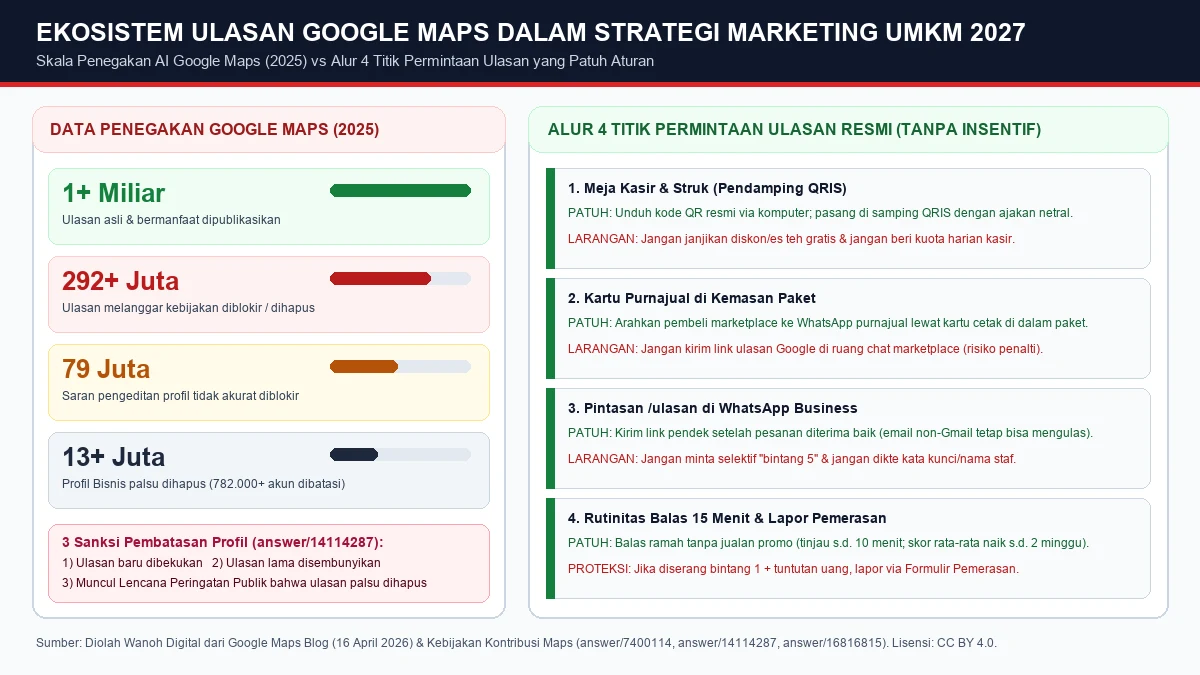
As summarized in Figure 1, the high business value of map reviews led Google to tighten automated enforcement using Gemini AI models [5]. Google Maps' official safety report on 16 April 2026 stated that in 2025 users contributed over 1 billion published reviews and 80 million business information edits [5]. Over that same 2025 period, Google's AI systems and analysts blocked or removed more than 292 million policy-violating reviews, blocked 79 million inaccurate profile edits, restricted posting privileges on over 782,000 violating accounts, and removed more than 13 million fake Business Profiles [5].
When Google's systems detect that a business owner has violated the Fake Engagement policy, Google does more than just delete the offending reviews [4]. Under official documentation on Business Profile restrictions for policy violations, Google can apply three direct penalties to your Business Profile [4]:
- Freeze on new reviews: Your Business Profile will be unable to receive new reviews or ratings from customers for a set period [4].
- Hiding existing reviews: All genuine reviews and ratings already collected on your Business Profile will stop displaying publicly for a set period [4].
- Consumer warning badge: Your Business Profile will display a public warning notice on Google Maps informing prospective buyers that fake reviews were recently removed from the profile [4].
To keep good-faith review collection from turning into a profile restriction penalty, review the four clear boundaries between prohibited practices under Rating Manipulation and Google-approved methods in the table below [1, 3, 10]:
| Maps Policy Rule Category | Strictly Prohibited by Google (answer/7400114) | Why Is It Dangerous for Your Store? | Official Google-Approved Protocol [1, 3, 10] |
|---|---|---|---|
| 1. Transactional Incentives and Rewards | Offering payment, discounts, coupons, or free goods and services in exchange for posting a review, editing a review, or deleting a negative review [1, 3, 10]. | Classified immediately as Fake Engagement and Rating Manipulation even if the customer experience was real [1, 3]. | Deliver friendly, consistent service to every buyer without making it a condition for trading reviews [1, 10]. |
| 2. Selective Solicitation (Review Gating) | Discouraging or prohibiting customers from leaving negative reviews, or selectively asking only happy customers (e.g., "If satisfied give 5 stars on Maps, if disappointed message WA instead") [1]. | Violates the selective solicitation ban under Rating Manipulation and strips natural credibility from your profile [1, 10]. | Use an open invitation asking for honest feedback on their real experience without mentioning specific star numbers [1, 10]. |
| 3. On-Site Pressure, Staff Quotas, and Content Dictation | Pressuring customers to write reviews while still on site, setting review count quotas for staff, or asking reviewers to include specific content such as naming staff members [1]. | Triggers bursts of similarly worded reviews from the same physical location, causing Google's AI spam filter to block them [1, 5]. | Display a voluntary QR code at the checkout counter and send a reminder link via WhatsApp after the transaction wraps up [1, 3]. |
| 4. Conflict of Interest and Promotional Content | Posting reviews from current or former employees, family members, consultants, multiple accounts owned by one person, or embedding phone numbers and website URLs inside review text [1]. | Reviews are permanently removed without reinstatement and the reviewer's Maps contribution features may be restricted [1, 11]. | Ensure reviews come solely from genuine customer Google Accounts and remind buyers not to include web links in their review text [1, 10]. |
How do you create an official review short link and QR code for your counter and WhatsApp?
Business owners with a verified Google Business Profile can immediately copy an official review short link and download a QR code image for free straight from the profile management dashboard without paying for third-party tools [3]. Note that generating and downloading the official review QR code is currently available only through a desktop browser and not yet on mobile devices, while the short link can be copied anytime for messaging [3].
Follow these official steps on your computer browser to grab both assets in under two minutes [3]:
- Sign in to your store-managing Google Account on a computer, then open Your Business Profile on Google Search [3].
- Select Read reviews, then click the Get more reviews button [3].
- To grab the text link for WhatsApp Business or digital receipts, click Copy [3].
- To save the printable official QR code image, right-click directly on the QR code displayed on your screen and choose Save image as... [3].

Source: Maliha Mannan via Unsplash / Wikimedia Commons. License: CC0 1.0.
Once your official short link and QR code image are saved, place them across the four touchpoints recommended by Google (answer/16816815) so they connect cleanly with your 2027 SME Marketing Strategy [3]:
- Touchpoint 1, Physical Checkout Counter & Receipts (Beside Your QRIS Stand): Print and display the review QR code in an acrylic stand at the cashier counter or waiting area, and print the short link at the bottom of payment receipts [3]. As covered in Indonesia's Digital Payment Transformation: From QRIS to SME AI, Indonesian customers are already used to scanning the Quick Response Code Indonesian Standard (QRIS), which carries a 0% Merchant Discount Rate (MDR) for Micro Enterprises as a daily cashless payment rule of thumb. Placing the review QR code right beside your QRIS stand lets customers scan while waiting for their order without having to type your shop name manually [3].
- Touchpoint 2, End of After-Sales Chat on WhatsApp Business: Official Google documentation recommends placing your review link at the end of a chat interaction or WhatsApp conversation [3]. In a 2027 retention workflow, send the short review link a few hours or one day after delivery once the customer confirms the order arrived in good shape.
- Touchpoint 3, After-Sales Card Inside the Shipping Box (For Marketplace Sellers): If your first-time buyer came through a marketplace, never send a Google Maps review link inside the marketplace app's chat window [8]. Platform rules such as Shopee Indonesia's explicitly prohibit sellers from sending external links or steering communication off-platform in chat because it counts as directing transactions outside the app [8]. Instead, slip a printed after-sales service and care guide card inside the shipping box (like Template 1 in our SME Marketing Strategy 2027 pillar article) with the review QR code printed on the card, or share the link once the customer reaches out to your official after-sales WhatsApp number [3, 8].
- Touchpoint 4, Thank-You Emails and Institutional Invoices: For businesses handling corporate, school, or institutional catering orders (B2B in the 10-to-12-point phase), include the review link at the bottom of thank-you emails or digital delivery notes [3]. Many owners hesitate to ask office clients for reviews assuming reviewers must own an
@gmail.comaddress. Official Google documentation clarifies that customers do need to sign in to a Google Account to post a review, but they can create a Google Account using a work email address other than Gmail [10].
What do compliant WhatsApp (/ulasan) quick-reply scripts, counter QR stickers, and package cards look like?
A review request that stays safe from Google's spam filters must meet three criteria: invite customers to share their genuine experience, promise zero rewards, and avoid steering star counts or specific keywords [1, 3]. Also remind customers gently not to put phone numbers, email addresses, or website URLs inside their review text, since Google Maps' Advertising and Solicitation policy deletes reviews containing contact details or links [1].
To test whether your store admin's review request wording clears all four Rating Manipulation bans while generating copy-ready scripts for WhatsApp Business quick replies (/ulasan), counter QR stickers, and package insert cards, use the interactive checker below:
Google Maps Review Message Compliance Checker & Script Generator
Test your store's draft review invitation against Google's four Rating Manipulation bans (answer/7400114), estimate monthly added reviews, and copy compliant scripts for WhatsApp Business (/ulasan), QRIS counter stands, or package cards.
answer/7400114) and official Google Business Profile sharing guidance (answer/16816815).
Recommended Ready-to-Use Official Script (100% Google-Compliant):
*Methodology note: This checker tests text against Fake Engagement and Rating Manipulation prohibitions in official Google Maps documentation (answer/7400114) and marketplace chat external-link bans. Review volume projections are illustrative arithmetic scenarios (daily orders × 30 days × reviewer percentage).
As a direct companion to the /katalog quick reply you set up in SME Marketing Strategy 2027: Protecting Margins in the AI Search Era, run through this seven-step checklist with your cashiers and WhatsApp admin this week:
7-Step Checklist to Set Up Counter QR Codes, Package Cards, and WhatsApp Business /ulasan Quick Replies
Check off items you have verified below, or click Copy Checklist to share it with your team or web vendor.
Why do genuine customer reviews sometimes not appear, and how should you reply and handle 1-star attacks?
Genuine reviews just submitted by customers sometimes do not appear immediately on your store profile because they must pass automated policy checks that can take several days, or because the Google Maps app on the customer's phone needs updating [11]. Moreover, changes to your Google Business Profile's average star rating do not update instantly; they can take up to 2 weeks after a new review is published [13].
Business owners often panic after watching a customer tap submit on their phone, only to see the review missing the next day or disappear. Based on official documentation on Missing and delayed reviews and Understanding review scores for local places and businesses, here are five technical reasons to keep in mind calmly [1, 11, 12, 13]:
- Multi-day policy check queue: Every new review is inspected by Google systems for content policy compliance; in some cases this takes several days before the review goes live publicly [11].
- Outdated Google Maps app on the customer's phone: Customers using outdated software or older versions of the Google Maps app may run into submission issues, so updating the Google Maps app is recommended [11].
- Phone numbers, emails, or URLs inside the review text: If a customer writes a contact number or website link inside their review, the system deletes it under the Advertising and Solicitation policy, and reviews removed for policy violations are not reinstated [1, 11].
- Unusual submission spikes from the same location or Wi-Fi network: Asking numerous customers to submit reviews simultaneously while standing at the counter on the same store Wi-Fi network risks looking like an unusual contribution pattern to the Rating Manipulation filter [1, 5].
- Up to 2-week average score update lag and photo rules: Review scores average all published ratings on a 1-to-5-star scale and can take up to 2 weeks to refresh after a new review arrives [13]. Remember too that customer-uploaded photos help showcase fresh menu items or products, but photo uploads do not affect your store's average star rating [12].
Once customer reviews begin arriving steadily, carve out a few minutes in your admin's daily routine (as outlined in AI for SMEs: 5 Store Tasks Done in 15 Minutes) to read and reply to them. Official Google documentation notes that owner replies are also reviewed by the system first (typically taking up to 10 minutes, though occasionally up to 30 days) before appearing publicly under your business name [12]. When you reply, the customer who wrote the review receives a notification and can update their rating or review text after reading your response [12].
To see the practical steps for reading and replying to reviews inside Google's interface, watch this official guide from the Google Help channel:
When writing replies, official Google guidelines offer three practical habits store owners often miss: keep responses brief and polite, be a friend rather than a salesperson (do not pitch promos or discount codes inside replies since the reviewer is already a customer), and welcome a mix of positive and negative feedback because a profile with balanced honest reviews feels far more credible to prospective buyers than one that looks artificially polished [10].
What if your store receives an unfair 1-star review, a competitor attack, or even falls victim to review extortion? Google draws a sharp line between ordinary customer complaints, policy-violating reviews, and negative review extortion attacks [5, 14, 15]. Follow this six-step protocol to handle them without hurting your reputation:
6-Step Protocol for Handling Negative Reviews & Reporting 1-Star Extortion Scams on Google Business Profile
answer/16404809) so the safety team can clear the attack and turn on temporary spam review freezes for your profile [5, 15].If you want to reorganize your WhatsApp Business after-sales workflow, prepare printed QR code materials for your checkout counter, or talk through Google Business Profile issues for your store, you can book a Free Wanoh Digital Consultation with zero fee commitment. You can also browse Wanoh Digital website and app examples, read our next guide on optimizing Google Business Profile to reach the top 3 on Maps, or continue setting up your business review and digital profile pages at the Wanoh Digital Build stage.
Frequently asked questions
May I give a discount or free drink to customers who leave a review on Google Maps?
No [1, 3]. Maps User Contributed Content Policy and Google Business Profile Help strictly prohibit offering incentives such as money, discounts, or free goods or services in exchange for posting a review, editing a review, or removing a negative review [1, 3, 10]. Violating this rule is classified as Fake Engagement and can lead to review removal, a freeze on receiving new reviews, hiding old reviews, and a public warning banner on your store profile [4].
Why should I not send a Google Maps review link inside Shopee or Tokopedia chat?
Sending external links such as a Google Maps review link inside marketplace chat violates platform terms of service (such as Shopee Indonesia's ban on directing transactions or communication outside the app) and risks chat restrictions or store account penalties [8]. The safe approach for marketplace sellers is placing a printed after-sales service card inside the package bearing a review QR code or directing buyers to your store's official WhatsApp Business after-sales support [3, 8].
Why does a newly posted customer review not appear immediately, or why has my store's average star score not changed?
Newly submitted reviews must pass Google's automated policy compliance checks, which in some cases take several days before going live publicly [11]. Additionally, official Google documentation explains that after someone leaves a new review, the system can take up to 2 weeks to update the average star rating calculation across Google Search and Google Maps [13].
Can I ask Google to delete a 1-star review from a customer complaining about pricing or delays?
Google will not remove a review simply because a business owner dislikes or disagrees with the customer's complaint, as Google does not mediate service disputes between businesses and consumers [14]. Removal only occurs when a review violates Google content policies (such as containing spam, advertising, profanity, personal information, or conflict of interest) via the Review Management Tool, or if it is proven to be part of a negative review extortion attack [1, 14, 15].
Technical notes
This section is intended for Information Technology (IT) staff and SME website administrators in the 10-to-12-point phase of our SME Marketing Strategy 2027: Protecting Margins in the AI Search Era matrix (namely businesses already operating an owned catalog website with LocalBusiness structured data markup). One technical question that comes up often once a shop gathers dozens of Google Maps reviews is: may a web developer copy the average star rating from Google Maps into the aggregateRating property of the LocalBusiness schema on the store homepage so yellow review stars (review snippets) appear in Google web search results?
The answer is no for any LocalBusiness or Organization entity controlling the page about itself [16]. Per Google Search Central's technical documentation on Review Snippet (Review, AggregateRating) Structured Data, site administrators must observe three technical boundaries to avoid a manual action penalty from Google Search [16]:
- Ban on copying or aggregating scores from other websites: Google Search Central states the rule "Don't aggregate reviews or ratings from other websites" (including copying your Google Maps average star rating into your own site's JavaScript Object Notation for Linked Data / JSON-LD code) [16]. Ratings marked up with structured data must come directly from users leaving reviews on that website itself [16].
- Self-serving review rule on
LocalBusinessandOrganization: When the reviewed entity controls reviews about itself, pages marked up withLocalBusinessor anyOrganizationsubtype are ruled ineligible for review star snippets in web search results [16]. - Valid implementation using
sameAsand theProducttype: To connect your store's official website identity with its Google Business Profile reputation validly under World Wide Web Consortium (W3C) JSON-LD specifications, include your official Google Maps URL inside thesameAsproperty of yourLocalBusinessschema without injecting fakeaggregateRatingmarkup [16, 17]. If your owned catalog website has direct customer reviews on individual item pages,AggregateRatingandReviewmarkup may only be applied to aProductschema for that specific item [16]:
<script type="application/ld+json">
{
  "@context": "https://schema.org",
  "@type": "LocalBusiness",
  "name": "Kedai Kopi Senja",
  "url": "https://example.com",
  "telephone": "+62-812-0000-0000",
  "address": {
    "@type": "PostalAddress",
    "streetAddress": "Jl. Ir. H. Juanda No. 100, Lebakgede, Kec. Coblong",
    "addressLocality": "Bandung",
    "addressRegion": "West Java",
    "postalCode": "40132",
    "addressCountry": "ID"
  },
  "sameAs": [
    "https://www.instagram.com/kedaikopisenja",
    "https://www.google.com/maps?cid=0000000000000000000"
  ]
}
</script>
Testing note: The JSON-LD configuration structure above was validated against Google Search Central's Review Snippet technical guidelines (developers.google.com/search/docs/appearance/structured-data/review-snippet) and the W3C JSON-LD 1.1 Recommendation as of 4 November 2026 (these settings are technical discoverability and schema compliance prerequisites, not an automatic search ranking guarantee) [16, 17].
Update and correction policy: All references to Maps User Contributed Content policies, Google Business Profile QR code procedures, Google Maps safety enforcement reports, and Google Search Central technical guidelines in this article were verified as of 4 November 2026 [1, 3, 5, 16]. If Google Business Profile interface features or content policies change in the future, this page will be updated with a dated revision note.
References
Verified Sources & References (17 Sources)Show References
- Google. "Prohibited & restricted content (Maps User Contributed Content Policy: Fake Engagement and Rating Manipulation)." Maps User Contributed Content Policy Help, 4 November 2026. https://support.google.com/contributionpolicy/answer/7400114?hl=id (accessed 4 November 2026) (in Indonesian).
- Google. "Tips to improve your local ranking on Google." Google Business Profile Help, 4 November 2026. https://support.google.com/business/answer/7091?hl=id (accessed 4 November 2026) (in Indonesian).
- Google. "Create a link or QR code to ask for reviews." Google Business Profile Help, 4 November 2026. https://support.google.com/business/answer/16816815?hl=id (accessed 4 November 2026) (in Indonesian).
- Google. "Business Profile restrictions for policy violations." Google Business Profile Help, 4 November 2026. https://support.google.com/business/answer/14114287?hl=id (accessed 4 November 2026) (in Indonesian).
- Samantaray, Bibek. "New ways we're protecting businesses on Maps." Official Google Blog (The Keyword - Google Maps), 16 April 2026. https://blog.google/products-and-platforms/products/maps/new-ways-were-protecting-businesses-on-maps/ (accessed 4 November 2026).
- Hoppe, Florian, Willy Chang, Aadarsh Baijal, Fock Wai Hoong, and Nitin Gajria. "e-Conomy SEA 2026: Harnessing Southeast Asia's AI Advantage." Bain & Company, Google, and Temasek, 21 October 2026. https://www.bain.com/insights/e-conomy-sea-2026/ (accessed 4 November 2026).
- Indonesian Chamber of Commerce and Industry (Kadin Indonesia) and Ministry of SMEs RI. "Data dan Statistik UMKM Indonesia (Ministry of SMEs SIDT Database as of 31 December 2025)." Kadin Indonesia, 31 December 2025. https://kadin.id/data-dan-statistik/umkm-indonesia/ (accessed 4 November 2026) (in Indonesian).
- Shopee Indonesia. "Biaya Administrasi Penjual Non-Star, Biaya Proses Pesanan, dan Program Gratis Ongkir XTRA." Shopee Indonesia Seller Education Hub, 1 May 2026. https://seller.shopee.co.id/edu/article/7187 (accessed 4 November 2026) (in Indonesian).
- Chapekis, Athena, and Anna Lieb. "Google users are less likely to click on links when an AI summary appears in the results." Pew Research Center, 22 July 2025. https://www.pewresearch.org/short-reads/2025/07/22/google-users-are-less-likely-to-click-on-links-when-an-ai-summary-appears-in-the-results/ (accessed 4 November 2026).
- Google. "Tips to get more reviews." Google Business Profile Help, 4 November 2026. https://support.google.com/business/answer/3474122?hl=id (accessed 4 November 2026) (in Indonesian).
- Google. "About missing and delayed reviews." Google Business Profile Help, 4 November 2026. https://support.google.com/business/answer/10313341?hl=id (accessed 4 November 2026) (in Indonesian).
- Google. "Read and reply to reviews on Google." Google Business Profile Help, 4 November 2026. https://support.google.com/business/answer/3474050?hl=id (accessed 4 November 2026) (in Indonesian).
- Google. "Understand review scores for local places & businesses." Google Business Profile Help, 4 November 2026. https://support.google.com/business/answer/4801187?hl=id (accessed 4 November 2026) (in Indonesian).
- Google. "Report inappropriate reviews on your Business Profile." Google Business Profile Help, 4 November 2026. https://support.google.com/business/answer/4596773?hl=id (accessed 4 November 2026) (in Indonesian).
- Google. "Report negative review extortion scams on your Business Profile." Google Business Profile Help, 4 November 2026. https://support.google.com/business/answer/16404809?hl=id (accessed 4 November 2026) (in Indonesian).
- Google Search Central. "Review Snippet (Review, AggregateRating) Structured Data Documentation." Google for Developers, 4 November 2026. https://developers.google.com/search/docs/appearance/structured-data/review-snippet (accessed 4 November 2026).
- Sporny, Manu, et al. "JSON-LD 1.1: A JSON-based Serialization for Linked Data." World Wide Web Consortium (W3C) Recommendation, 16 July 2020. https://www.w3.org/TR/json-ld11/ (accessed 4 November 2026).